


Use this page to send a test request, read GemCRM’s answer, and fix the most common problems.
What GemCRM accepts
POST.Content-Type: application/json) or as a normal form post./dispatch. Copy it from GemCRM → Settings → Incoming WebHooks → Edit.Send a test request
Here is a request that matches a webhook with the mapping from the field mapping doc. Replace the URL with yours.
curl -X POST "https://your-site.com/wp-json/gemcrm/v1/incoming-webhook/YOUR-WEBHOOK-KEY/dispatch" \
  -H "Content-Type: application/json" \
  -d '{"data":{"full_name":"Jane Doe","email":"[email protected]","phone":"+15550100","city":"Austin"}}'
The same data as a form post works too. Nested names use square brackets:
curl -X POST "https://your-site.com/wp-json/gemcrm/v1/incoming-webhook/YOUR-WEBHOOK-KEY/dispatch" \
  --data-urlencode "data[full_name]=Sam Lee" \
--data-urlencode "data[email][email protected]"Many tools, such as form builders and automation tools, have a “Webhook” or “HTTP request” step. Choose POST, paste the URL, and send the data as JSON.
Check the result
Open GemCRM → Contacts → All Contacts. New contacts show their list, tag and status. Click a contact to see all details.
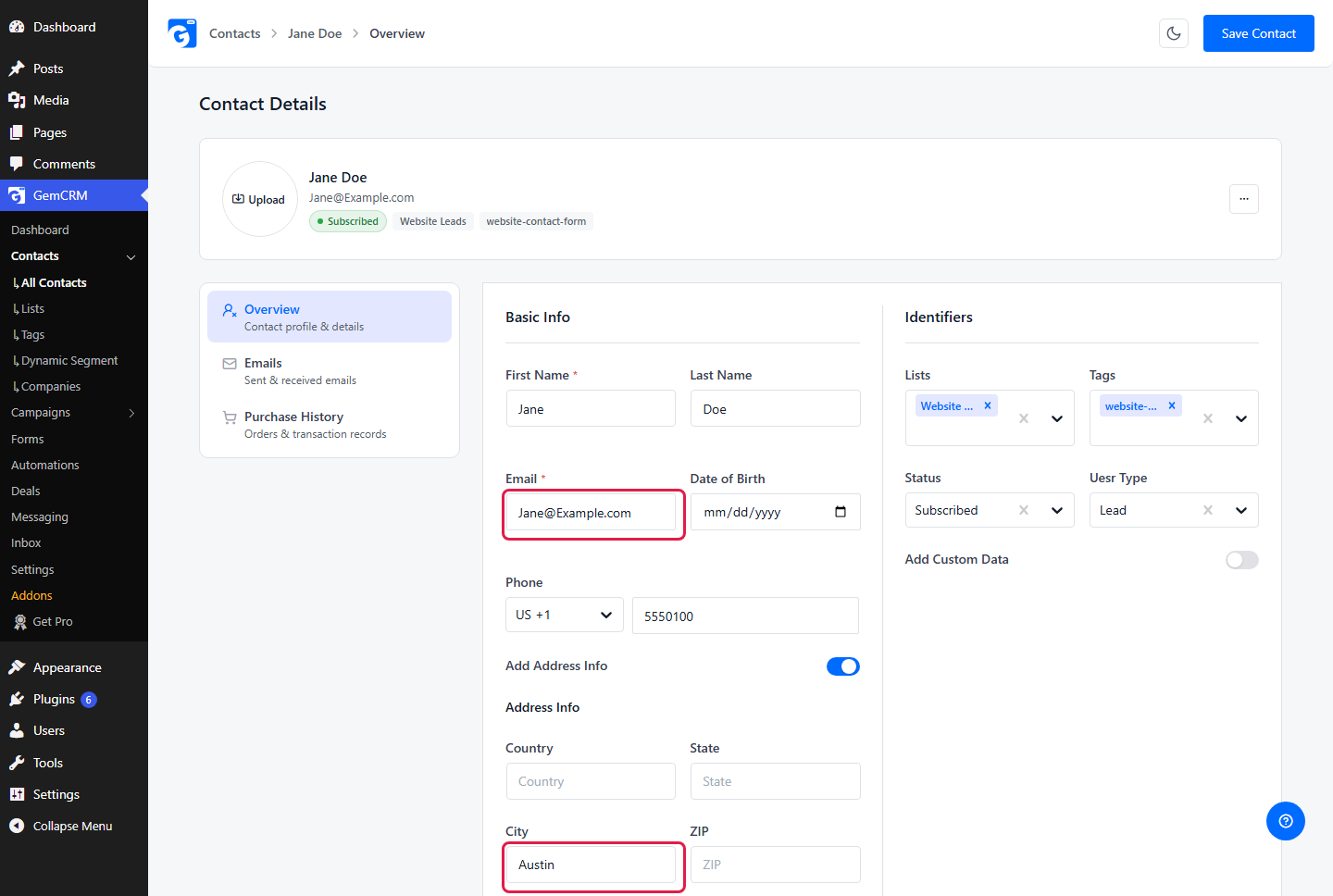
The contact created by the test request. City is under Add Address Info.
What the answers mean
|
Answer |
Message |
What to do |
|
200 |
The new contact as JSON. |
It worked. The contact is in GemCRM. |
|
422 |
The required field “email” is missing from the incoming payload. |
The path in your mapping row does not match your data, or the sender left the value out. Check the Source Path against a real request. |
|
400 |
Email already exists. |
The contact is already in GemCRM. GemCRM does not update it from the webhook. Edit the contact in GemCRM if you need to change it. |
|
404 |
Record not found. |
The key in the URL is wrong or the webhook was deleted. Copy the URL again from the webhook’s Edit window. |
|
429 |
Too many requests. Please slow down. |
The sender made too many requests in a short time. Wait a minute and send again. For many contacts at once, spread requests out or use an import. |
Other errors (such as 5xx from your own host or a firewall) come from the server, not from the webhook itself. Check your hosting or security plugin if a request never reaches GemCRM.
Problems and fixes
|
Problem |
Likely cause |
Fix |
|
The contact is created but names or phone are blank |
Source paths do not match your data |
Paste a real sample in Field Mapping and use Auto Add, or fix the paths by hand. |
|
Email has capital letters |
GemCRM saves email as sent |
Choose the Lowercase transform on the Email row. |
|
Status is wrong |
The webhook’s Status setting |
Edit the webhook and change Status. It applies to new contacts only. |
|
Nothing happens and no error appears |
Wrong URL, or a firewall or security plugin blocks the request |
Check the URL, send a test with curl, and look at your host or security plugin logs. |
|
Works for some tests, then fails |
Rate limit |
Wait a minute. Space out test requests. |