


Merge codes are placeholders wrapped in double curly braces like {{contact.first_name}}. When GemCRM sends your email, it replaces each placeholder with the contact’s real data — so {{contact.first_name}} becomes Sarah, James, or whatever the actual name is.
Where Can You Use Them?
Merge codes work everywhere you write content in GemCRM — Email Subject Lines, Email Body, SMS Messages, and any Template field that supports the rich text editor.
How to Insert a Merge Code
There are two ways to insert a merge code in GemCRM:
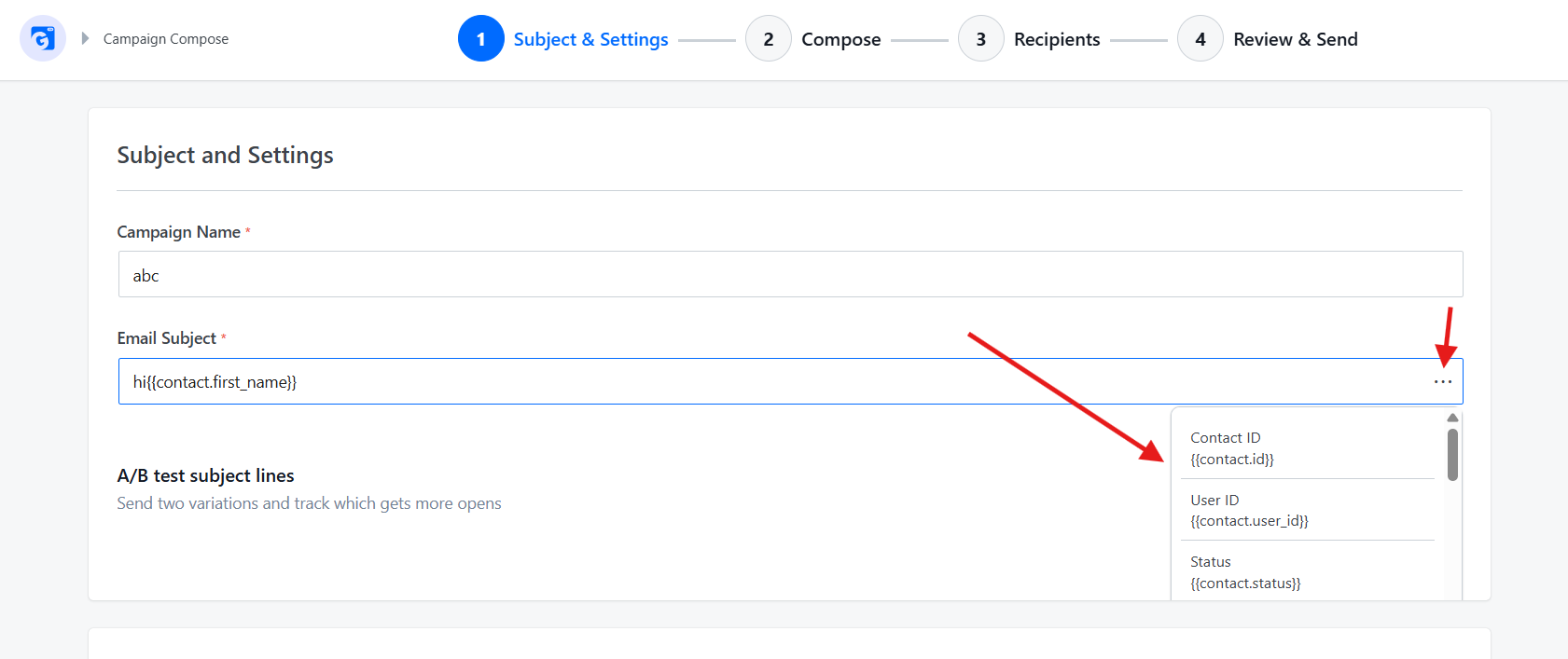
Method 1 — Click the ⋯ button next to any text input. A pop-up lists all available codes. Click any item to insert it immediately.
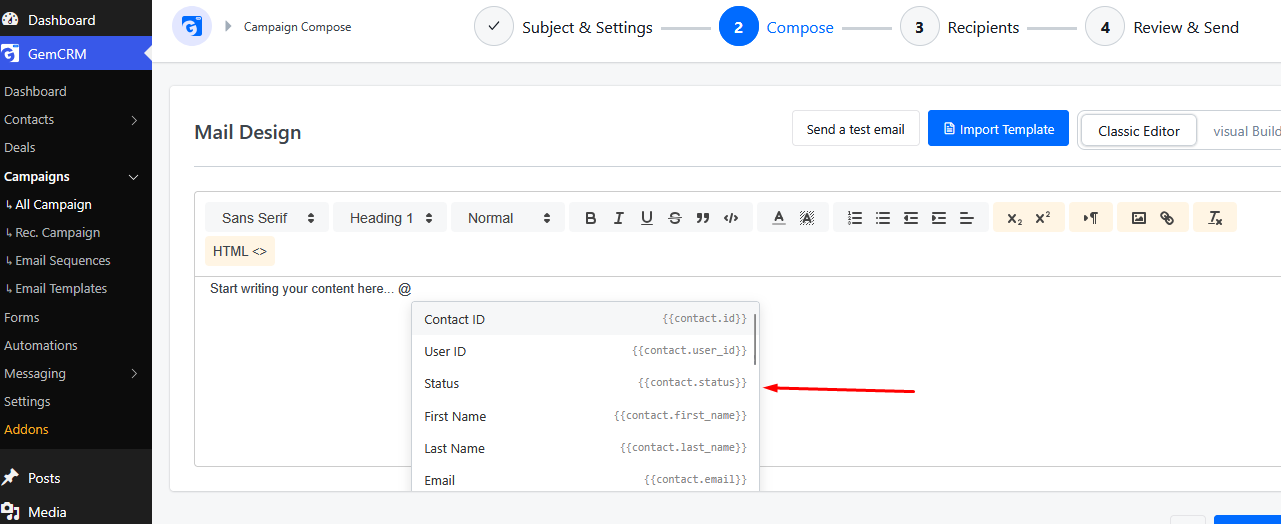
Method 2 — Type @ in the editor. A dropdown suggestion list appears instantly. Keep typing to filter, then click a code or use arrow keys and press Enter to insert it.
Common Uses
|
Scenario |
Example |
|
Greet by name |
Hi |
|
Confirm email |
Your email is |
|
Local offer |
Deals for |
|
Unsubscribe link |
|
|
Preferences link |
|
All Available Merge Codes
Contact — Core Fields
|
Merge Code |
Description |
|
|
Unique contact ID in GemCRM |
|
|
Linked WordPress user ID |
|
|
Current status (subscribed, unsubscribed, etc.) |
|
|
Contact’s first name |
|
|
Contact’s last name |
|
|
Contact’s email address |
|
|
Contact’s phone number |
|
|
Unique secure token for this contact |
Contact — Address Fields
|
Merge Code |
Description |
|
{{contact.meta.addr_line_1}} |
Street address, line 1 |
|
{{contact.meta.addr_line_2}} |
Street address, line 2 |
|
{{contact.meta.add_addr_info}} |
Additional address info |
|
{{contact.meta.city}} |
City |
|
{{contact.meta.state}} |
State or province |
|
{{contact.meta.zip}} |
ZIP or postal code |
|
{{contact.meta.country}} |
Country |
Contact — Activity & Campaign Fields
|
Merge Code |
Description |
|
{{contact.created_at}} |
Date contact was added |
|
{{contact.updated_at}} |
Date the record was last updated |
|
{{contact.linked_id}} |
ID of a linked record |
|
{{contact.campaign_id}} |
Campaign ID this contact belongs to |
|
{{contact.sent_count}} |
Total messages sent to this contact |
System Links
|
Merge Code |
Description |
|
{{unsubscribe_link}} |
One-click unsubscribe link (legally required) |
|
{{update_preferences_link}} |
Link to manage email preferences |
Important Tips
- If a field has no value for a contact, GemCRM will leave that spot blank — always preview before sending.
- {{unsubscribe_link}} is mandatory in every bulk email campaign to comply with CAN-SPAM and GDPR.
- Merge codes are case-sensitive — copy them exactly as shown, or use the @ trigger in the editor to avoid typos.