



A visitor downloads your guide. They get one email, maybe a second a few days later, and then silence. Another visitor downloads the same guide, clicks a link to your pricing page, and gets a message about exactly that product within the hour.
Both people are on your email list. The difference isn’t the emails. It’s the marketing automation funnel behind them: a system that notices what each person does and decides what happens next.
This guide explains how that system works, how to build one, and how to set it up in WordPress.
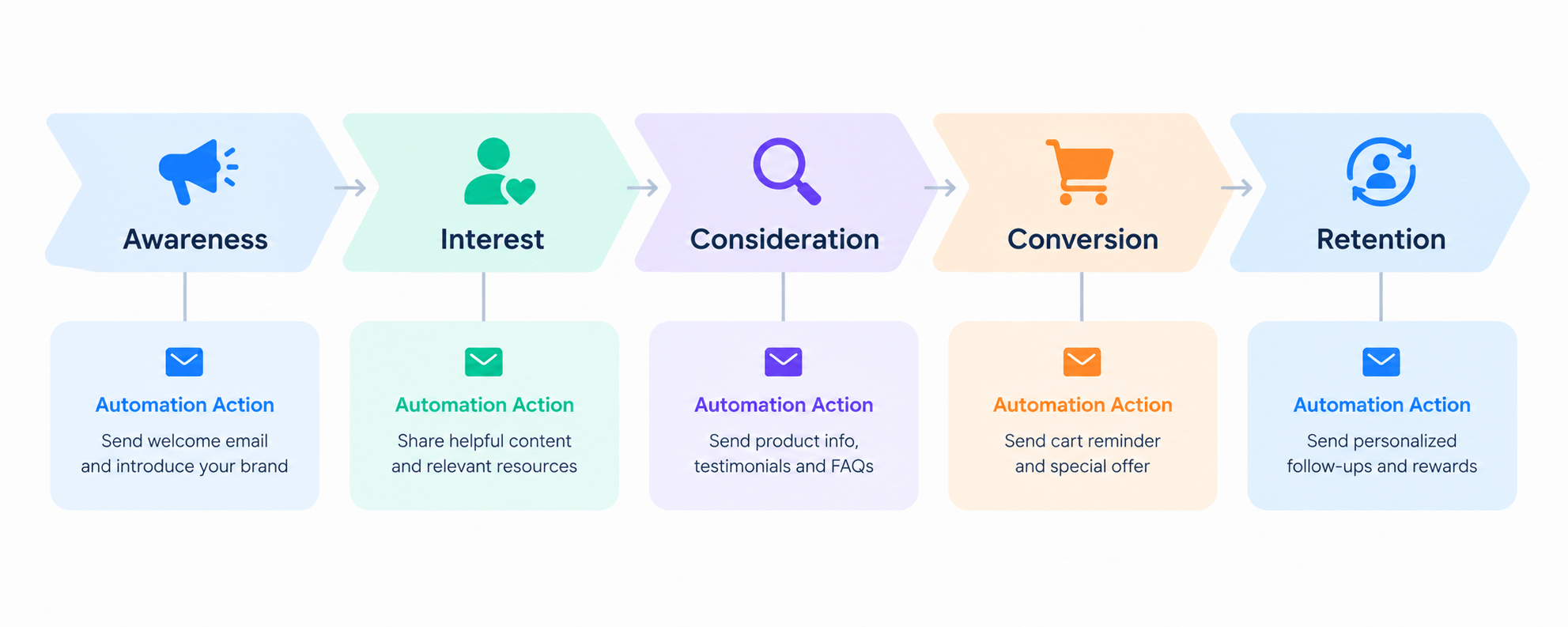
Marketing Automation Funnel at a Glance
|
Funnel Stage |
Customer State |
Automation Example |
|
Awareness |
Just discovered you |
A form signup creates a contact and tags the traffic source |
|
Interest |
Engaging with your content |
A guide download starts a short welcome series |
|
Consideration |
Comparing options |
A click on a product link tags the contact and switches the journey to product education |
|
Conversion |
Ready to buy, or stalled right before |
An abandoned cart starts a reminder sequence |
|
Retention |
Already a customer |
A purchase starts onboarding; 90 days of silence starts a win-back |
What Is a Marketing Automation Funnel?
A marketing funnel describes the path a person takes from first hearing about you to becoming a customer, and then a repeat customer. It’s a map. It tells you where someone is.
Marketing automation is software that acts on that map. It sends messages, applies tags, moves contacts between lists, and alerts your team, all based on rules you set once.
Put them together and you get a marketing automation funnel. The funnel tells you where the customer is. The automation decides what happens next.
That changes how a funnel works in practice. A traditional funnel is something you look at in a report. An automated one is something that acts: when a contact reaches a new stage, the next step starts without anyone pressing send.
Is It the Same as Email Automation?
No. This is the most common mix-up, and it’s worth settling early.
Email automation is one part of the funnel. It’s the main communication channel, and it often does most of the visible work. But a funnel also includes how people are captured, what data you store about them, how you group them, what counts as a conversion, and what happens after it. Many tools also add SMS, WhatsApp, internal tasks, and sales pipeline updates.
If email is the delivery truck, the funnel is the whole logistics system.
How Does a Marketing Automation Funnel Work?
Under the stage names, every automated funnel runs on the same chain. MarTech’s anatomy of funnel automation describes the same building blocks: conditional triggers, lead scoring, and branching.
Customer stage → trigger → contact data → segment → journey → behavior → next action
Here’s what each link does in practice.
[IMAGE PLACEHOLDER (GENERATE — diagram) — Description: A flow diagram showing Trigger → Segment → Automated Action → Behavioral Condition → Next Step, with a short example label under each box. | Alt: Diagram of the marketing automation mechanism from trigger to next step]
1. Attract the Right People
Traffic sources, content, ads, and search all bring people in. Automation doesn’t create this traffic, but it should record where each person came from. A visitor from a pricing-page ad and a visitor from a beginner blog post are not at the same stage.
2. Capture Their Information
A form, checkout, enrollment, or webhook turns an anonymous visitor into a contact.
Trigger: someone submits a form. Action: create a contact and store their email, name, and source.
Without this step, nothing downstream can run. There is no one to message.
3. Identify Their Interests
Now you add meaning to the contact record. You can do this with tags (“downloaded SEO guide”), lists (“newsletter”), custom fields (“company size”), or purchase data.
This is the step most funnels skip. They capture the email but not the context. Then every later message has to be generic.
4. Start an Automated Journey
The contact’s data decides which journey they enter.
Trigger: tag “downloaded SEO guide” is applied. Action: start the welcome series.
A journey is a planned set of steps over time, usually emails, with waits between them.
5. Respond to Their Behavior
This is where a funnel stops being a drip. The system watches what the contact does and changes what happens next.
Trigger: the contact clicks a link to your product page. Action: apply the tag “interested in product”. Condition: has the contact already purchased? Next step: if no, send a product-focused email. If yes, end the journey.
That chain is the pattern to remember: Trigger → Action → Condition → Next Step. Almost everything in marketing automation is a variation of it.
6. Move Them Toward Conversion
At the conversion point, the funnel should push, not wait. Common moves are a reminder with a clear call to action, an offer, a notification to a sales rep, or a recovery message for an abandoned cart.
7. Continue After the Purchase
A purchase is both an exit and an entry. The contact leaves the sales journey (so they stop getting “buy now” messages) and enters a new one: onboarding, a how-to series, a review request, or a cross-sell.
Marketing Automation Funnel Stages
Most guides split the funnel into three or four stages. Mailchimp’s guide to automated marketing funnels uses awareness, consideration, and decision. Braze’s funnel automation guide uses top, middle, and bottom of the funnel.
This article uses five stages because the last one, retention, is where many small businesses leave money on the table.
Awareness
Customer state: they have a problem and are looking for answers. They don’t know you yet.
Your goal: earn attention and capture a contact.
Typical behavior: reading a blog post, watching a video, clicking an ad, visiting for the first time.
Useful automation: form capture, source tagging, an instant confirmation or welcome message, and adding the contact to a starting list.
Example: a reader finishes a blog post, joins your newsletter through an inline form, and is tagged with the topic of that post.
Notice that email isn’t the only thing happening here. Most of the awareness work is capture and tagging.
Interest
Customer state: they know who you are and want to learn more.
Your goal: build trust and learn what they care about.
Typical behavior: opening emails, reading more content, downloading a resource.
Useful automation: a welcome series, interest tagging based on what they click, and a preference signal (“I want tips about X”).
Example: a contact downloads a checklist. A two-email welcome series starts. Whichever link they click in it tells you what they want next.
Consideration
Customer state: they are comparing options and need proof.
Your goal: answer objections and show fit.
Typical behavior: visiting product or pricing pages, reading case studies, replying with questions.
Useful automation: product education sequences, segment-based content, a notification to a salesperson when a contact shows buying interest.
Example: a contact tagged “interested in product” receives a short sequence on how the product solves their specific problem, and a sales task is created if they click twice.
Conversion
Customer state: ready to act, or has just stopped right before acting.
Your goal: remove the last obstacle and close.
Typical behavior: adding to cart, starting checkout, requesting a quote.
Useful automation: abandoned cart recovery, quote follow-ups, deal stage updates, a time-limited offer.
Example: a shopper leaves a cart. An hour later a reminder arrives with a link back to the exact cart. A second message follows a day later if they haven’t returned.
Retention
Customer state: they bought. Now they decide whether to stay.
Your goal: help them succeed, earn a second purchase, and keep the relationship active.
Typical behavior: using the product, contacting support, reordering, or going quiet.
Useful automation: onboarding, review requests, cross-sell based on what they bought, replenishment reminders, and win-back journeys for inactive customers.
Example: a customer buys a course. They get an onboarding series that guides them through the first lesson. Sixty days later, if they’ve stopped logging in, they enter a re-engagement journey.
Where Email Automation Fits Into the Funnel
Email automation is the most widely used channel inside a marketing automation funnel, because email is cheap, personal, and you own the list. The funnel decides who should get which message, and email automation delivers it.
Here are the six email types that map most clearly onto funnel stages.
Welcome Emails
Sent right after signup, during awareness and interest. A welcome email confirms what the person signed up for, sets expectations about frequency, and gives them one useful next step. It tends to get read because the contact just asked for it.
Lead Nurture Emails
Sent through the interest and consideration stages. Nurture emails are a short series that teaches, answers common questions, and builds trust before asking for anything. Their purpose is to keep the lead warm until they’re ready.
Product or Service Education
Sent when a contact shows interest in something specific. These explain how it works, who it’s for, and what results to expect. The key is relevance: only people who showed interest should get them.
Abandoned Cart Emails
Sent in the conversion stage when someone leaves a purchase unfinished. These are triggered by behavior, which is why they’re a classic example of a funnel step rather than a campaign. If you run a store, our guide to WooCommerce abandoned cart recovery covers the setup in detail.
Post-Purchase Emails
Sent in retention (our WooCommerce email marketing guide covers store-specific timing). They confirm the next steps, help the customer get value, and later ask for a review or suggest a related product. They’re often the most neglected emails in the whole funnel.
Win-Back Emails
Sent to customers or subscribers who have gone quiet. The trigger is the absence of activity, such as no purchase or no email click for a set number of days. A good win-back journey ends: if the person still doesn’t respond, you stop and clean the list.
For more workflow ideas by store type, see WooCommerce email automation: 7 workflows to build first. If your question is specifically about email tooling in WordPress, our email marketing automation guide goes deeper than this page does.
Automated Email Journeys vs One-Time Email Campaigns
Both belong in your funnel, and they do different jobs. Campaign Monitor makes the same distinction in its customer journeys guide: journeys react to what a subscriber does, while newsletters and one-off campaigns go to a list at once.
|
Automated Email Journey |
One-Time Email Campaign |
|
|
Trigger |
A contact action or condition (signup, tag, purchase, inactivity) |
You choose to send, or schedule a send |
|
Timing |
Relative to each contact, or to a rule |
One chosen date and time |
|
Personalization |
Based on the contact’s data and behavior |
Usually based on the audience segment |
|
Behavior-based branching |
Possible, depending on the tool |
Rare; typically one message |
|
Manual effort |
High once at setup, low afterward |
Required every time |
|
Typical uses |
Welcome series, nurture, cart recovery, onboarding, win-back |
Newsletters, announcements, sales, product launches |
A journey can have many steps, waits, and conditions. A broadcast is generally a single message to a selected audience. How these work varies by platform. Some tools call a multi-step drip a “sequence”, while others call a branching flow a “workflow” or “automation”, so check what your tool’s terms mean.
Marketing Automation Funnel Examples
These examples show the full chain. Each one starts with a trigger and ends with a clear outcome.
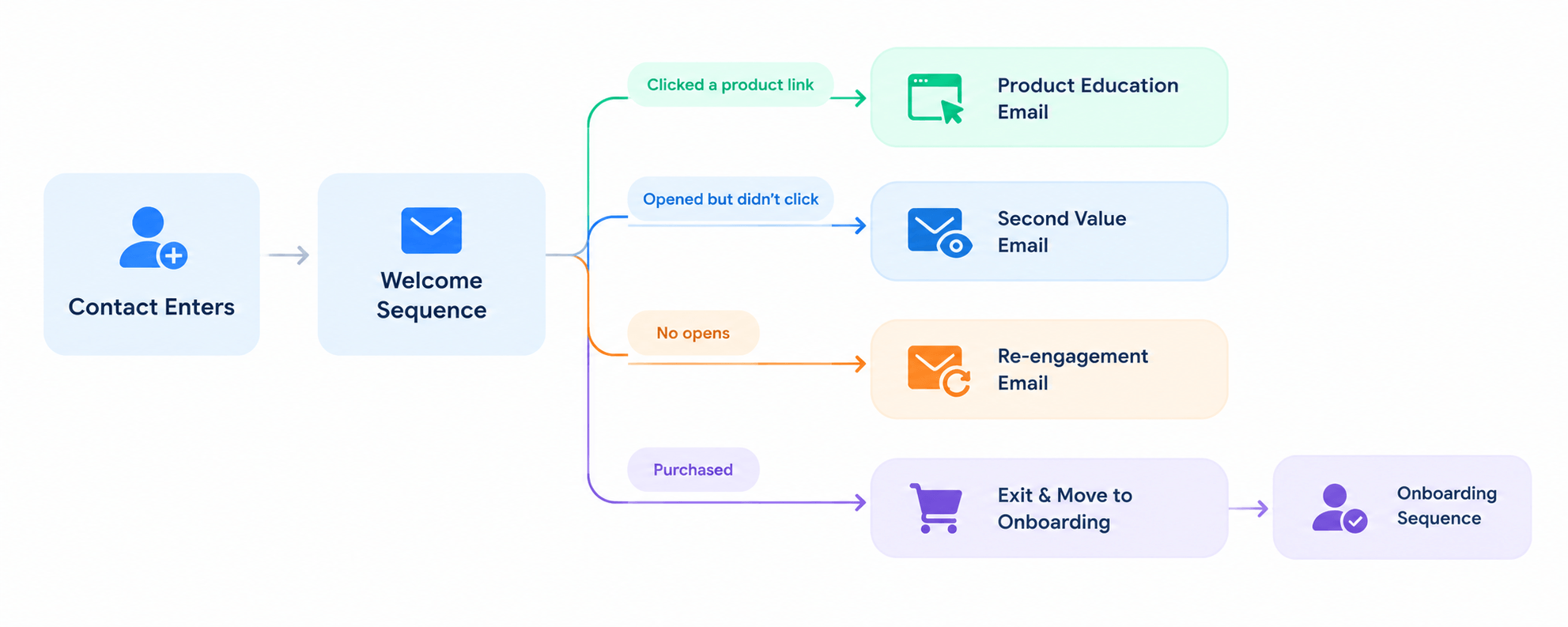
1. Lead Magnet → Welcome → Nurture
2. Product Interest → Education → Offer
3. Abandoned Cart → Reminder → Recovery
4. Purchase → Onboarding → Cross-Sell
5. Inactive Customer → Win-Back Journey
What Happens After the Click
The examples above hide a detail that matters most. Here is the full chain for one contact:
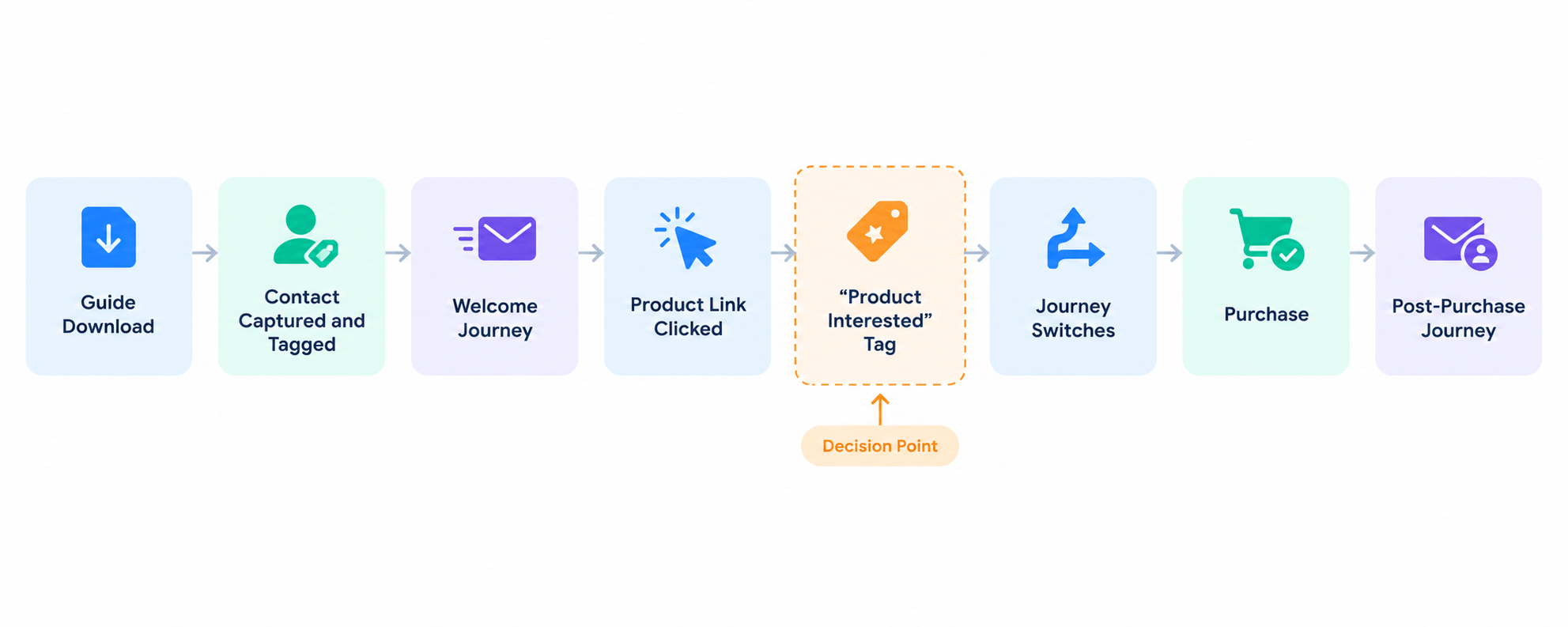
Each arrow in that chain is a rule. If any link is missing (no click tracking, no tag, no exit), the contact keeps getting the wrong message. This is what separates a funnel from a pile of emails.
How to Build a Marketing Automation Funnel
You don’t need a complex system to start. Build one funnel with one goal and make it work before you add more.
Step 1: Define One Funnel Goal
Pick a single outcome. “Get more leads” is too loose. A usable goal looks like: “Turn people who download the pricing guide into booked demos,” or “Recover abandoned carts for our top product category.”
One goal tells you which stage to build first and which number to watch.
Step 2: Map the Customer Journey
On paper, list what a person does from first contact to goal. Write down each action and what you want to happen next. For the pricing-guide goal, it might look like: sees blog post → downloads guide → reads welcome emails → clicks demo link → books demo.
Mark the moments where people usually drop off. Those are where automation helps most.
Step 3: Choose Your Entry Trigger
The trigger decides who starts the journey. Pick something specific: a form submission, a tag being applied, a purchase, a cart left behind, a sign-up to a list, or a birthday. Avoid vague triggers like “any visitor.”
Step 4: Segment Your Contacts
Decide the groups you need. Start with two or three: for example, “new leads,” “customers,” and “inactive”. Segments can be based on tags, lists, fields, purchase history, or engagement. If you need help, our guide to WooCommerce customer segmentation shows what’s possible with store data.
Step 5: Create the Automated Journey
Write the emails and set the waits. For a first journey, three to five emails are usually plenty. Each email needs one purpose and one call to action. Decide the delay between steps up front, for example 0 days, 2 days, 4 days.
Step 6: Add Behavioral Conditions
Decide what the system should check. The most useful conditions for beginners are: did they click, have they bought, did they open, and what tag do they have. Then decide what each answer does: continue, branch, or stop.
Step 7: Define the Conversion Point
State exactly what counts as success: an order placed, a form submitted, a deal created, a meeting booked. This event should also act as the exit, so converted contacts stop receiving persuasion emails.
Step 8: Test and Launch
Before going live, run through it as a contact. Sign up with a test address. Click the links. Check that tags apply, the right emails send, and that the exit works. Send test emails to check the layout on mobile. Then launch to a small group first if you can.
Step 9: Measure and Improve
After a few weeks, look at where contacts drop off. Fix the weakest step first, whether that’s a subject line, a call to action, or the delay. Change one thing at a time so you know what worked.
What Tools Do You Need for a Marketing Automation Funnel?
You need five layers. Some tools combine several layers, and some cover only one.
Contact and CRM Data
This is where every person and everything you know about them lives: email, tags, lists, purchases, notes, and activity. Automation is only as good as this data. If a tool can’t tell that a contact bought yesterday, it will keep sending sales emails.
Automation or Workflow Engine
The engine runs your rules: when this happens, check that, then do this. It handles triggers, waits, conditions, and actions. This is what makes a funnel more than a series of emails.
Email Sending
The part that delivers messages. Your tool builds the email, but a mail service or SMTP connection sends it. Sending quality affects whether your emails reach the inbox. Google’s email sender guidelines require SPF, DKIM, DMARC, and one-click unsubscribe for bulk senders (5,000+ messages a day to Gmail accounts), and they are a useful checklist even for smaller lists. WordPress hands mail to the server through wp_mail(), which is why many sites route sending through an SMTP or transactional email service.
Forms and Lead Capture
Signup forms, checkout fields, quiz results, and webhooks from external pages. Look for capture that creates contacts directly in your data layer, so you don’t need to import CSV files.
Analytics and Tracking
Open and click tracking, conversion tracking, and reports by journey or step. Without them you can’t see where people drop off.
Email Marketing Software vs a WordPress Email Marketing Plugin
Migrating from a hosted tool is usually possible by CSV. GemCRM, for example, can import lists from Mailchimp, ActiveCampaign, ConvertKit, Drip, and MailerLite (import docs).
Both can power the same funnel. The difference is where the data lives and how you pay.
Email marketing software is a hosted service that you log into separately. It handles sending, lists, and automation for you. It’s a good fit if you don’t use WordPress, or you want someone else to manage the infrastructure. You connect it to your site with forms or an integration, which means your site data (orders, enrollments, users) must be synced across. Pricing often depends on the number of contacts.
An email marketing plugin for WordPress runs inside your site. Contacts and activity sit next to your orders, courses, and users, so a funnel can react to site events directly. You still choose how email is delivered, usually through your host, an SMTP service, or a transactional email provider.
A plugin makes the most sense when your funnel depends on what happens on your WordPress site: purchases, course progress, form submissions. External software can make sense when you want a hosted service or have needs that extend well beyond WordPress.
One more thing to check with either option is how much of the funnel it covers. Some tools handle only sending. Others cover contacts, segments, automation, and reporting together. The more layers a single tool covers, the fewer connections you need to maintain.
How to Build a Marketing Automation Funnel in WordPress
A practical WordPress funnel stack looks like this:
WordPress → lead capture and forms → contact data → segmentation → automation → email sending → analytics
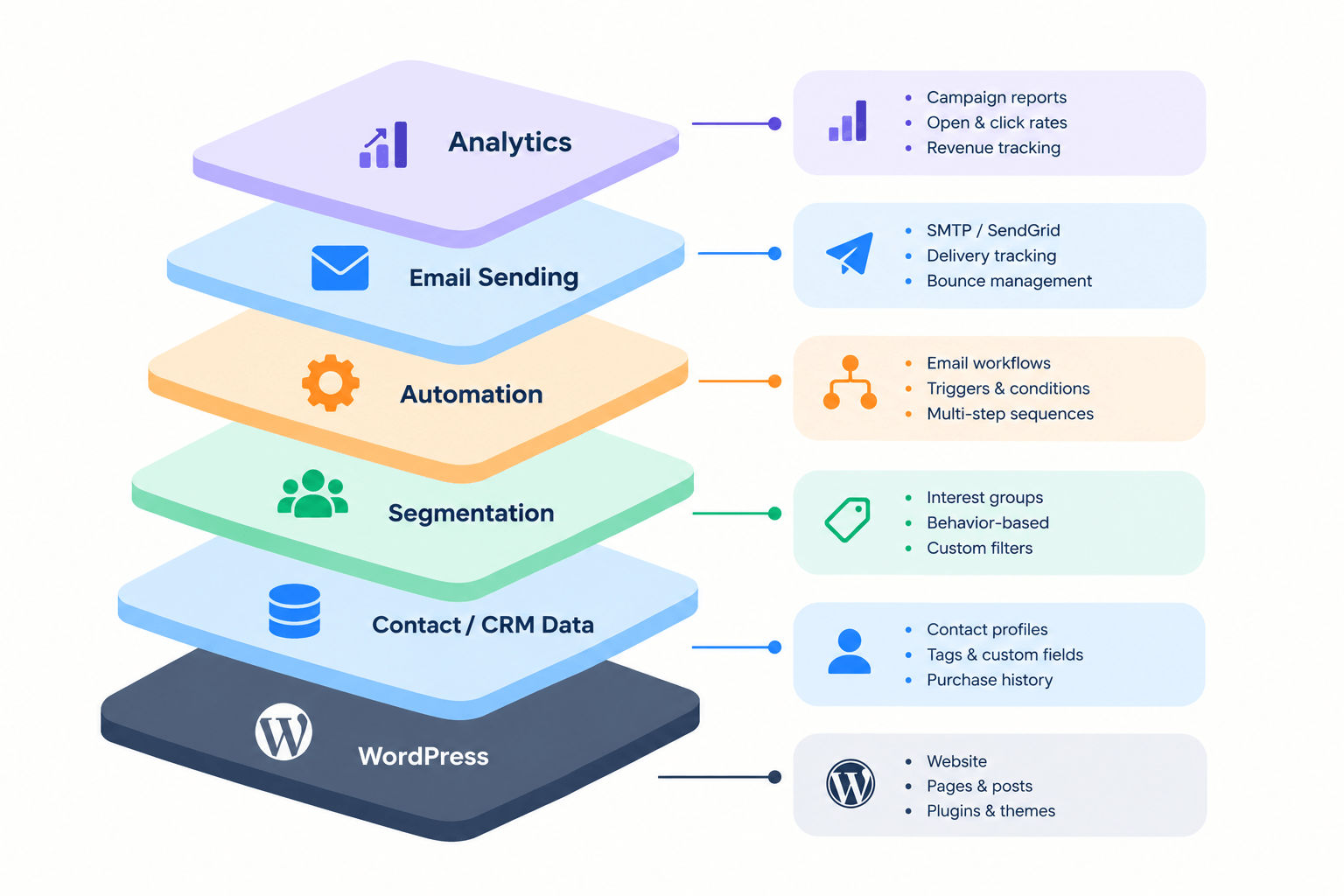
The role of an email/CRM plugin is to hold the contact data and connect the layers. Here is how that looks in GemCRM, which we build, so you can see the chain in practice. Some parts are free, and others need GemCRM Pro.
Capture and contact data. In GemCRM, you build a signup form from the Forms menu and place it with a shortcode. Each submission creates a contact. Contacts from StoreEngine and Academy LMS sync automatically, and WooCommerce customers and WordPress users are included too, so you don’t have to export and import. You can also organize contacts with tags, lists, labels, and custom fields. All of this is in the free plugin. See the docs for subscription forms, lists and tags, and incoming webhooks.
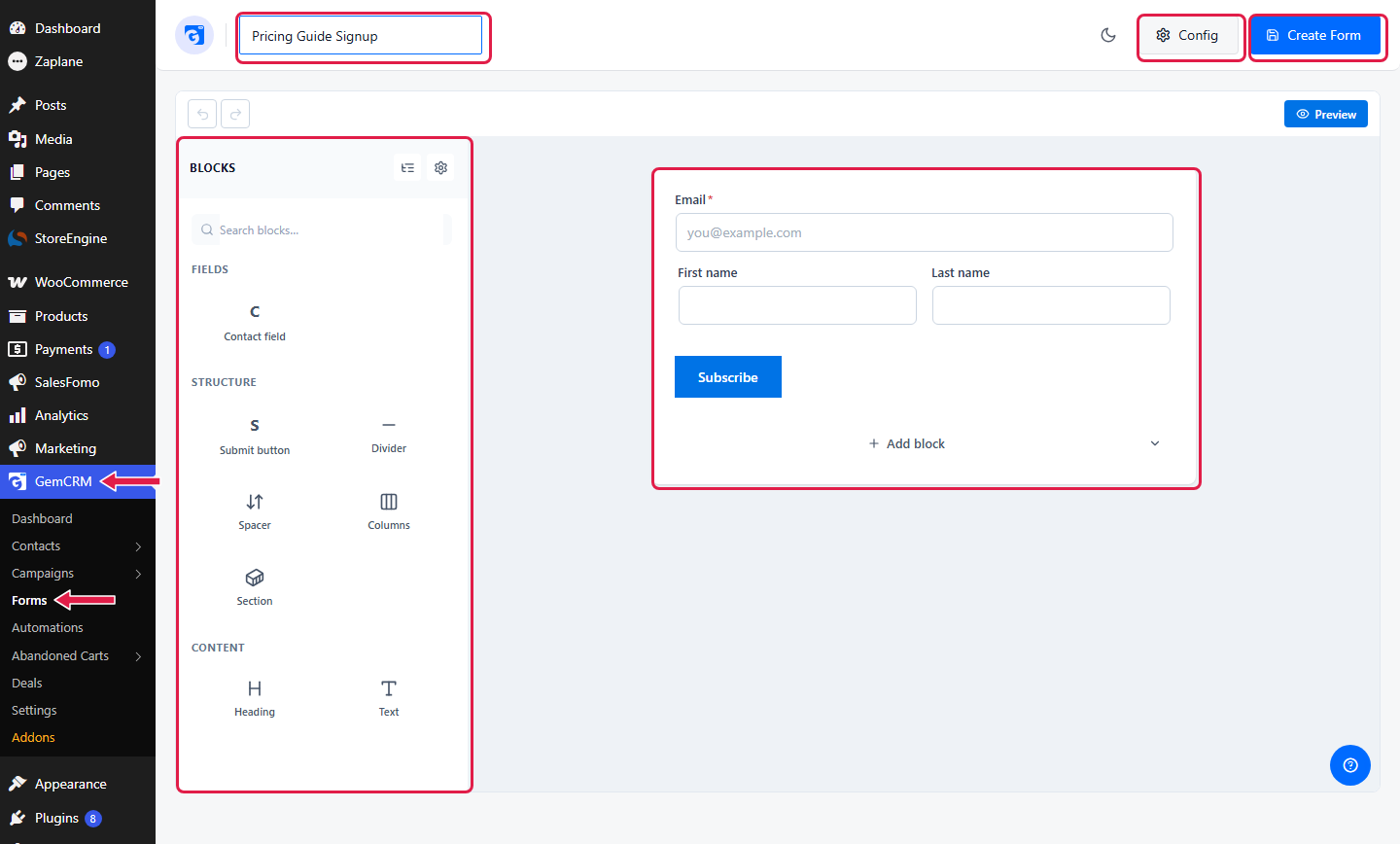
| Alt: GemCRM subscription form builder for lead capture]
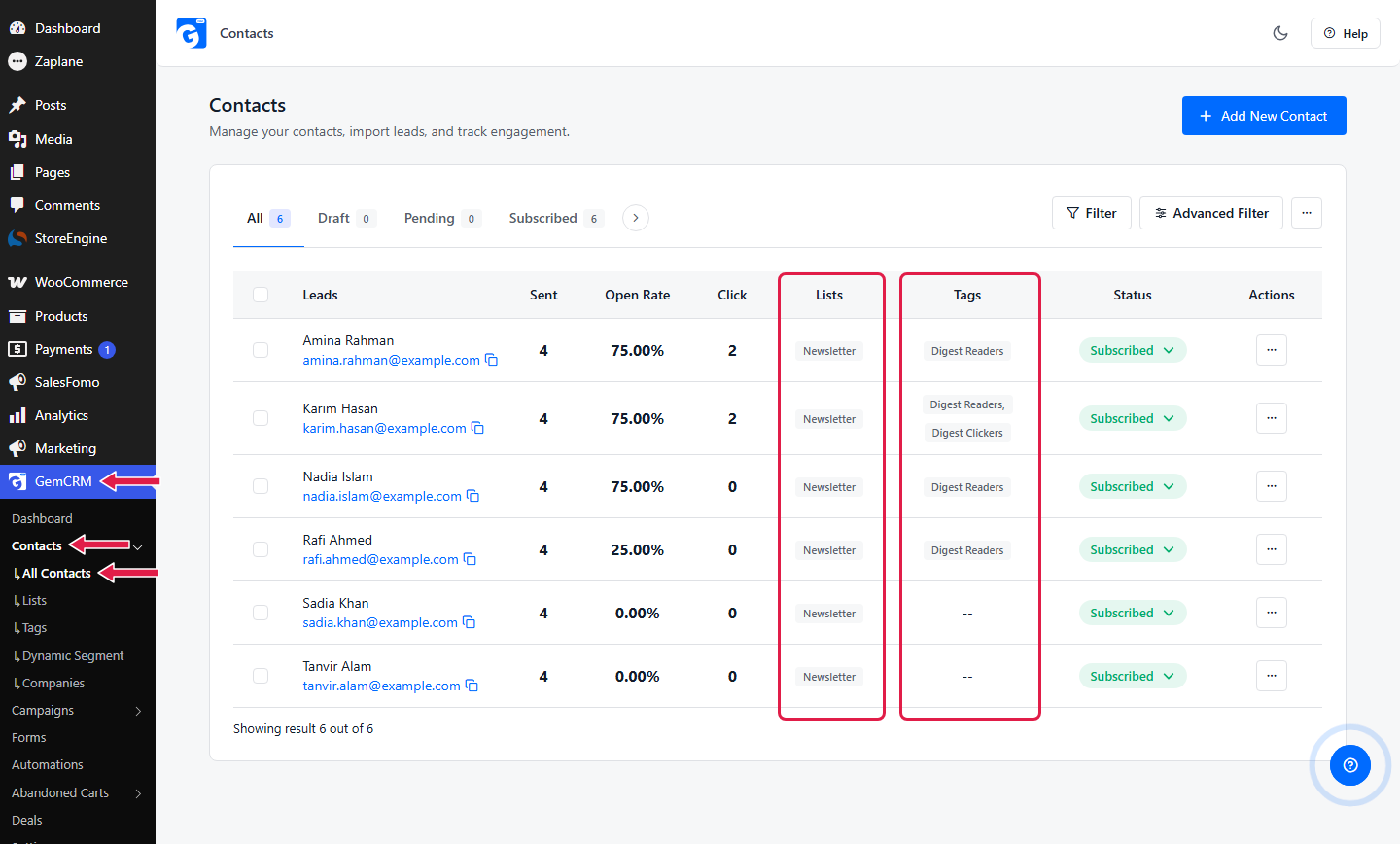
| Alt: GemCRM contact record with tags and lists]
Segmentation. Tags and lists work for most funnels. When you need more precision, such as “customers who spent over a set amount” or “bought a certain product,” Dynamic Segments (GemCRM Pro) build a group from conditions and update as contacts change. They’re under Segments in the GemCRM menu. The docs cover Dynamic Segments and Advanced Filters.
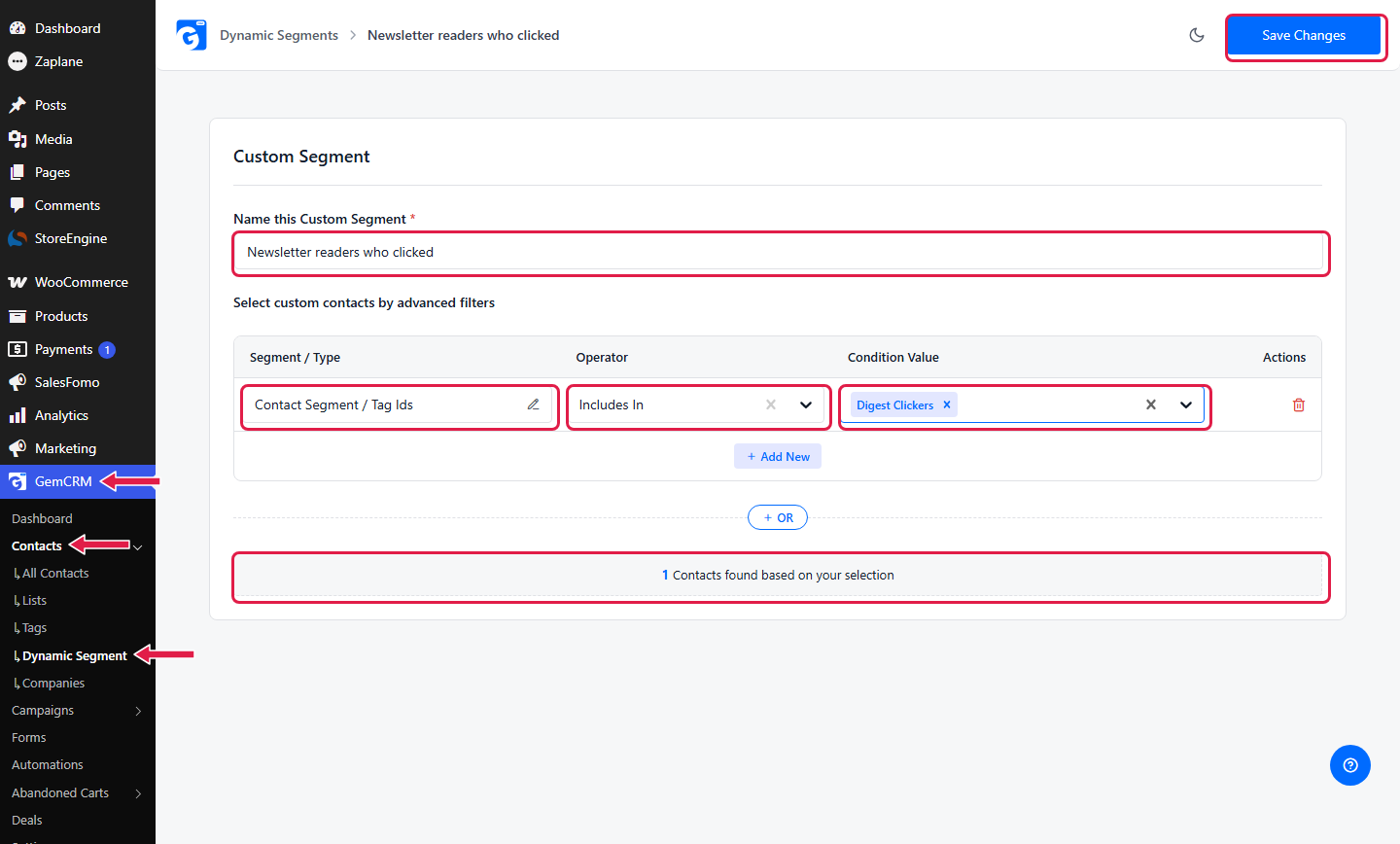
| Alt: GemCRM Dynamic Segment condition builder]
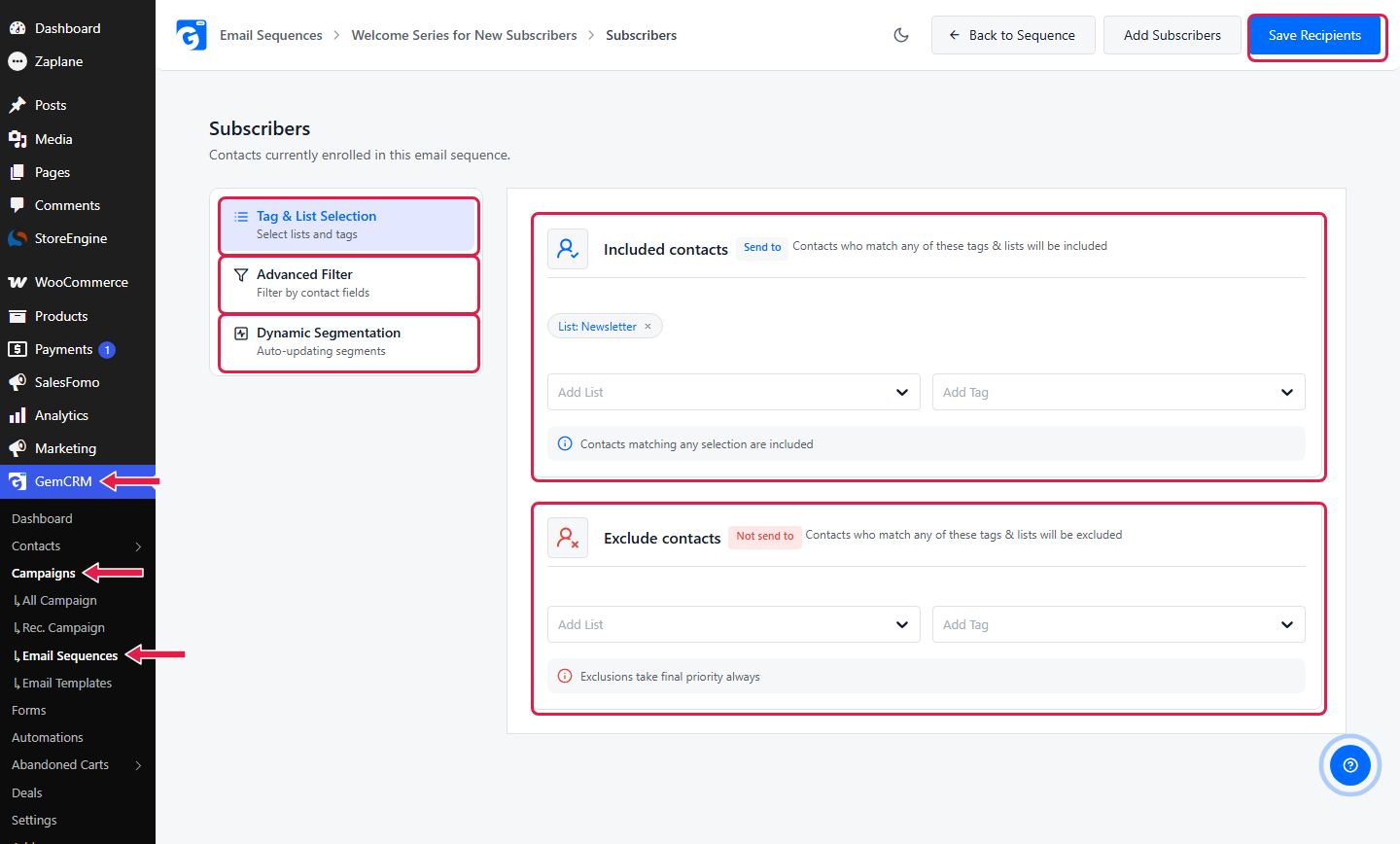
Journeys. Email Sequences (GemCRM Pro) are multi-step journeys, found under Campaigns. Each email has its own subject, body, and delay, and the audience is defined by tags and lists (include or exclude) or a saved filter or segment. The exclude option is how you keep customers out of a sales journey: exclude the “customer” tag. Step-by-step setup is in the Email Sequences docs.
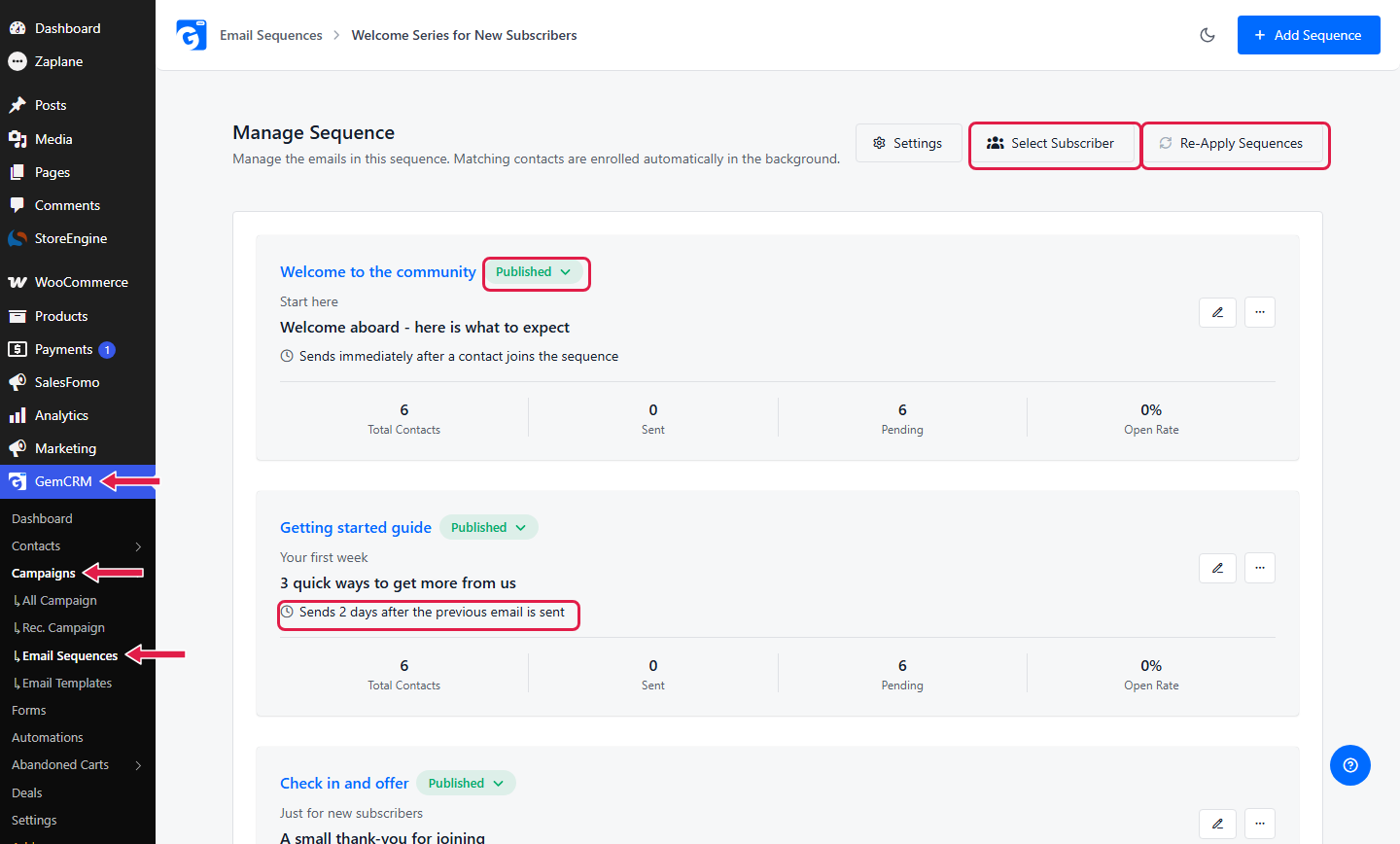
| Alt: GemCRM email sequence with delays and an excluded tag in the audience]
Detecting behavior. This is the link between a click and a changed journey. Magic Links (also called Smart Links, GemCRM Pro) are trackable links you add to emails. You set them up under GemCRM → Settings → Magic Link. When a contact clicks one, GemCRM can apply or remove tags and lists on their record and track the click. So the click on your product link becomes a “product interested” tag, which can then be used as an audience or a trigger. See the Magic Links docs.
| Alt: GemCRM Magic Link form that applies a tag when a contact clicks]
Automation workflows. Under GemCRM → Automations, you build workflows with Zaplane, the companion automation plugin (a separate, free plugin that needs to be active). A workflow starts with a trigger, such as Contact Created, Tag Added To Contact, Tag Removed From Contact, Contact Added To List, Contact Removed From List, or Contact Birthday. From there you can add Zaplane’s If Condition and Wait / Delay steps, and GemCRM actions such as applying or removing tags and lists, updating a contact, sending an email, or sending an existing campaign. Because it also connects to other plugins, a workflow can start from something outside GemCRM, like a form plugin or a store event. The full walkthrough is in GemCRM Automation with Zaplane.
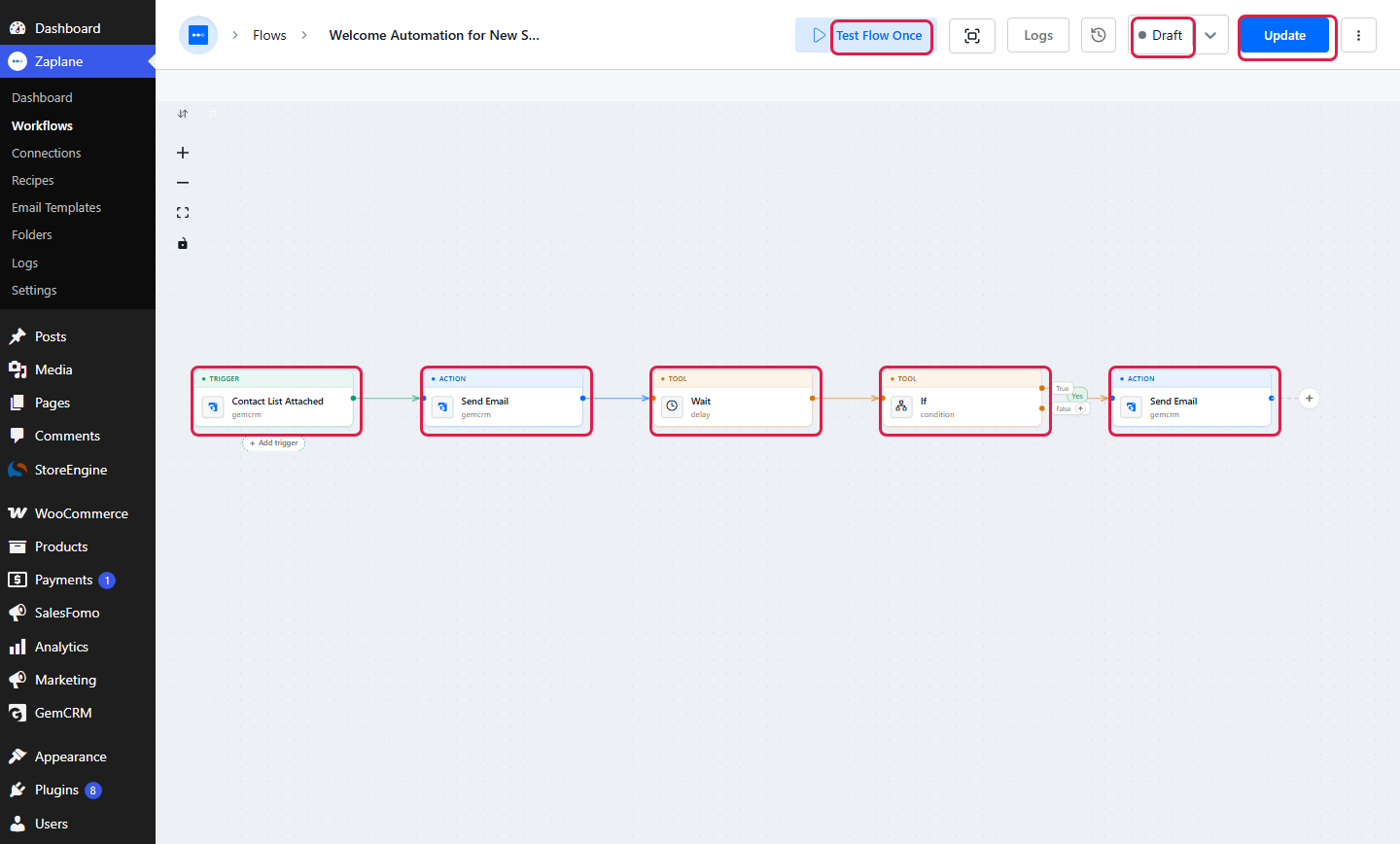
| Alt: Zaplane workflow in GemCRM triggered by a tag, with a condition and email step]
Put together, the “after the click” chain from earlier looks like this in GemCRM: a form creates the contact and tag, a sequence sends the welcome emails, a Magic Link click applies “product interested”, a workflow reacts to that tag, and the audience rules keep the contact out of the wrong sequence.
Conversion and follow-up. For stores, Abandoned Cart recovery (GemCRM Pro) tracks carts with a known email and can start a recovery flow. For sales-led funnels, the Deals pipeline (GemCRM Pro) tracks each opportunity through stages next to the contact record. Our guide to WooCommerce CRM shows how the store side fits together. The docs have an Abandoned Cart overview and a Deal module page.
Sending and reporting. Emails go out through your own SMTP or a transactional email service, (SMTP setup docs), and campaign reports show opens and clicks. GemCRM handles bounces from Amazon SES, Mailgun, SendGrid, and Pepipost.
Three differences are worth knowing if you’re comparing options. GemCRM doesn’t charge per subscriber, which matters when your list grows. With GemCRM Pro, email, SMS, and WhatsApp messages (messaging docs) share the same contact record and consent data, so a funnel can use more than one channel without a second tool. And the automation layer comes from the same team, so GemCRM triggers and actions don’t need a separate connector.
One honest limit: today, the way a contact leaves an Email Sequence is by unsubscribing or by no longer matching the audience (for example, by gaining an excluded tag). There’s no separate “goal reached” exit. In practice, you build the exit by applying a tag when the goal happens and excluding that tag from the audience.
Benefits of a Marketing Automation Funnel
Email automation gets most of the attention, but the benefits come from the whole funnel working together. None of these are guaranteed numbers. They depend on your offer, audience, and execution.
Common Marketing Automation Funnel Mistakes
Automating a Broken Process
If your offer is unclear or your landing page doesn’t convert, automation will only send more people to the same problem. Fix: walk through the journey manually first and make sure a real person would understand it.
Sending the Same Journey to Everyone
A new subscriber, a loyal customer, and a lapsed buyer shouldn’t get the same emails. Fix: start with two or three segments and give each its own journey.
Using Too Many Emails
Long sequences with no clear purpose tire people out and push them to unsubscribe. Fix: give each email a single job. If you can’t state it in one sentence, cut the email.
Ignoring Customer Behavior
A drip that ignores clicks and purchases is a timer, not a funnel. Fix: add at least one behavior check, such as a click-based tag or a purchase exit.
Having No Exit Conditions
Customers who’ve already bought should not get “buy now” emails. Fix: define the conversion event, and make it remove the contact from the journey.
Ignoring Post-Purchase Automation
Many funnels stop at the sale. Fix: build at least a thank-you and onboarding journey before you build a second acquisition funnel.
Failing to Monitor Results
A funnel left alone drifts. Links break, offers expire, and audiences change. Fix: set a monthly review of each journey’s key numbers.
How to Measure and Optimize Your Funnel
The right KPI depends on the funnel’s goal. A lead funnel and a cart-recovery funnel should be judged differently. We don’t give benchmark numbers here because they vary widely by industry, list, and offer. Compare your funnel to its own past performance first.
|
Metric |
What it tells you |
|
Lead capture rate |
How many visitors become contacts. Low numbers point to the form, offer, or page. |
|
Email engagement (opens) |
Whether your subject lines and sender name get attention. Treat opens as a rough signal, since features like Apple’s Mail Privacy Protection can stop senders from seeing real opens. |
|
Click-through rate |
Whether the content and call to action motivate action. More reliable than opens. |
|
Journey conversion rate |
How many contacts who entered a journey completed its goal. |
|
Funnel drop-off |
The step where most contacts stall. This is where to improve first. |
|
Conversion and revenue metrics |
Orders, booked demos, deals won, and revenue connected to the funnel. |
|
Customer retention |
Repeat purchase rate and the share of customers still active after a set period. |
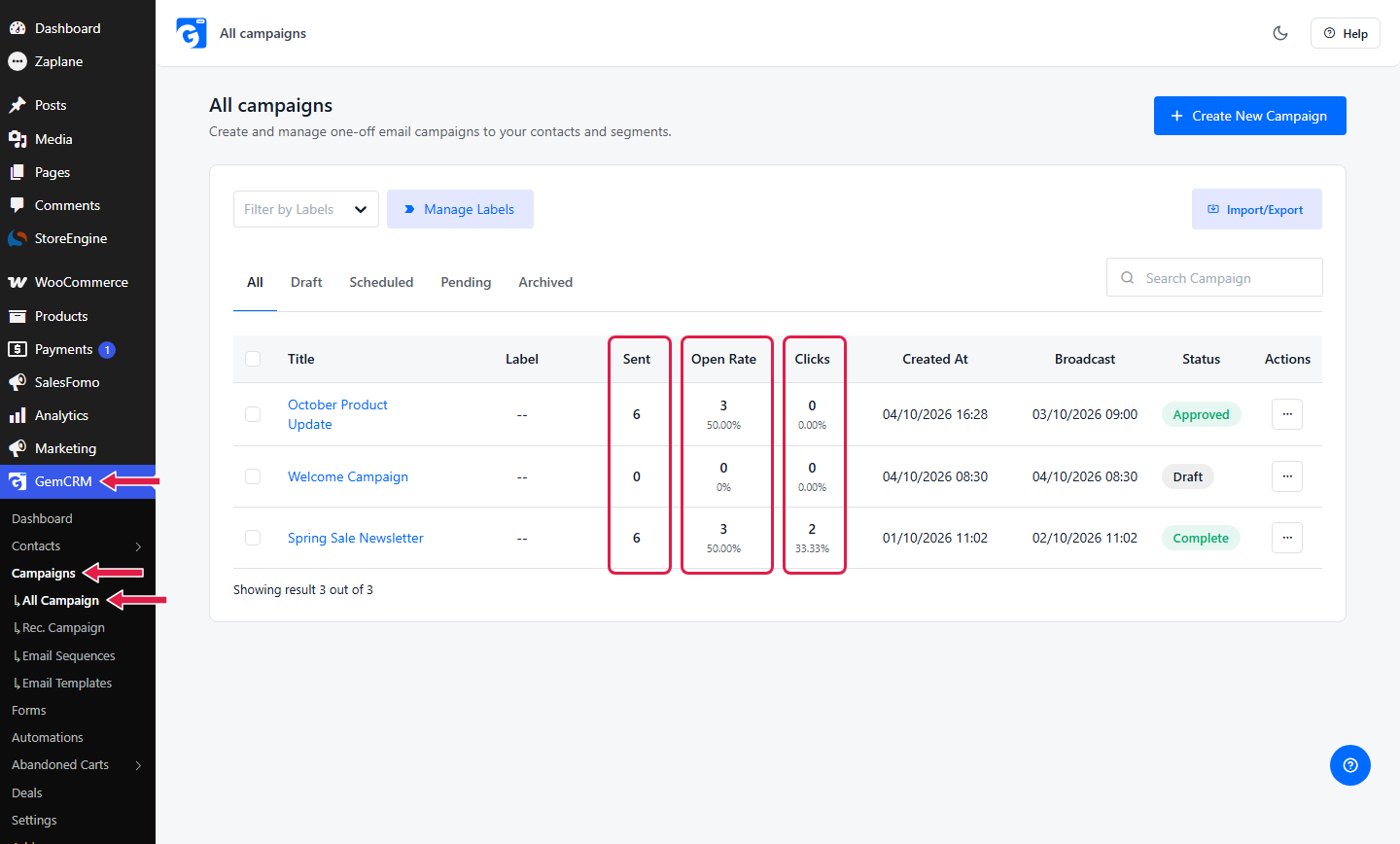
| Alt: GemCRM email report with opens, clicks, and unsubscribes]
Review the funnel in order, from the top. If lead capture is weak, fixing a late-stage email won’t help.
Marketing Automation Funnel Best Practices
Conclusion
A marketing automation funnel isn’t a collection of automated emails. It’s a system that connects what a customer does with the next relevant thing that happens.
Start small. Pick one goal, map the path, choose a trigger, and add one behavior check and one exit. When that works, add the next stage.
If you’re on WordPress, GemCRM puts contacts, tags, segments, sequences, and workflow automation in one place. You can begin with the free plugin from WordPress.org for forms, contacts, and campaigns, and add Pro features when your funnel needs them.
Frequently Asked Questions
What is a marketing automation funnel?
It’s a system that moves contacts through the stages of buying (awareness, interest, consideration, conversion, and retention) using automated rules. When a contact takes an action, such as signing up or clicking a link, the system decides what happens next, such as sending a message or changing their segment.
How does a marketing automation funnel work?
A trigger (a form, a purchase, a tag) puts a contact into a journey. Their data decides which segment they belong to. As they act, conditions change what they receive. When they reach the conversion point, they exit and start a new journey, usually post-purchase.
What is the difference between marketing automation and email automation?
Email automation sends emails based on triggers and timing. Marketing automation is wider. It covers capturing and scoring contacts, segmentation, multiple channels like SMS, and sales follow-up. Email automation is usually one part of it. Act-On offers a similar explanation in its comparison of email marketing and marketing automation.
What are examples of marketing automation funnels?
Common ones include lead magnet to welcome series, product interest to education to offer, abandoned cart recovery, purchase to onboarding to cross-sell, and an inactive-customer win-back.
How do automated email journeys work?
A contact enters a journey when a trigger fires. The tool sends the first email, waits, and sends the next. Along the way it can check conditions, like whether the contact clicked or bought, and branch or stop. Exact options depend on your tool.
What software do I need for marketing automation?
At minimum: a place to store contacts, a way to capture them, an automation engine, an email sending method, and reporting. Some tools bundle these, and others need to be connected.
Can I build a marketing automation funnel in WordPress?
Yes. You can use forms for capture, a CRM or email plugin for contacts and segments, an automation engine for triggers and conditions, and an SMTP or email service for sending. Running these inside WordPress lets your funnel react to site activity like orders and enrollments directly.
What are the benefits of email automation?
Faster follow-up, consistent communication, less manual work, more relevant messages through segments and behavior, and easier scaling. Results depend on your audience, offer, and setup, so measure your own.