



Sending more emails does not automatically bring more sales. Many stores double their send volume and see opens and clicks go the other way. The problem is rarely the number of emails. It’s usually the goal, the audience, or the message inside them.
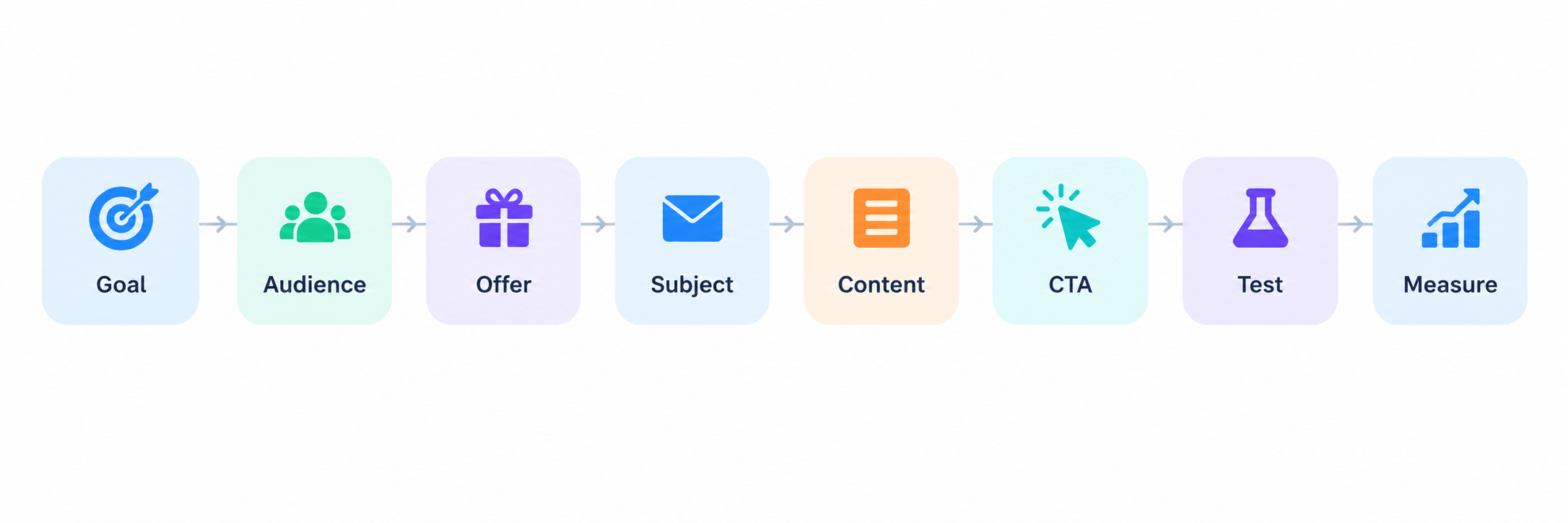
A good email campaign is not one lucky subject line. It’s a chain of small decisions done in the right order: a clear goal, the right audience, a relevant offer, a focused message, and a way to measure what happened. Each step makes the next one easier.
This guide walks through that chain. You’ll learn how to plan a campaign, write it, send it, automate the follow-up, and use the results to make the next one better.
Quick Overview of Email Campaign Best Practices
|
Best Practice |
Why It Matters |
|
Define one clear campaign goal |
Keeps the campaign focused |
|
Segment your audience |
Makes emails more relevant |
|
Match the offer to the audience |
Improves relevance and conversions |
|
Write a strong subject line |
Encourages opens |
|
Keep the email focused |
Makes the message easier to act on |
|
Optimize for mobile |
Improves readability and usability |
|
Personalize with useful data |
Creates more relevant experiences |
|
Use triggered emails and flows |
Sends messages based on customer actions |
|
Test before and after sending |
Helps catch problems and improve performance |
|
Measure and optimize |
Turns campaign data into better decisions |
10 Email Campaign Best Practices
1. Start With One Clear Campaign Goal
Before you write a single word, decide what this campaign is for. One campaign, one goal. Common goals:
The goal decides everything after it. It sets your call to action (CTA), and the CTA decides what you measure.
Goal → CTA → measurement.
If the goal is “sell more of Product X,” the CTA is “Shop Product X,” and success is measured in sales of that product, not in opens. If the goal is “bring people back to the site,” the CTA is a link, and success is measured in clicks and site visits, not sales.
A campaign that tries to do three things — sell a product, announce a blog post, and ask for a review — usually does none of them well. Pick one goal and build the rest of the email around it.
2. Segment Your Audience Before You Send
Sending the same email to everyone is the fastest way to make it less relevant to everyone. A first-time visitor, a loyal repeat buyer, and someone who hasn’t opened an email in six months are not the same audience, even if they’re all on one list.
Useful signals for segmentation:
A simple ecommerce example: a store selling running gear can send a “new arrivals in trail shoes” email only to people who’ve bought or browsed trail shoes before, instead of the entire list. Open and click rates go up because the email lands in the right inbox for the right reason.
In GemCRM, that grouping can be a tag or list you build by hand, or a saved Advanced Filter on contact fields, or a Dynamic Segment that keeps updating itself as contacts change. On a store with WooCommerce or StoreEngine connected, those filters include a WooCommerce History group — total orders, order value, purchased products and categories, coupons used — so “people who bought trail shoes” is a filter you set once, not a list you rebuild by hand each time. You pick that segment when you set the campaign’s recipients.
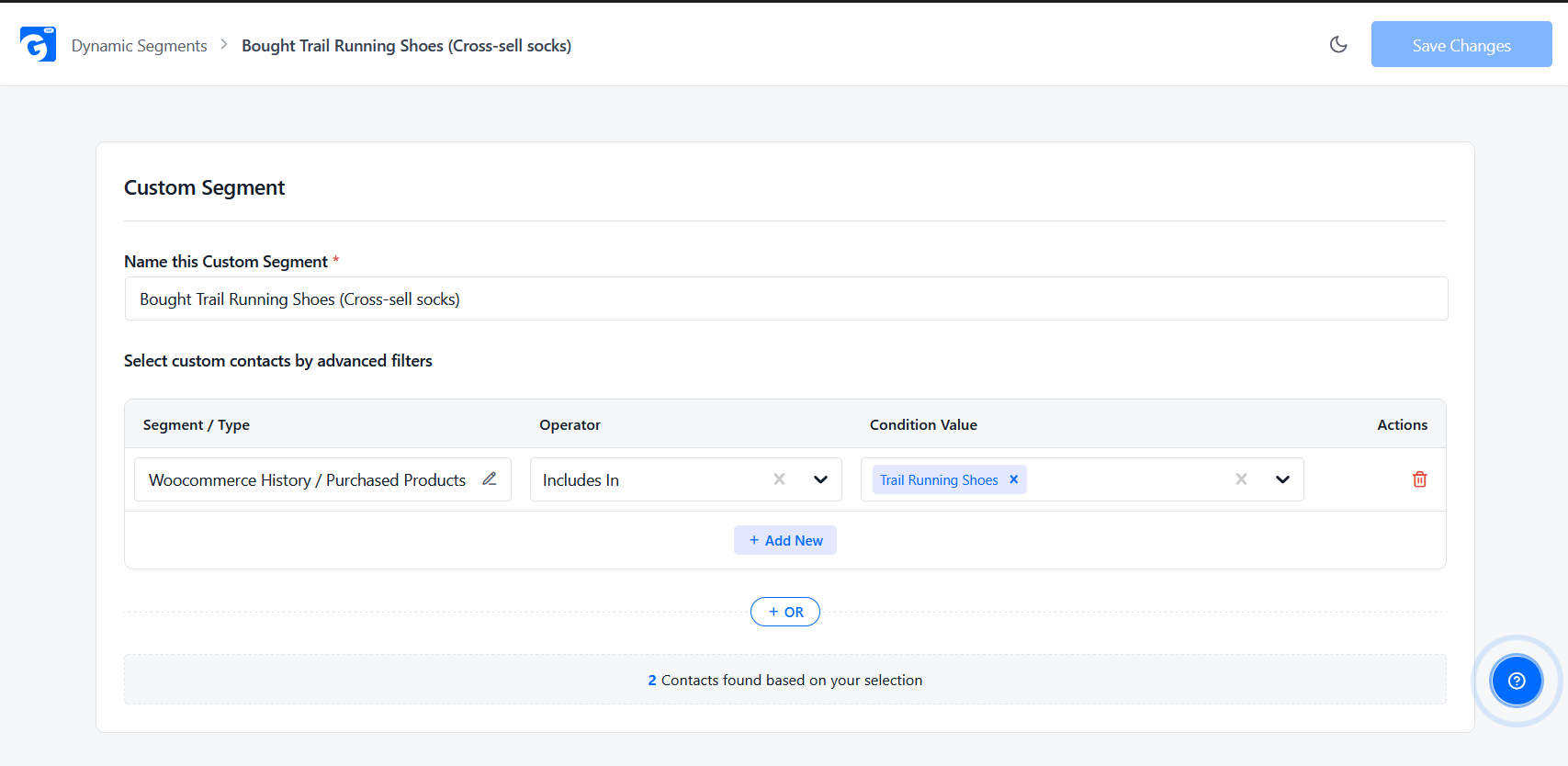
Alt text: “Building a customer segment by purchase history in GemCRM”.
3. Match the Offer to the Audience
Personalization is more than putting a first name in the subject line. Real personalization means the offer itself fits the person receiving it.
Audience → need or interest → relevant offer.
Two examples:
When the offer matches the audience, you need less persuasion to get a click. The email is already answering a question the reader already has.
4. Write Better Sales Email Subject Lines
The subject line’s only job is to earn the open. A few things that consistently work for sales and promotional emails:
A few examples of email sale subject lines, grouped by approach:
These are starting points, not a formula to copy word for word. The best sales email subject lines are the ones that match your actual offer and your audience’s actual language. Test a few per campaign and keep what works for your list (more on testing in Section 9).
When you set up a campaign in GemCRM, you can turn on A/B testing for the subject line right on the settings step — add two or more variants, give each a share of the send, and GemCRM splits your recipients between them automatically. The report that comes back afterward shows open rate and click rate side by side per variant, so which line actually won is a number, not a guess.
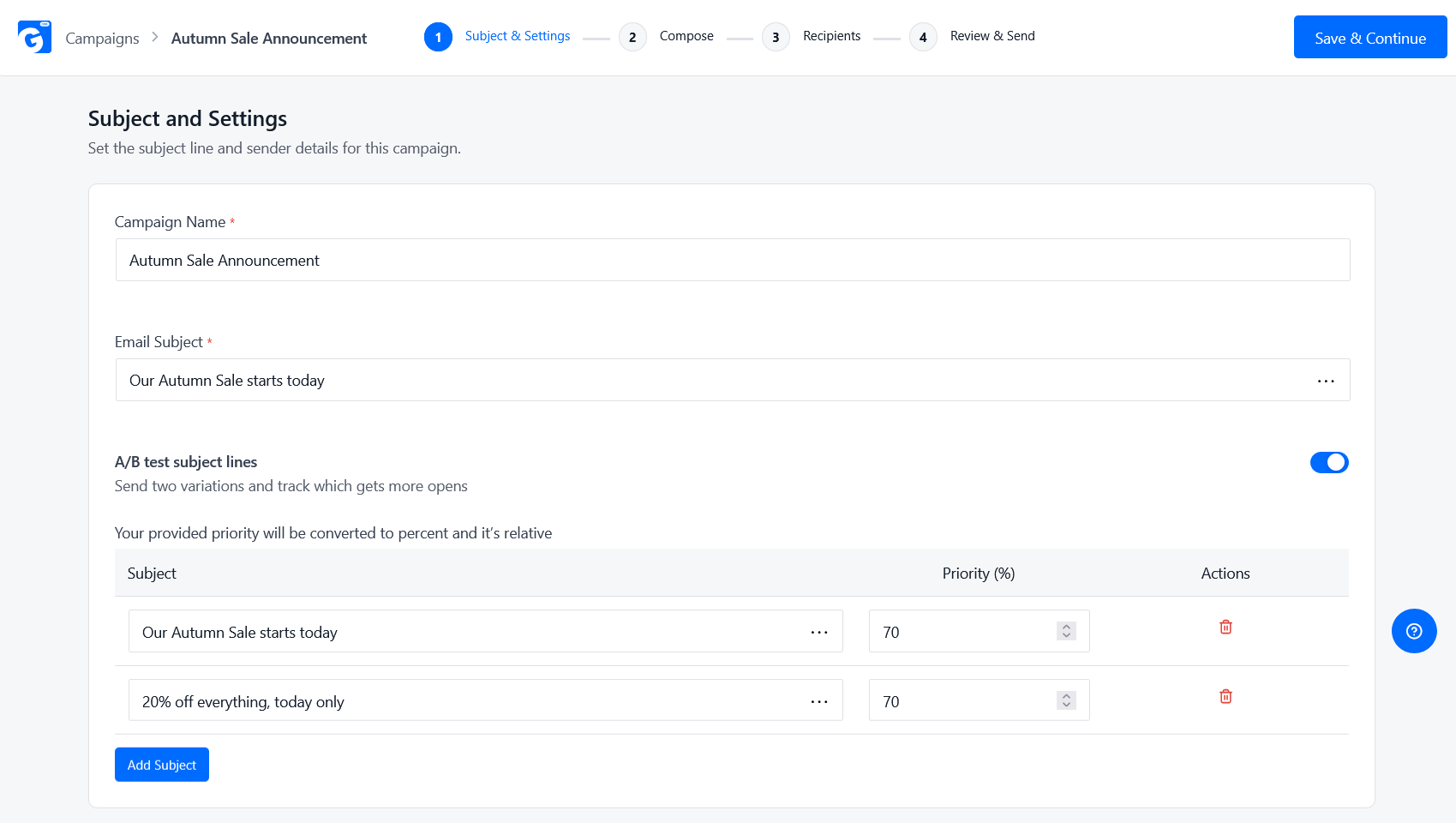
Alt text: “Setting up an A/B test on a campaign’s subject line in GemCRM”.
5. Keep the Email Focused on One Primary Action
An email with five links and three offers asks the reader to make five decisions. Most people make none and move on.
Keep it simple:
If the goal is to sell one product, the email should be mostly about that product, with one clear “Shop Now” button. Save the second offer for the next email.
6. Make Your Emails Easy to Read on Mobile
Most marketing emails get opened on a phone first. If the email is hard to read there, the rest of your work doesn’t matter.
Practical points:
Before you send, open a preview on an actual phone. It takes thirty seconds and catches problems a desktop preview misses.
7. Use Personalization and Behavioral Data
Behavioral data tells you what someone actually did, not just who they are. That makes it more useful than a name field.
Useful behavioral signals:
You don’t need to explain this to the customer as “behavioral data.” You just use it to send a more relevant email — a follow-up on a product they viewed, a reminder about something they left behind, a recommendation based on what they already bought.
In GemCRM, this data sits right on the contact record — every WooCommerce or StoreEngine order for that person shows up automatically, matched by email, with order status, total, and date. Merge codes pull details like a name or a last order straight into the email body, and because it’s the same purchase data behind the segments from Section 2, personalizing an email and segmenting an audience both draw from one place instead of two.
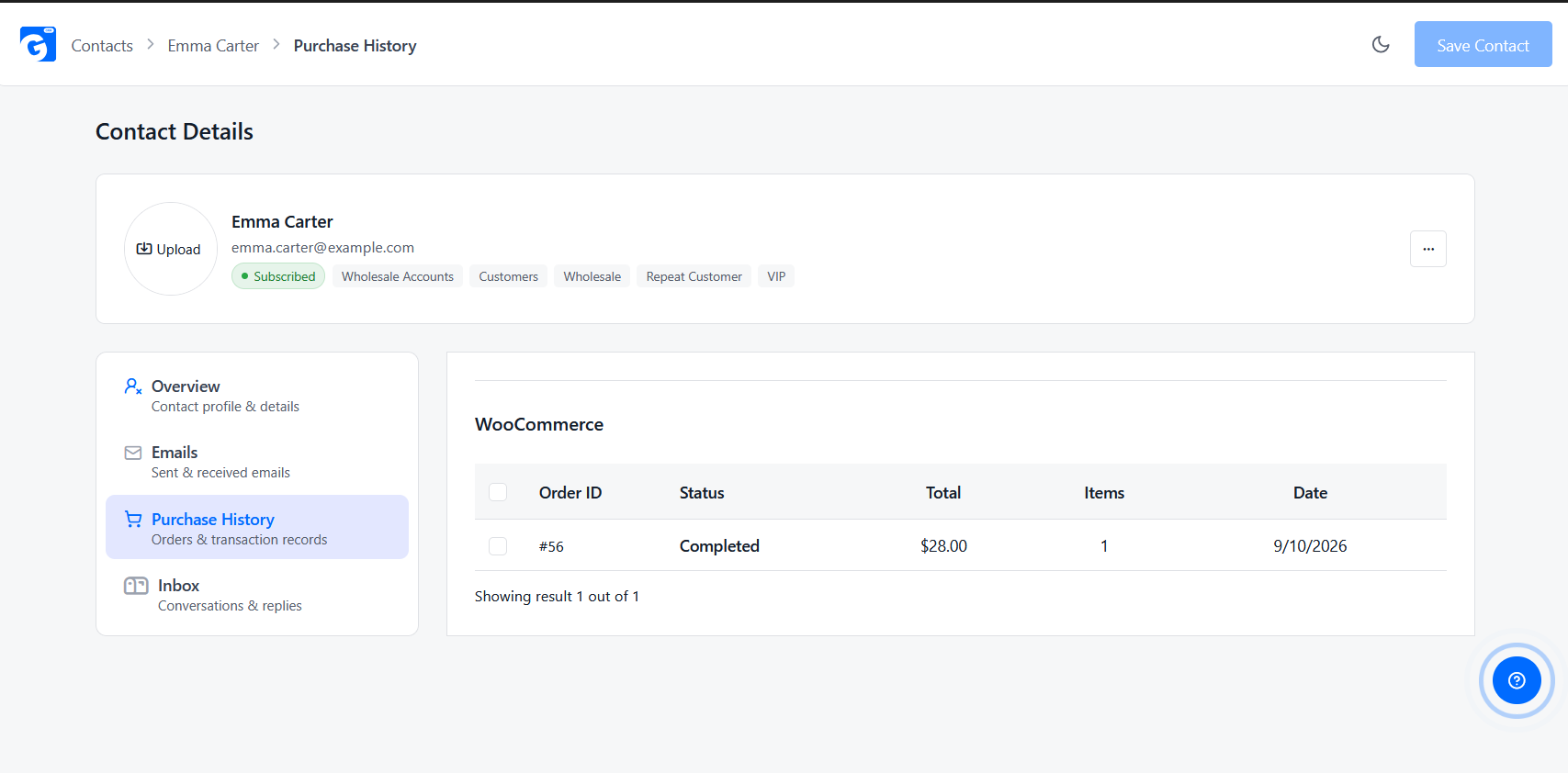
Alt text: “A contact’s purchase history in GemCRM”.
8. Use Triggered Emails and Simple Email Flows
A regular campaign and a triggered email work differently, and it helps to know the difference before you build either one.
Regular campaign: a marketer picks a time and sends it. Everyone on the list gets it around the same time.
Trigger email: a customer action or event starts it automatically. No one schedules it manually — it fires when the trigger happens.
Email flow: a short series of emails triggered by one event, with conditions or delays controlling what sends next.
Simple examples:
Triggered email campaigns tend to perform better than regular campaigns because they arrive at the moment they’re relevant, not on a schedule that has nothing to do with the customer’s actual behavior.
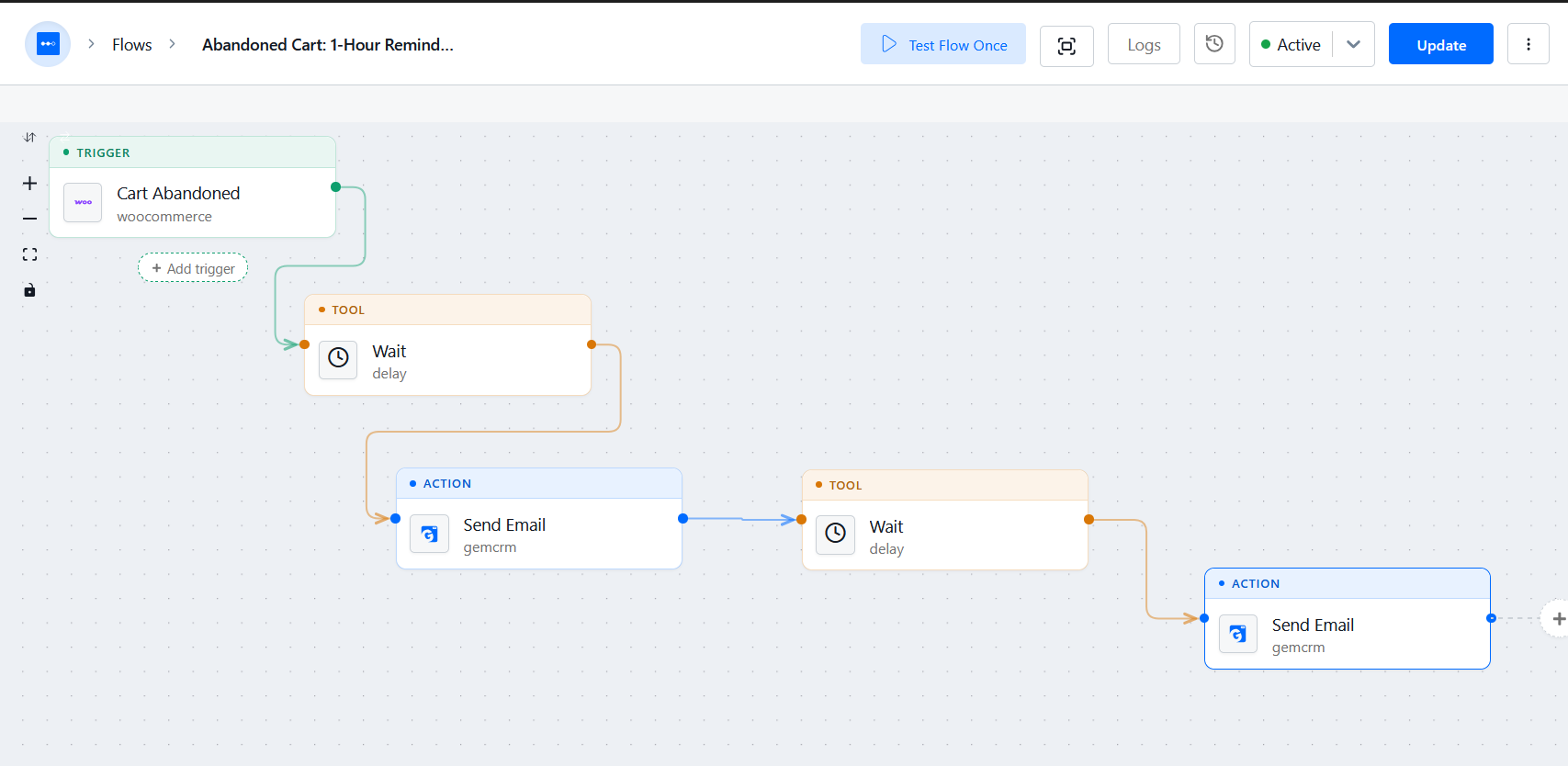
GemCRM handles the two cases separately. A single trigger — say, tag someone and send them an email — is built on the Automations workflow canvas: pick an event like a contact being created or tagged, or a WooCommerce order changing status, then add an action to send a campaign or a one-off email. Each step can be test-run before it goes live, so you’re not debugging it on a real customer. A multi-step flow, like a welcome series, is built instead as an Email Sequence: you choose the audience the same way you’d build any segment, then add steps with their own delay before each one sends, and a step stays in draft until you switch it on. Both draw from the same contact and segment data as your regular campaigns, so nothing needs exporting between tools.
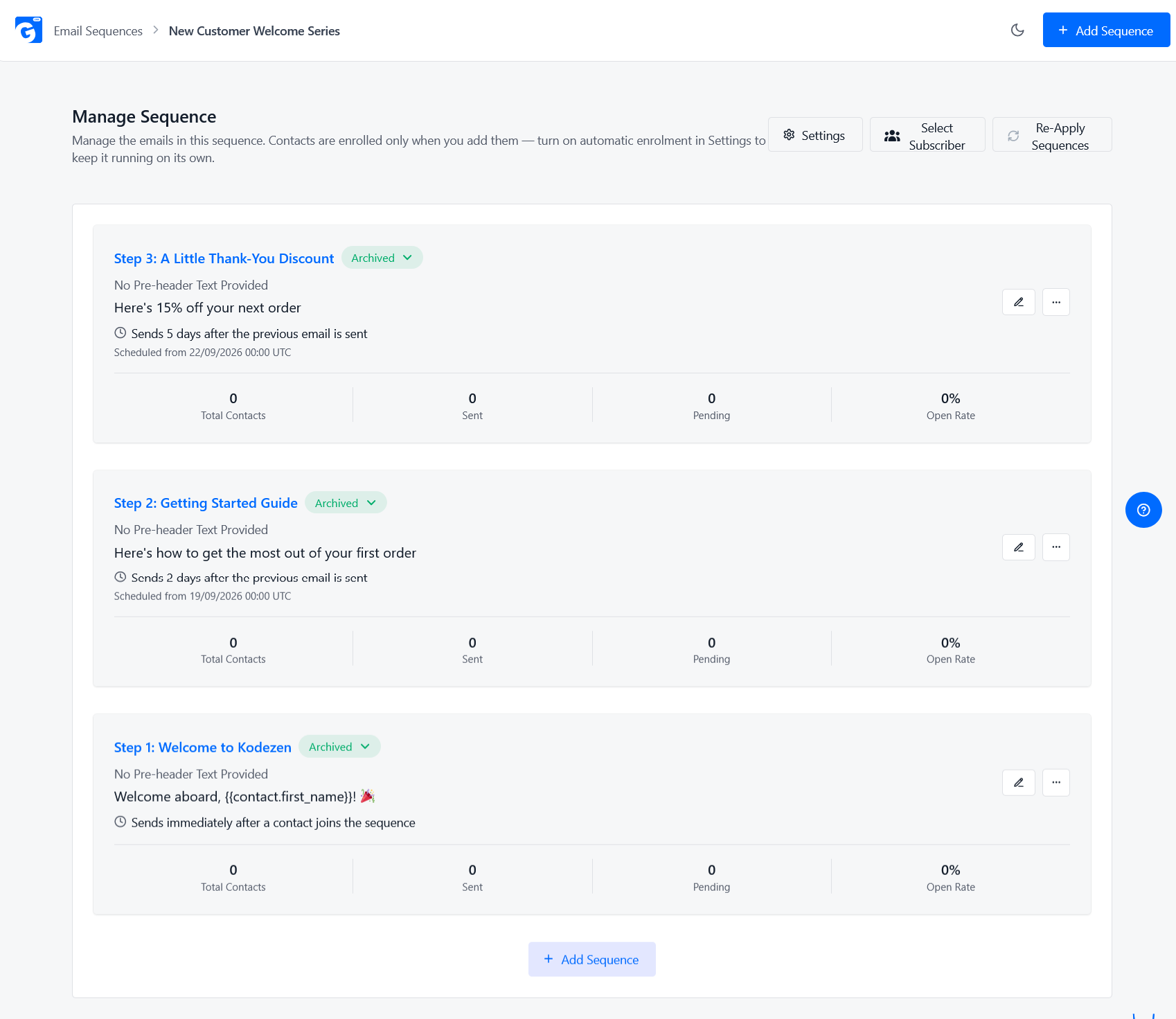
Alt text: “A multi-step email sequence in GemCRM”.
This section is a starting point, not a full guide — automation and email flows deserve their own deep dive .
Email Deliverability and Compliance Basics
None of the practices above matter if the email never reaches the inbox, or if it gets your domain flagged. A few fundamentals to have in place before you scale up sending:
This isn’t a full legal guide, and rules vary by region (CAN-SPAM, GDPR, and similar laws each have their own specifics) — check what applies to where your subscribers are. The practical baseline is the same everywhere: get real consent, make opting out easy, and identify yourself honestly.
GemCRM covers the mechanics of most of this out of the box. Double opt-in can be turned on from Settings, so a contact has to click a confirmation link before they’re an active subscriber — useful if a lot of your signups come through forms rather than a purchase. The business address you set in Settings is available as a merge code for the footer, and campaign email templates already include an unsubscribe link by default. The campaign report (Section on measuring, above) also tracks unsubscribes per campaign, so a spike after a particular send is something you’ll actually notice instead of missing.
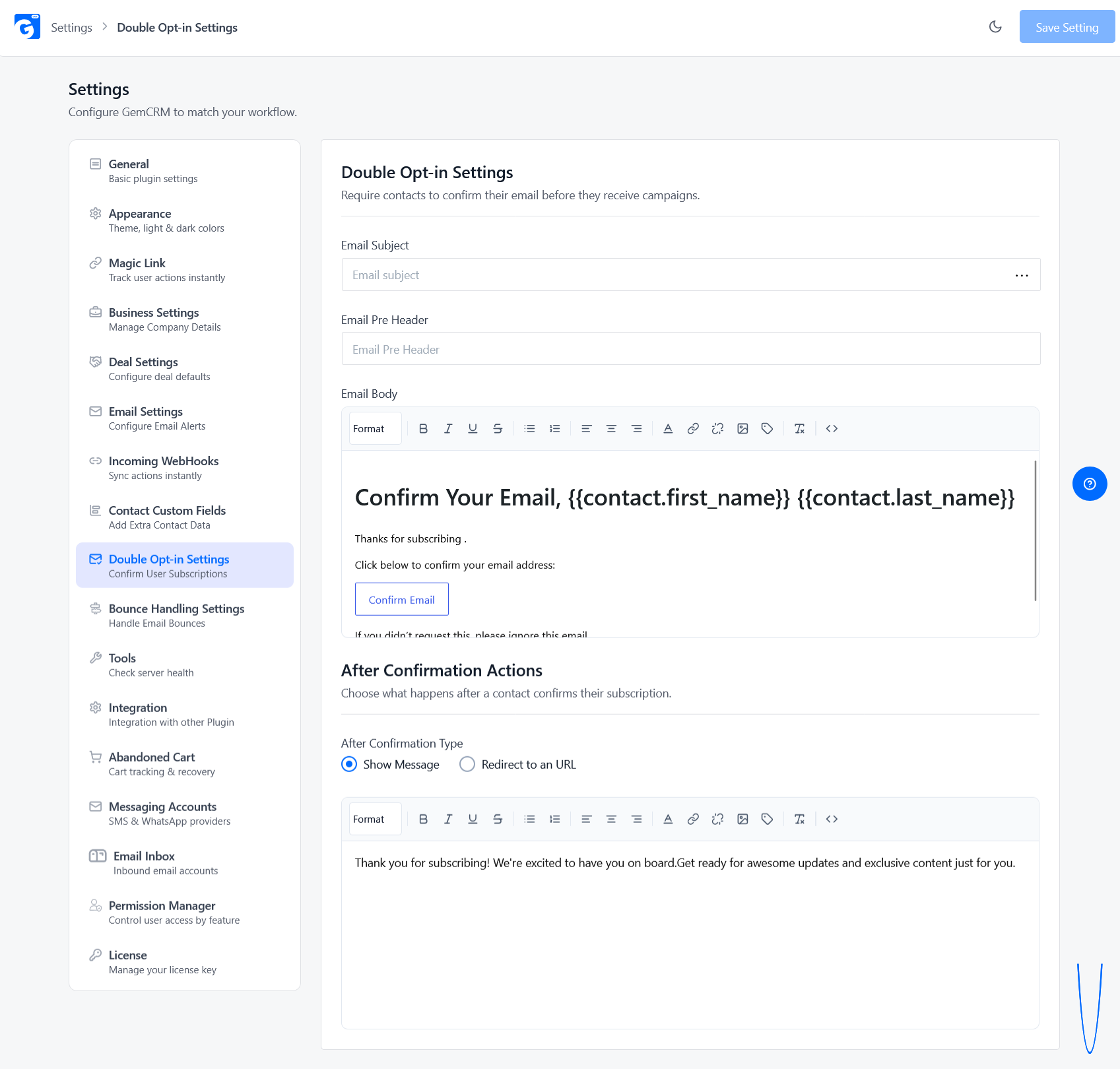
Alt text: “Double opt-in confirmation settings in GemCRM”.
Campaign vs. Triggered Email vs. Email Flow
|
Type |
Starts When |
Example |
|
Email campaign |
Scheduled by a marketer |
Weekend sale announcement |
|
Triggered email |
A customer action or event occurs |
Abandoned cart reminder |
|
Email flow |
A trigger starts a multi-step sequence |
Welcome series |
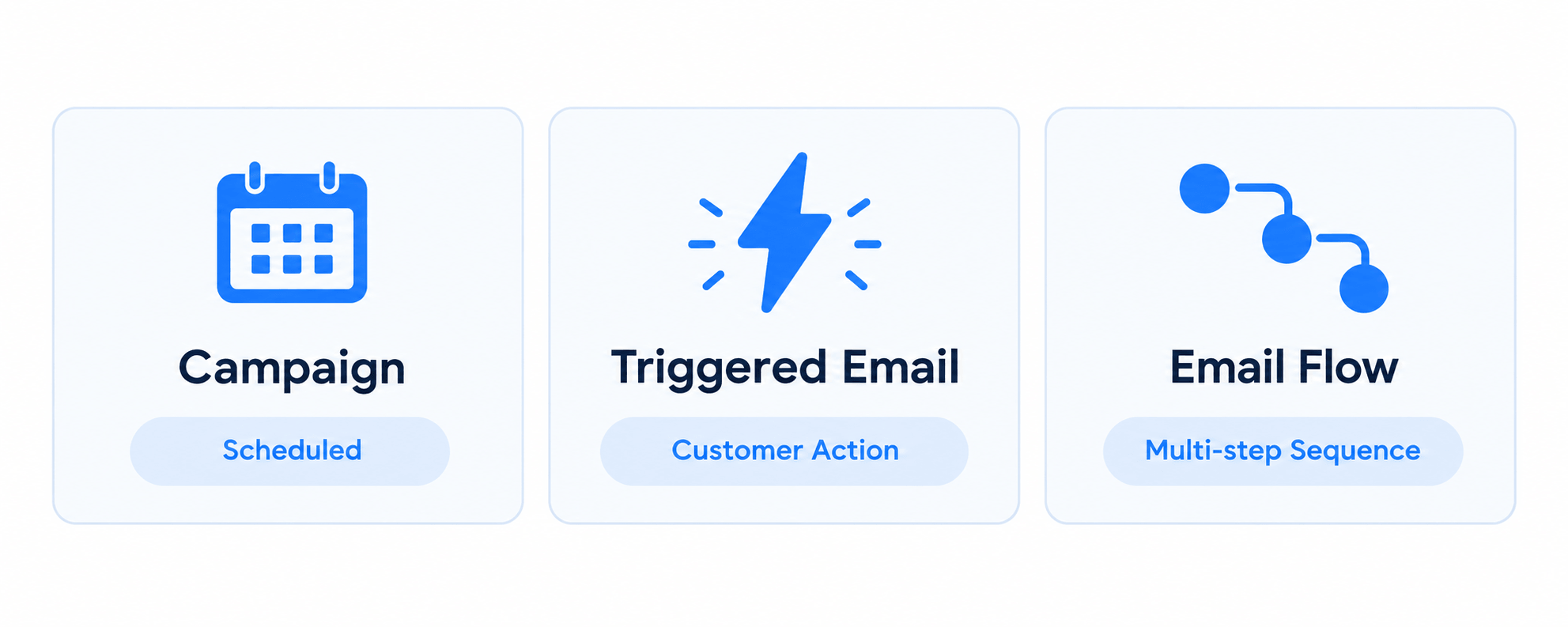
A campaign is a single, planned message. A triggered email is a single, automatic message. A flow is several triggered messages connected together, usually with a delay or a condition between them. Most stores need all three — campaigns for planned promotions, triggers for time-sensitive moments, and flows for anything that needs more than one follow-up.
Simple Email Automation Examples for Ecommerce
These are short examples of how the best practices above come together as email automation examples. Each one could be its own detailed guide — this is just enough to show the shape.
Welcome Flow
Signup → welcome email → a value or product-education email → a first offer.
Abandoned Cart Flow
Cart abandoned → reminder email → an email addressing a common objection or highlighting the benefit → a final reminder before the discount (if any) expires. In GemCRM, this runs off a cart-abandoned trigger with a delay between each follow-up.
Post-Purchase Flow
Purchase completed → thank-you email → product education (how to use what they bought) → a review request or cross-sell. This works well as an Email Sequence triggered when an order is marked completed, with a delay before each step.
Win-Back Flow
Customer goes inactive → a simple check-in reminder → a relevant offer based on past purchases → a final re-engagement email. Filtering the audience by last-order or last-activity date keeps this flow reaching only contacts who’ve actually gone quiet, not everyone.
The common thread: every step in every flow still follows the best practices from earlier in this guide — one goal per email, a relevant offer, a focused CTA, tested before it goes live.
A Simple Sales Email Template
A sales email template doesn’t need to be complicated. A structure that works for most promotional and sales emails:
Subject line — a clear benefit or reason to open.
Opening — one or two lines on why this message matters right now.
Offer or value — what the product, promotion, or benefit actually is.
Proof or context — a short reason to trust the offer (a real detail, not a made-up statistic).
CTA — one clear next step.
A short example:
Subject: Your size is back in stock
Hi [First Name],
The [product] you were looking at is back — and it’s going fast.
It’s the same style you added to your cart last week, now with free shipping through Sunday.
[Shop Now]
This template stays inside the context of marketing and ecommerce campaigns. It’s not built for cold outreach or B2B sales prospecting.
GemCRM’s campaign editor is block-based with merge codes, so this structure maps onto it directly — a subject field, a content block for the opening and offer, and a button block for the CTA. If you only need to send it to one person instead of a full campaign, the same email can go out as a one-off send from that contact’s record, or as an action inside an automation.
Alt text: “Building a sales email with GemCRM’s campaign editor”.
Email Campaign Pre-Send Checklist
In GemCRM, the last step of the campaign wizard is a review screen built for exactly this — audience count, subject, and content all in one place before you send, with a test send available first. For a trigger or a sequence step, testing it once before switching it on catches a broken merge code or a wrong condition before a real contact hits it.
Keep Improving From Campaign Data
A campaign doesn’t end when you hit send. The results tell you what to do next time.
Things worth reviewing after every send:
Open rate alone doesn’t tell you if a campaign worked. Someone can open an email and never act on it. Judge the campaign against the goal you set at the start — clicks, conversions, or revenue, not opens in isolation.
Every campaign in GemCRM gets its own report, with sends, opens, clicks, pending, and unsubscribes summarized up top, and a link-click breakdown below showing exactly which link in the email got clicked. That link-level view is what tells you whether your CTA worked, not just whether people opened the email.
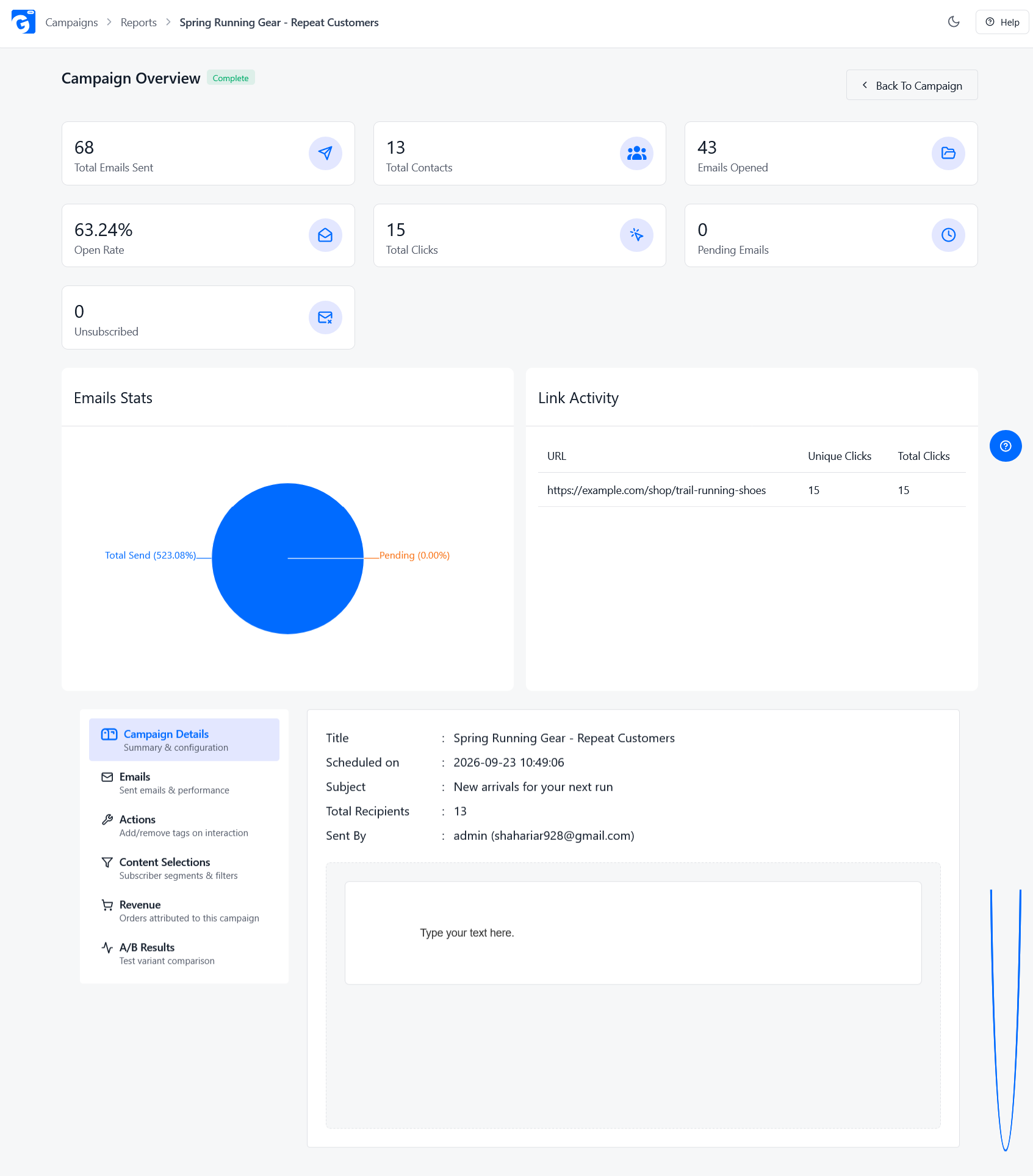
Alt text: “A campaign performance report in GemCRM”.
The cycle repeats:
Plan → Send → Measure → Learn → Improve.
Conclusion
A strong email campaign comes from following the same process every time: define the goal, pick the audience, match the offer, write a focused message with a clear CTA, decide whether it’s a one-time send or a trigger-based flow, test it, send it, and measure it against the goal you started with.
Goal → Audience → Offer → Message → CTA → Trigger/Flow → Test → Measure → Improve.
None of these steps are complicated on their own. The results come from doing all of them, in order, every time — not from any single trick. If you’re managing this across a growing customer list, having your campaigns, segments, and triggered emails work off the same customer data (instead of separate tools and exports) makes each step in this process faster to repeat.
Frequently Asked Questions
What are email campaign best practices?
They’re the habits that make an email campaign more effective: a clear goal, a segmented audience, a relevant offer, a focused message, mobile-friendly design, testing before and after sending, and reviewing results to improve the next campaign.
What makes a good email campaign?
One clear goal, sent to the right audience, with an offer that matches what they actually want, a subject line that earns the open, and one clear action to take.
How do I write better sales email subject lines?
Lead with a real benefit, be specific, use urgency only when it’s genuine, and keep the subject line honest about what’s inside. Test a couple of variations each time instead of guessing.
What is a triggered email campaign?
An email that sends automatically when a customer does something — signs up, abandons a cart, completes a purchase, or goes inactive — instead of being scheduled manually.
How often should you send marketing emails?
There’s no fixed number that works for every list. Send often enough to stay relevant, and watch unsubscribe and complaint rates — if they climb, you’re sending too often or the content isn’t matching what people signed up for.
What should I test before sending an email campaign?
Links, personalization fields, the CTA, mobile layout, images, discount codes, and how the email renders in a couple of major inboxes. Send yourself a test email every time, no exceptions.