



When was the last time a store sent you an email that felt like more than a receipt? For most WooCommerce shoppers, the answer is never.
Most stores stop talking to customers the moment the order confirmation lands. Email marketing for WooCommerce closes that gap. It turns a one-time order into an ongoing relationship, instead of leaving every customer to come back on their own.
What Is Email Marketing for WooCommerce?
WooCommerce ships with email out of the box. But it’s only the transactional kind — order confirmations, shipping updates, account creation, and password resets.
These emails are useful, but they are not marketing. They don’t build a list. They don’t segment customers. They don’t run on their own once an order is placed.
Email marketing for WooCommerce means adding a dedicated tool on top of the store. That tool sends the emails WooCommerce was never built for: newsletters, automated sequences, abandoned cart recovery, and campaigns that bring a customer back to buy again.
Why Email Marketing Matters for WooCommerce Stores
Email is one of the highest-ROI channels for any store. Litmus’s own research puts the average return at $36 for every $1 spent — ahead of most paid ad channels.
You also own the list outright. No algorithm change can cut your reach overnight, and no ad platform can suddenly raise your cost per click. A Facebook or Instagram update can quietly cut your organic reach in half. Your email list doesn’t answer to anyone’s algorithm but your own.
Email also runs well without you watching it. Once a welcome sequence or a cart-recovery automation is live, it keeps working on its own. A customer who abandons a cart at 2 a.m. still gets a recovery email, whether or not anyone is at the dashboard.
The traffic email reaches is higher-intent too. Everyone on your list already gave you their email address — that’s a stronger signal of interest than a cold click on a paid ad. High ROI, low ongoing effort, and an audience that already said yes: that’s why almost every online store ends up needing email marketing, WooCommerce included.
The Types of WooCommerce Emails You Should Be Sending
Transactional (Order & Account) Emails
Order confirmations, shipping notifications, account creation, and password resets. WooCommerce sends these by default. They’re not something you build a strategy around — they’re the baseline every other email type sits on top of.
Welcome Emails
The first message a new subscriber or customer gets after opting in or placing their first order. It sets expectations for what they’ll hear from you next.
This is usually the highest open-rate email you will ever send to that person. People who just subscribed or just bought something are paying the most attention to your brand right now. That makes this email worth getting right.
Abandoned Cart Emails
Triggered when a shopper adds items to their cart and leaves without checking out. Baymard Institute’s research puts the average cart abandonment rate at just over 70%. That makes this one of the single highest-leverage automations a WooCommerce store can set up.
A well-timed reminder only recovers a fraction of those abandoned carts. But since that 70% pool is so large, even a modest recovery rate means real revenue that would otherwise be lost. See our full guide to WooCommerce abandoned cart recovery for the complete setup.
Promotional & Campaign Emails
One-off sends — sales, new product launches, seasonal offers — aimed at your whole list or a segment of it. These aren’t triggered by one customer’s behavior.
This is the category most people picture when they hear “email marketing.” But on its own, it’s the least automated of the five types here. Someone has to decide what to send, and when, every single time.
Post-Purchase & Win-Back Emails
Sent after an order to ask for a review, suggest a related product, or — if enough time passes without a repeat order — bring a quiet customer back with an offer.
The review and cross-sell email fires shortly after delivery. The win-back email is timed off silence instead: a customer who hasn’t ordered in 60 or 90 days needs a different message than one who ordered last week.
Before You Start: List-Building & Setup
Getting email marketing for WooCommerce stores off the ground takes a little groundwork first.
Grow a Real, Opted-In Email List
Add an opt-in checkbox at checkout and a signup form elsewhere on the site. A small incentive, like a discount code, helps too.
Only email people who actually said yes. Sending to a list that never opted in is what gets a domain flagged as spam — and that hurts every email you send after it, even to people who did opt in.
Keep the opt-in checkbox honest and unchecked by default, not pre-checked. Store a timestamp of when each contact consented. Most CRMs, GemCRM included, handle this automatically once a contact is added — but it’s worth confirming any tool you use actually keeps that record.
Decide What You Actually Need
If all you want is to notify customers about their orders, WooCommerce’s default emails already do that. The moment you want a newsletter, a segment, or an automation that runs without you, you need a dedicated email marketing tool or CRM.
Stores commonly reach for a general email tool like Klaviyo or Mailchimp, a WooCommerce-focused automation plugin, or a WordPress-native CRM like GemCRM that handles contacts and campaigns in one place. Which one fits depends mostly on whether you want that data living inside WordPress or on an outside platform.
Sync Your WooCommerce Data Automatically
Check whether your tool reads order and customer data automatically, or needs a separate connector, plugin, or manual export to stay current. A tool working from old data will segment and automate off information that’s already wrong.
For example, a “customers who spent over $200” segment built from a CSV exported last month is already wrong the moment a new order comes in. A win-back automation aimed at “hasn’t ordered in 60 days” is only as accurate as the last time someone remembered to re-sync the list.
How to Build a WooCommerce Email Marketing Strategy (Step-by-Step)
Map Email Types to the Customer Lifecycle
Line up the email types from the taxonomy above against where a customer actually is. Welcome emails go to brand-new subscribers. Cart-recovery emails go to shoppers mid-checkout. Promotional sends go to the general list. Win-back emails go to anyone who’s gone quiet.
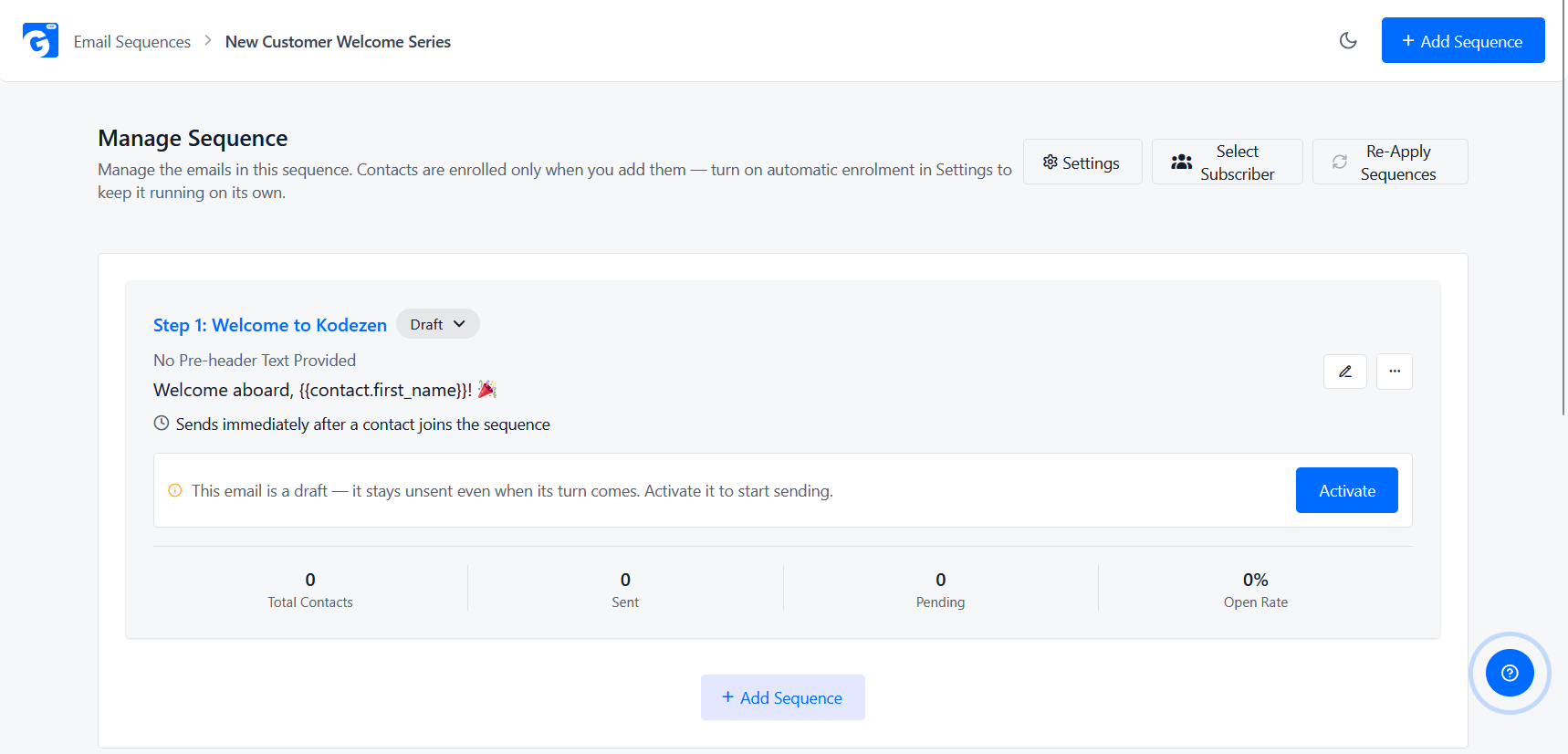
Set Up Your Welcome Sequence
A simple three-email cadence works for most stores:
Each email earns its place by giving the subscriber a reason to open the next one. Don’t front-load every pitch into a single email and go quiet after.
Automate Abandoned Cart Recovery
This is the single highest-leverage automation on this list, given how much traffic abandons a cart before checkout. See our step-by-step guide to setting up WooCommerce abandoned cart recovery rather than rebuilding it here.
Layer in A/B Tested Campaigns
Once your core automations are running, test subject lines and content on your promotional sends. Don’t just guess which version performs better. Our guide to A/B testing WooCommerce email campaigns covers hypothesis-setting and sample size in full.
Track Metrics and Iterate
Watch open rate and click rate. But watch revenue per email most closely — that’s the number that actually matters.
A high open rate on an email that generates no revenue is a vanity metric. Revenue per send tells you whether the strategy is actually working.
Check these numbers often enough to catch a decline early. A subject-line style that worked well for months can quietly stop working. The only way to notice is by checking — not by assuming last quarter’s approach still holds.
WooCommerce Email Automation: What to Automate First
Not every automation deserves equal priority when you’re just starting out. Rank them by return relative to effort:
Trying to launch all four in the same week usually means none of them get set up properly. Building them in this order lets each one prove itself before you add the next.
Best Practices for WooCommerce Email Campaigns
Write Subject Lines That Get Opened
Keep it specific and concrete, not vague or hype-driven. “20% off your last cart” beats “Don’t miss out!” because it tells the reader exactly what’s inside before they open it.
Vague urgency lines like “Don’t miss out!” or “Last chance!!” have been overused for years. Most inboxes tune them out now. A subject line that states the actual offer earns the open instead of asking for one on faith.
Segment Before You Send
A single blast to your whole list treats a first-time browser the same as a repeat $500 customer. That’s rarely a good idea.
Splitting sends by purchase history or engagement level consistently outperforms one-size-fits-all campaigns. A VIP discount means little to someone who’s never ordered. A “welcome back” offer aimed at last week’s customer reads as tone-deaf, not thoughtful.
The segment doesn’t need to be elaborate to work. Even a simple split between “has ordered before” and “hasn’t yet” beats sending the same email to both.
Mobile-Optimize Every Email
A large share of email opens happen on a phone. A template that isn’t responsive loses that audience before they even read the offer.
Test every campaign on a phone screen before sending — not just a desktop preview. A two-column layout or an oversized image can look fine on a monitor, but force a mobile reader to zoom and scroll sideways just to read the subject line.
Keep Your List Clean
Remove or suppress hard bounces and long-term non-openers now and then. A cleaner list protects your sender reputation.
It also keeps your open-rate numbers meaningful, instead of inflated by addresses that never see the email at all. Mailbox providers track engagement per sender — a list full of dead addresses drags down deliverability even for the subscribers who do want to hear from you.
How to Set Up Email Marketing for WooCommerce with GemCRM
Unlike tools that need a separate sync plugin or CSV export, GemCRM reads WooCommerce (and StoreEngine) customer and order data natively. Segments and automations are never working off a stale list.
SS: GemCRM setup screen showing WooCommerce store connection and auto-synced contacts
Getting started takes three steps:
Conclusion
Email marketing for WooCommerce isn’t one feature. It’s a strategy built from several: a real taxonomy of email types, a couple of core automations doing most of the work, and ongoing habits like segmentation and list hygiene that keep performance from fading over time.
None of it needs to launch at once. Start with the highest-leverage piece — abandoned cart recovery. Get the welcome sequence running next. Layer in segmentation and A/B testing once the basics are converting reliably.
For the bigger picture on managing WooCommerce customers beyond email alone, see our WooCommerce CRM guide, or browse more guides on the GemCRM blog.
FAQs
Does WooCommerce have built-in email marketing?
No. WooCommerce sends transactional emails by default — order confirmations, shipping updates, account and password emails. It has no newsletter, automation, or segmentation features on its own.
What’s the difference between transactional and marketing emails?
Transactional emails are triggered by a specific action, like an order or a password reset. They’re required for the store to function. Marketing emails — newsletters, promotions, abandoned cart reminders — are optional. They exist to bring a customer back or keep them engaged, and they need a separate tool to send.
Do I need a plugin to send newsletters from WooCommerce?
Yes. WooCommerce has no newsletter or campaign-sending feature on its own. You need a dedicated email marketing plugin or CRM, such as GemCRM, connected to your store.
What’s the best first automation to set up?
Abandoned cart recovery. Given how large a share of shoppers leave without completing checkout, it’s typically the single highest-return automation a WooCommerce store can set up first.
Is email marketing for WooCommerce free?
It can be. GemCRM’s free tier includes contact management, unlimited email campaigns, the drag-and-drop builder, opt-in forms, A/B testing, and open/click tracking at no cost. More advanced automation — abandoned cart recovery, sequences, and SMS/WhatsApp — needs the Pro upgrade.
Does this work if I also sell on StoreEngine?
Yes. GemCRM syncs customer and order data from both WooCommerce and StoreEngine automatically. Contacts and automations work the same way no matter which one processed the order.