



Two WooCommerce stores can have similar products and still perform very differently when it comes to retaining customers. One knows which customers are its highest-value repeat buyers, which customers have stopped purchasing, and how to engage each group. The other treats its entire customer list the same, sending the same message to a first-time buyer and a long-time VIP.
The difference often comes down to how effectively a store uses the customer and order data it already has. A WooCommerce CRM brings that data together, helping stores understand customer behavior, create targeted segments, and build more relevant follow-ups and marketing campaigns—instead of letting valuable customer information sit unused inside WooCommerce..
What Is a WooCommerce CRM
A WooCommerce CRM is a customer relationship management system that connects with a WooCommerce store to organize customer profiles, purchase history, interactions, and marketing activity in one place. Instead of treating every order as a separate transaction, a CRM helps a store build a complete picture of each customer.
Benefits of Using a CRM for WooCommerce Stores
These benefits become even more useful when you look at the features a WooCommerce CRM should provide, such as customer management, segmentation, email campaigns, automation, and reporting.
Does WooCommerce Have a Built-In CRM?
No. WooCommerce is primarily an ecommerce platform, not a full customer relationship management (CRM) system. It handles important parts of running an online store, such as products, checkout, orders, payments, and basic customer information.
A CRM adds another layer focused on understanding and managing customer relationships. It can bring customer profiles and purchase history together, segment customers based on their behavior, and help automate follow-ups and marketing campaigns.
For example, WooCommerce can show that a customer placed an order. A CRM can help you go further by showing how often that customer buys, how much they have spent, whether they are a repeat customer, and which campaigns or follow-ups may be relevant to them.
So, WooCommerce and a CRM are not replacements for each other. WooCommerce runs your store, while a CRM helps you turn customer and order data into better customer management, segmentation, and marketing.
Essential WooCommerce CRM Features to Look For
Not every plugin marketed as a “CRM” actually covers all of these. This is the checklist worth working through when evaluating one — whatever you end up choosing.
Contact & Purchase History Management
A WooCommerce CRM should pull every customer into a unified contact record automatically, with their order history attached — what they bought, when, and how much. Without this as the foundation, every other feature below (segmentation, automation, targeted campaigns) has nothing real to work from.
GemCRM covers this at no cost: contacts sync automatically from WooCommerce and StoreEngine, and any customer’s full order list sits on their profile under Contacts → Purchase History.
Segmentation
Static, manually-maintained lists go stale the moment they’re built. A CRM worth using can build live segments from order data — total spend, order count, last order date, products or categories bought — so a “lapsed VIP” segment keeps updating itself as new orders and refunds come in, rather than needing to be rebuilt.
GemCRM’s version of this, Dynamic Segment (found under Segments), is a Pro feature — conditions are grouped under “WooCommerce History” so a segment can be built directly from order data. The full field list is broken down here if you want to see exactly what’s available.
Email Campaigns & A/B Testing
Email remains the core channel for most WooCommerce stores, and a CRM should let you send campaigns and test what actually works — subject lines, send times, content — without a separate tool.
This is free in GemCRM — the campaign builder under Campaigns → Add Campaign includes drag-drop design and subject-line A/B testing as standard, not a paid add-on. For running the test itself correctly, this guide to A/B testing in email marketing is worth reading regardless of which platform you’re on.
Automation
A CRM that only stores data but can’t act on it leaves the follow-up work to you. The stronger version of this feature lets a store event — a new order, a status change, a cart abandonment — trigger a tag, a list update, or a campaign on its own.
GemCRM handles this through its free companion plugin, Zaplane, accessible from the Automations menu — the only actions gated behind Pro are the ones tied to Email Sequences specifically. Building automation funnels that convert walks through this pattern in more depth.
Abandoned Cart Recovery
Most ecommerce stores experience abandoned carts, which makes recovering them a common and often high-ROI CRM use case — a follow-up sequence timed to when a shopper leaves checkout without buying.
This sits behind GemCRM Pro, as the Abandoned Cart addon — turned on from the Addons page once you’re upgraded. The full setup is covered here if you want to see the recovery sequence in detail.
SMS & WhatsApp Messaging
Not every message belongs in an inbox — a shipping update or a time-sensitive offer often performs better as a text. Whether this lives on the same contact record as email (rather than a separate tool entirely) is worth checking before committing to a CRM.
GemCRM Pro adds this through Settings → Messaging Accounts, with support for several providers — Twilio, Vonage, and WhatsApp Cloud API among them.
Sales Pipeline
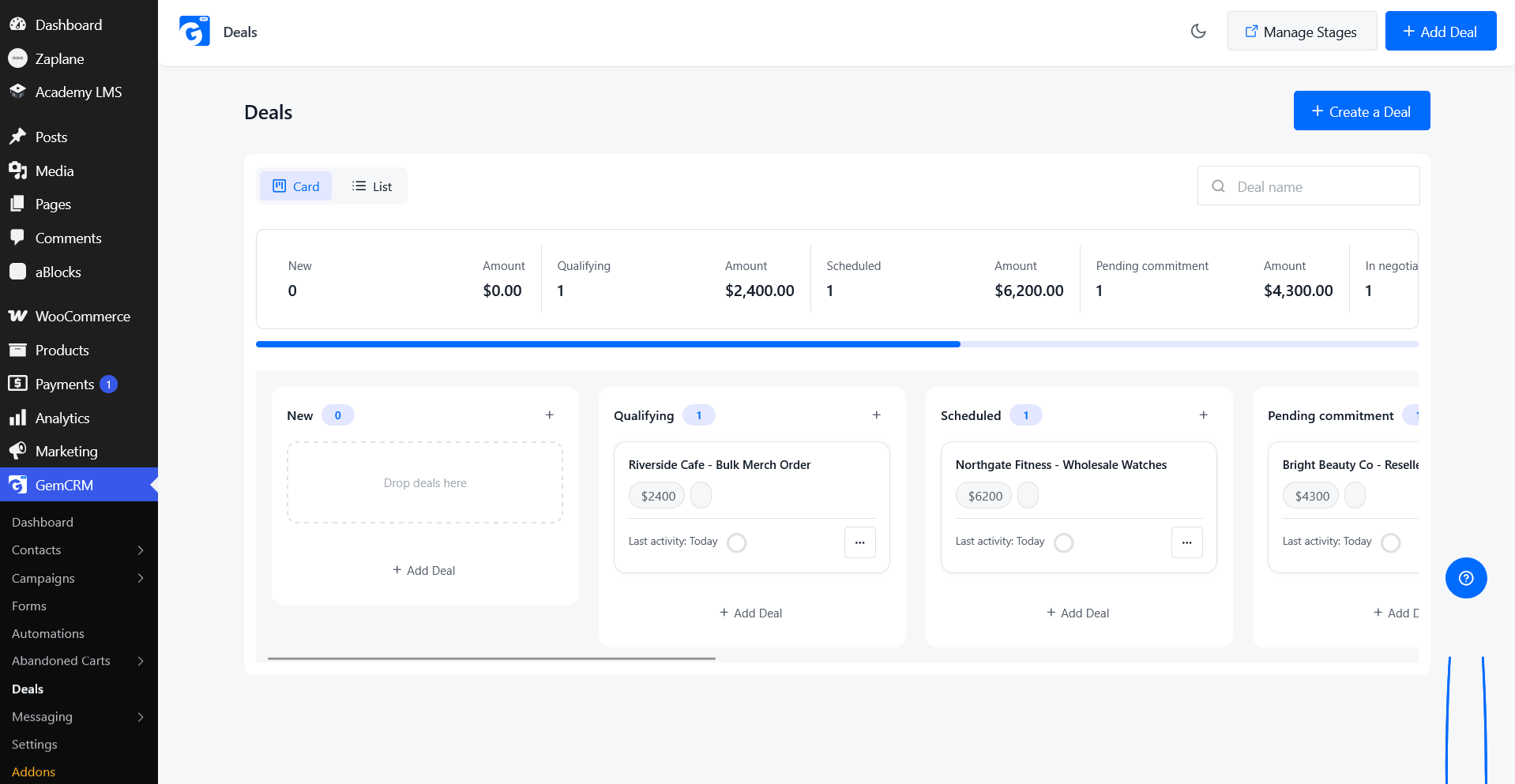
Not every WooCommerce store runs on pure self-checkout — stores handling quotes, wholesale orders, or high-touch sales need somewhere to track a deal from first contact through close, ideally without a second, separate sales CRM.
In GemCRM this lives under Deals, as a Pro feature — stages are fully configurable through Manage Stages, so the pipeline can be shaped around how your store actually sells, not a fixed template.
Forms
Capturing a lead before they ever place an order requires a form that feeds directly into the CRM’s contact list — not a separate form plugin that needs its own export or integration step.
GemCRM’s form builder is free and requires no code — build one under Forms → Create Form, then drop the generated shortcode wherever it needs to appear on the site.
Reporting
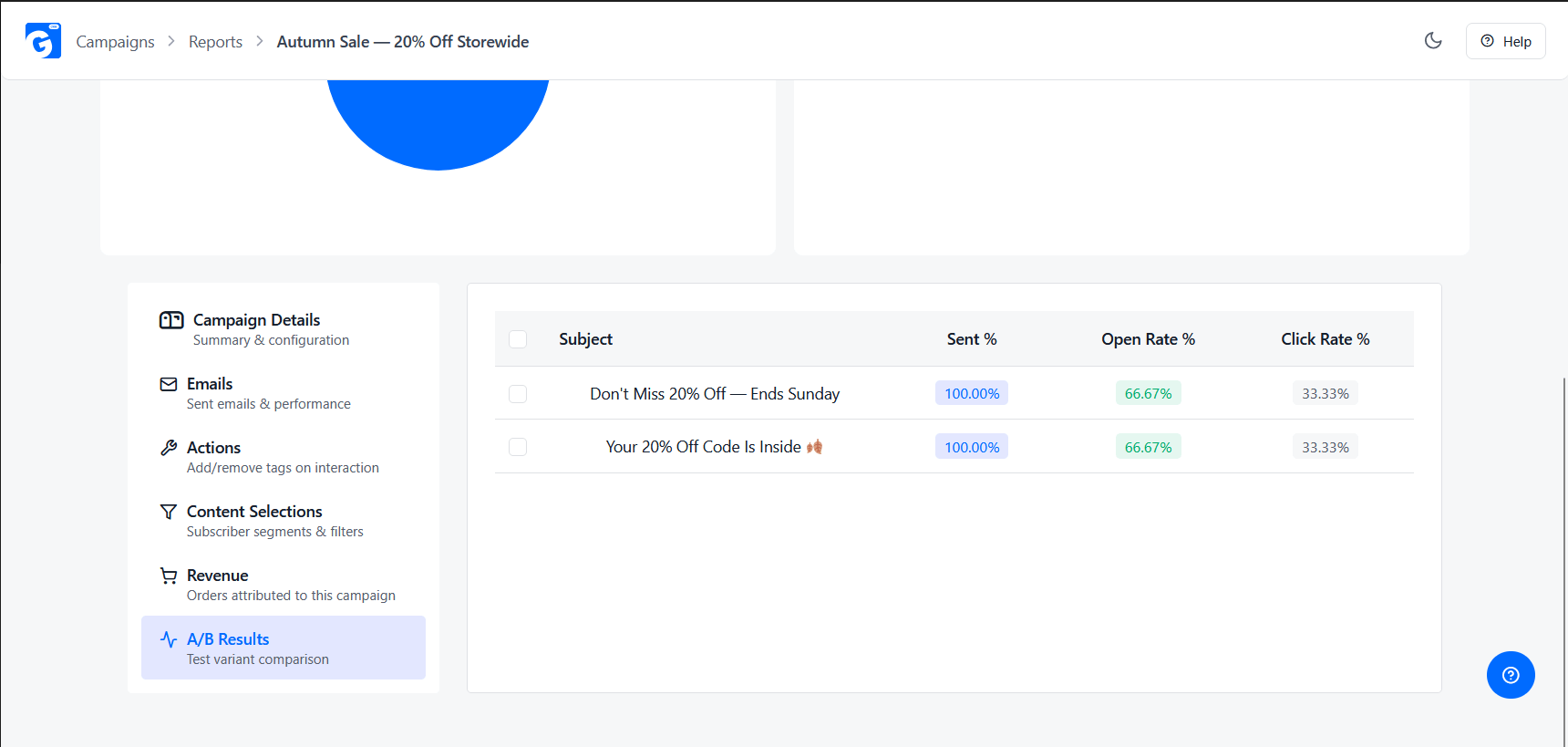
A campaign that can’t be measured is a campaign you’re guessing about. Delivery, open, and click data should be visible without leaving the CRM or exporting to a separate analytics tool.
This is free in GemCRM — click the report icon on any campaign in the Campaigns list to see its delivery numbers, opens, clicks, and link-level activity broken down on one page.
WooCommerce, so every segment, automation, and campaign in this guide works identically whichever one powers your checkout.
What Makes a WooCommerce CRM Flexible?
A WooCommerce store may start with a simple need—keeping customer information organized—but those needs can change as the business grows. A flexible CRM should be able to support different workflows without forcing every store to work in the same way.
Using these criteria, GemCRM is one option worth considering for WooCommerce stores. It combines customer management, purchase history, segmentation, campaigns, automation, and reporting within WordPress, while additional capabilities are available through its Pro features.
Rather than being the reason to choose a CRM by itself, these features provide a useful exampleWhat Makes a WooCommerce CRM Flexible?
of what flexibility can look like in practice.
How GemCRM Works with WooCommerce
Once you know what to look for in a flexible WooCommerce CRM, the next step is seeing how those ideas work in practice. GemCRM brings customer, order, marketing, and automation features together seamlessly—right inside your WordPress dashboard.
Note: Ensure WooCommerce is installed and active on the same WordPress site before getting started.
After follow Quick Activation Steps
Once enabled, GemCRM automatically captures and syncs all customer purchase history and WooCommerce store activity in real time.
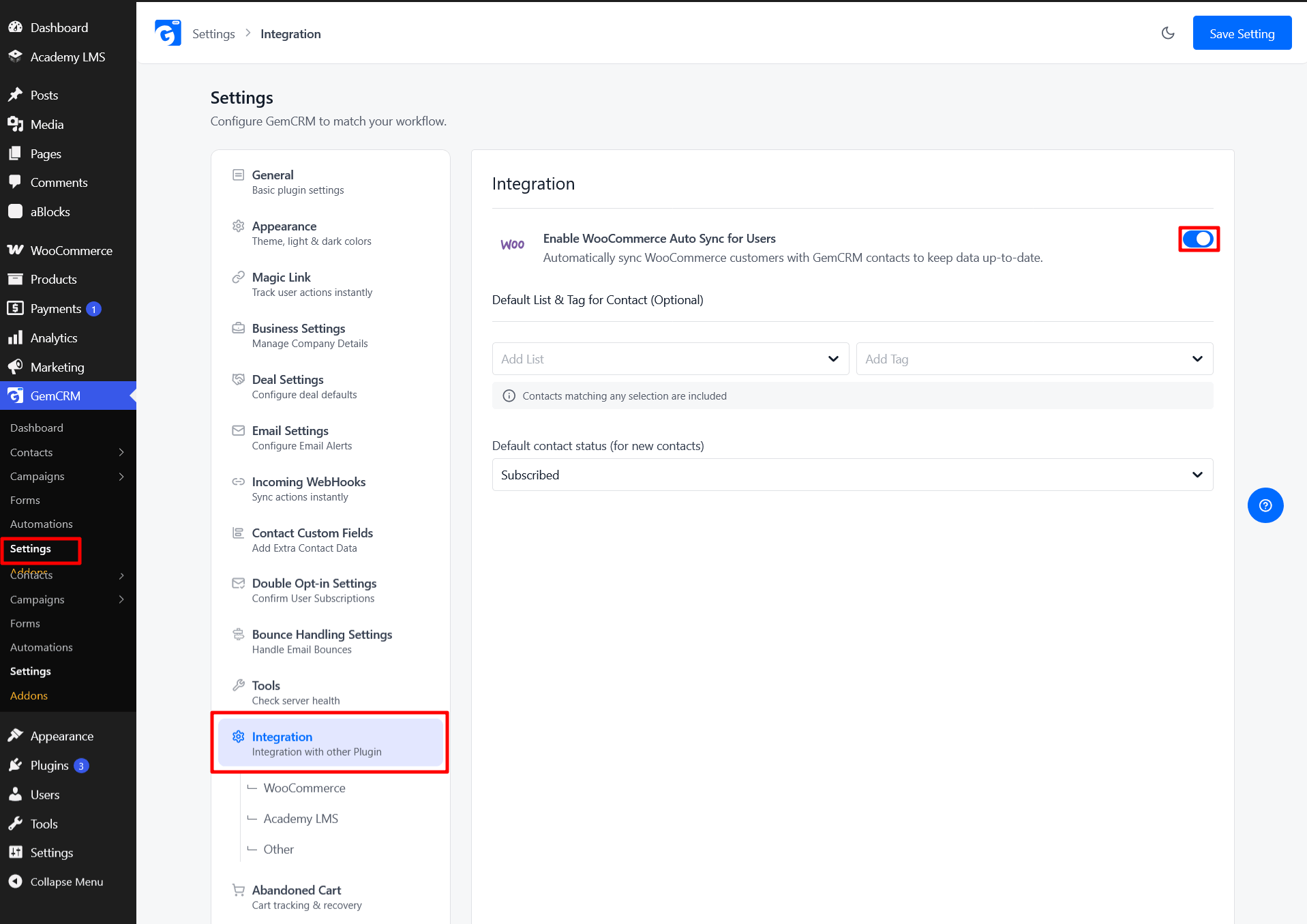
1. Sync WooCommerce Customers
GemCRM can sync WooCommerce customer information into its contact database. This gives you a central place to view customer details and purchase history instead of checking individual orders.
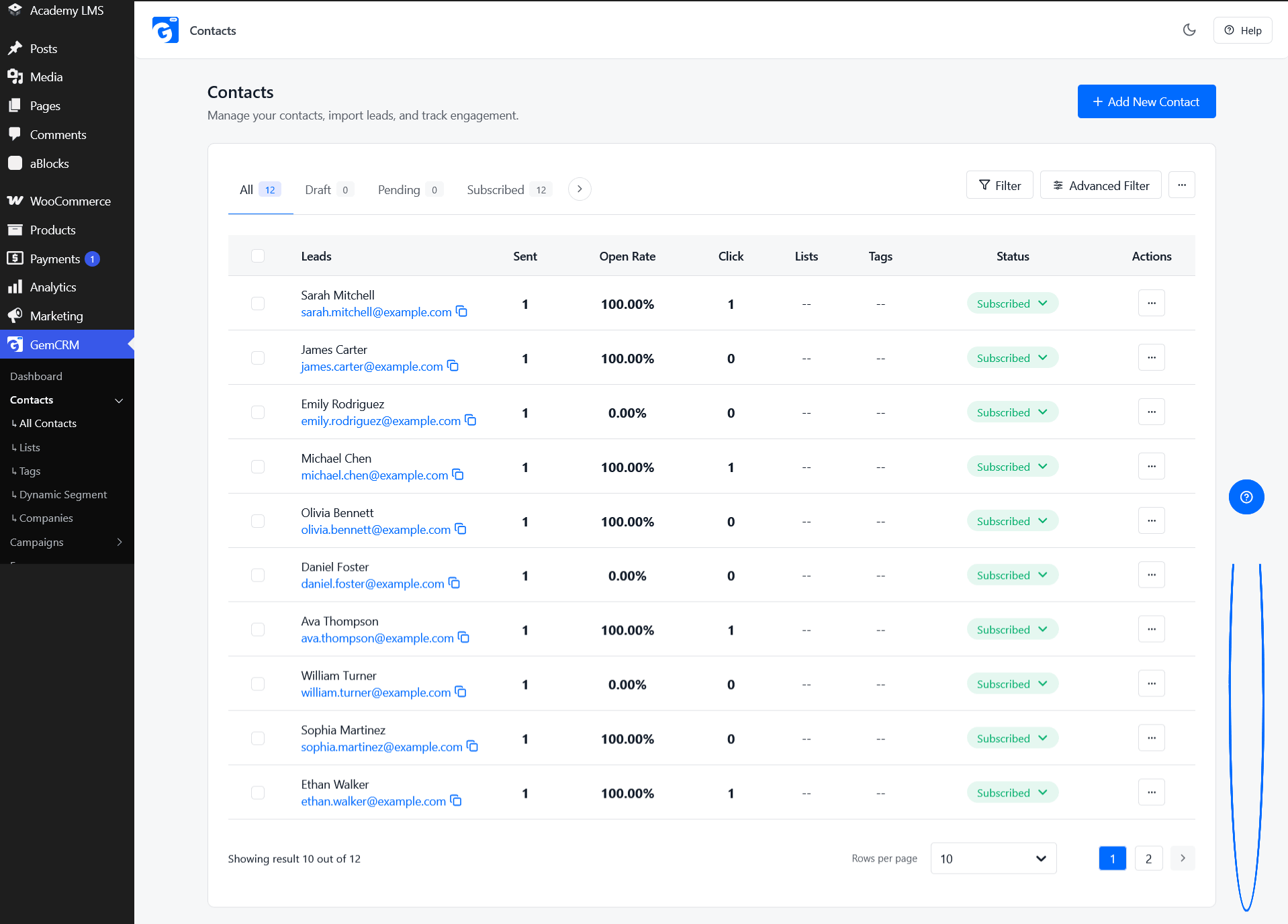
2. View Customer Purchase History
Each customer can have their WooCommerce order history attached to their contact record. You can see information such as orders, order status, order value, item count, and purchase dates.
This makes it easier to understand a customer’s relationship with your store.
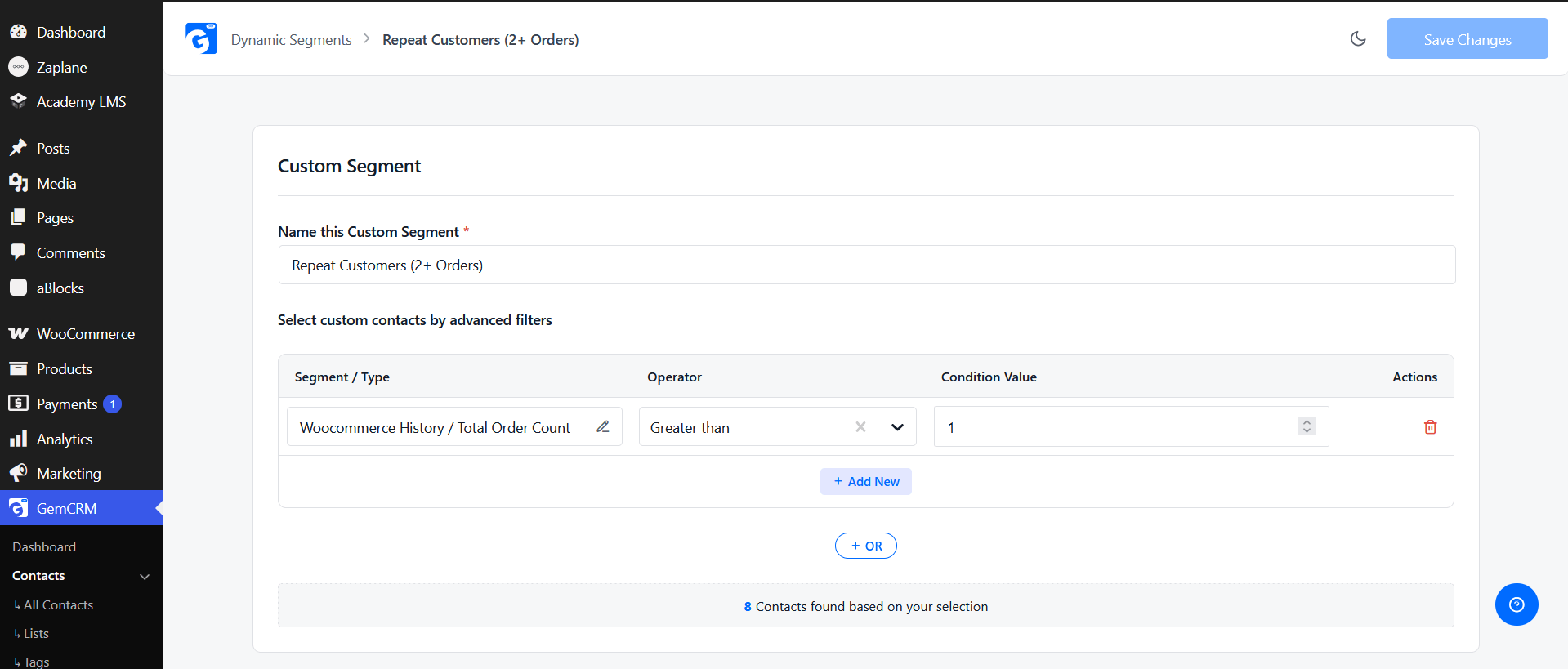
3. Create Customer Segments
You can create customer segments based on WooCommerce purchase data.
For example, you can build segments for:
This allows you to target different customer groups instead of sending the same campaign to everyone.
4. Automate Customer Follow-Ups
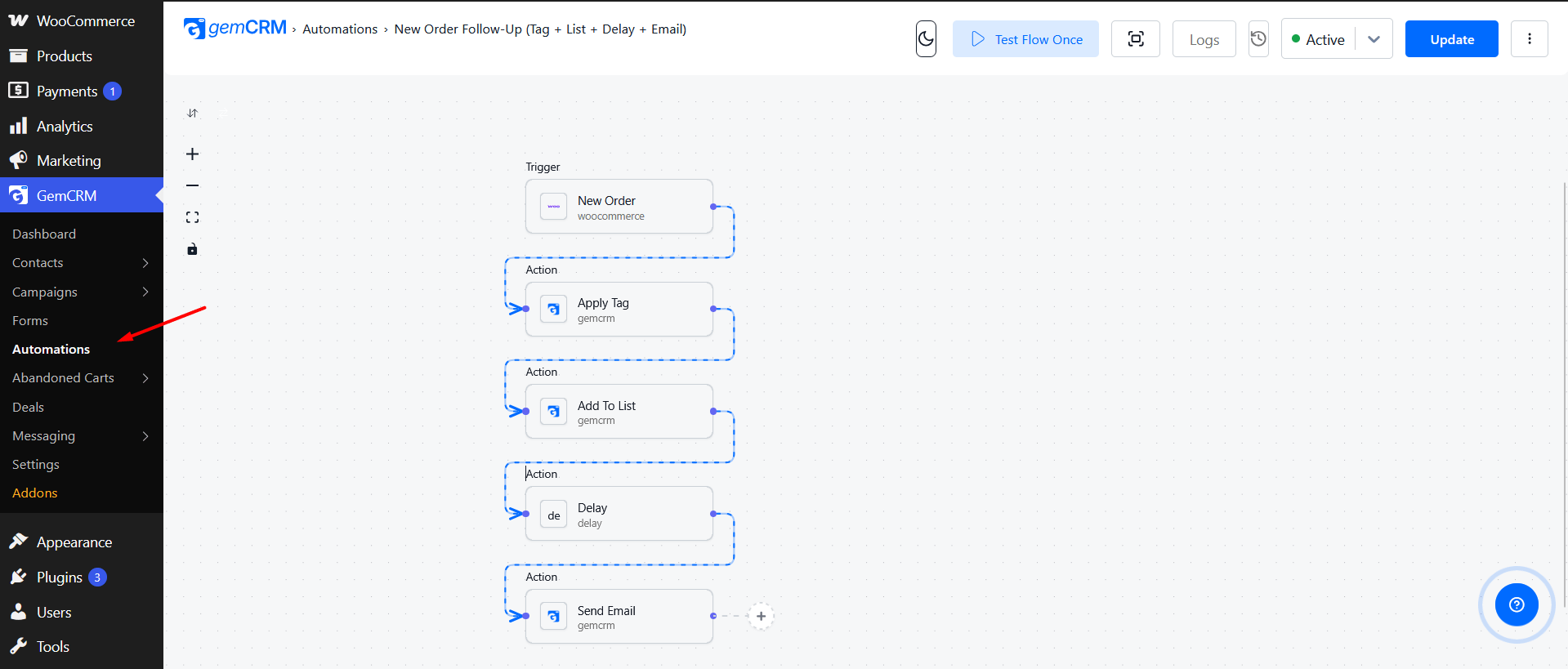
GemCRM works with Zaplane to connect WooCommerce events with follow-up actions.
For example:
New Order → Apply Tag → Add to List → Start Follow-Up
This can reduce repetitive manual work and help stores respond to customer activity automatically.
5. Run Email Campaigns
GemCRM includes an email campaign builder for creating and sending campaigns from WordPress. You can also use customer information and segments to make campaigns more relevant to different audiences.
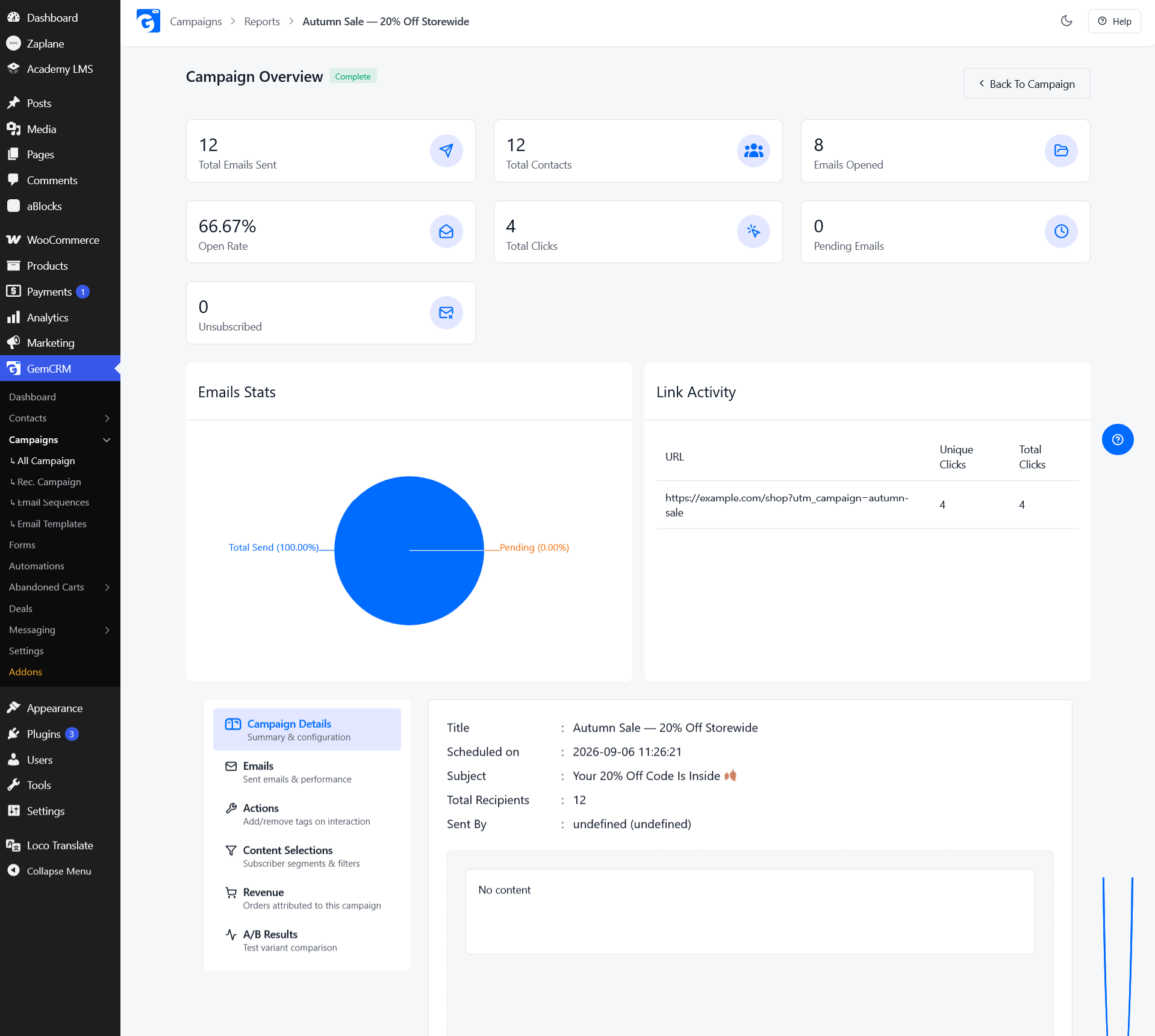
It also supports subject-line A/B testing and campaign reporting, allowing you to compare results instead of sending campaigns without measuring their performance.
6. Recover Abandoned Carts
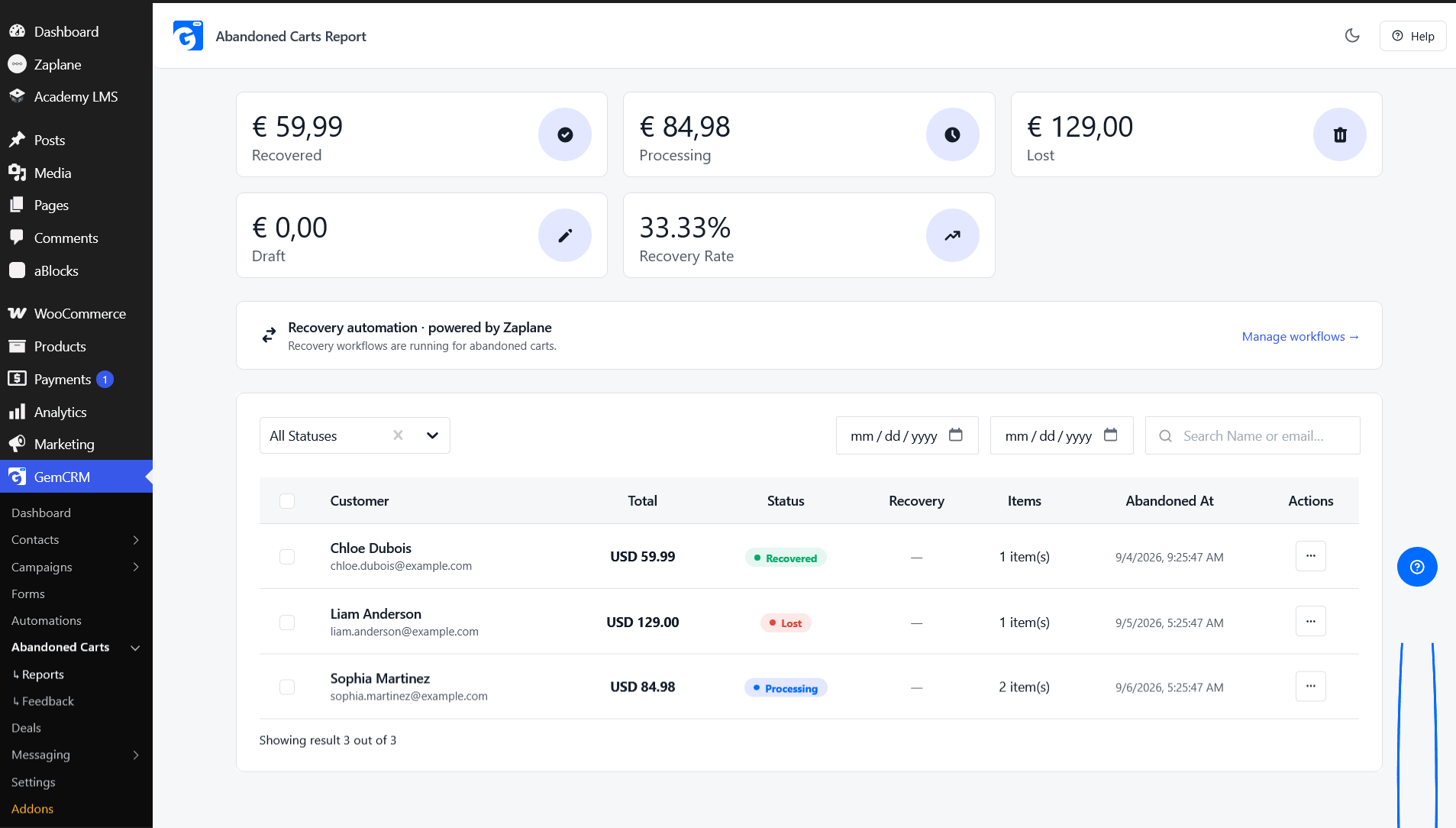
With GemCRM Pro’s Abandoned Cart addon, stores can capture eligible abandoned checkout information and use automated follow-ups to encourage customers to complete their purchase.
This can be useful for stores that regularly lose sales between checkout and order completion.
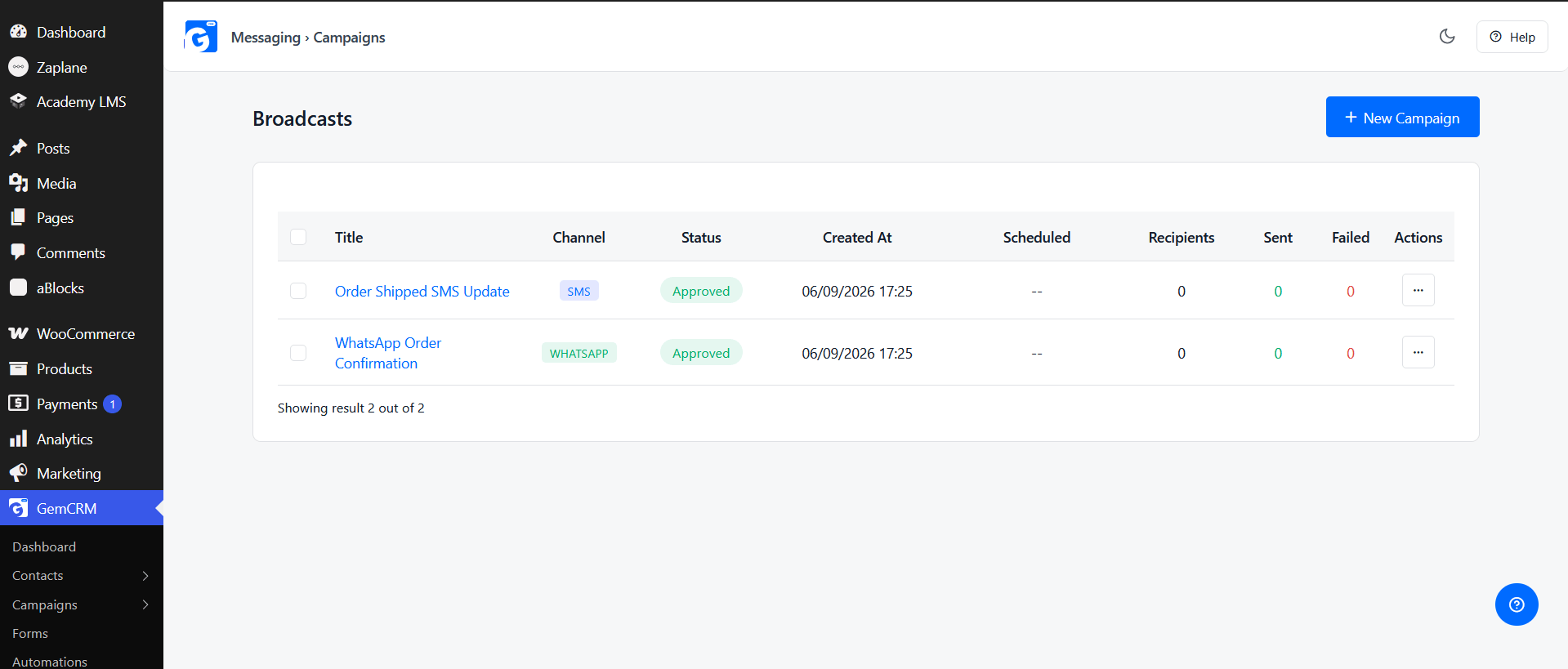
7. Use Multiple Communication Channels
For stores that need more than email, GemCRM Pro supports SMS and WhatsApp messaging through supported provider integrations.
This allows different types of customer communication to be managed alongside the customer’s existing CRM information.
8. Track Sales Opportunities
WooCommerce stores that handle wholesale orders, quotes, or other high-touch sales may need more than ecommerce order tracking.
GemCRM Pro includes a sales pipeline where deals can be organized into custom stages and connected to customer records.
9. Measure Campaign Results
A CRM is more useful when you can see what happened after a campaign was sent. GemCRM’s campaign reports provide information such as delivery, opens, clicks, and link activity.
This helps store owners understand which campaigns are getting engagement and which may need improvement.
Starting Simple
You don’t need to use every CRM feature at once. A practical starting point is to sync your WooCommerce customers, review purchase history, create one useful customer segment, and run a campaign based on that segment.
Once the workflow is working, you can add automation, abandoned-cart recovery, messaging, or other features as your store’s needs grow.
Conclusion
A WooCommerce store without a CRM isn’t missing a nice-to-have — it’s leaving the exact data needed to sell more effectively sitting unused in its own database. Every order already contains the information required to tell a VIP from a one-time browser and a lapsed customer from an active one; a CRM is simply what turns that raw data into a segment, a campaign, or an automated follow-up.
The features in this guide — contact and purchase history, segmentation, campaigns, automation, cart recovery, messaging, pipeline, forms, and reporting — aren’t extras stacked on top of WooCommerce. Together they’re what turns “we processed the order” into “we know exactly what to do next,” without adding a second dashboard, a manual export, or a separate subscription just to see data your store already has.
Start managing your WooCommerce customers with GemCRM, free — set up contact sync, purchase history, and your first campaign at no cost, then upgrade to GemCRM Pro when you’re ready for live segments, automation-driven cart recovery, and SMS/WhatsApp on the same contact record.
FAQ
What is a WooCommerce CRM?
Software that connects to your WooCommerce store’s customer and order data and turns it into something you can act on — segments, campaigns, and automations — instead of leaving it sitting in the Orders table.
Does WooCommerce have a built-in CRM?
No. WooCommerce handles orders and checkout well, but it has no native way to segment customers, run email/SMS campaigns, or track a sales pipeline. That requires a CRM layered on top.
Is GemCRM free?
Yes — contact management, purchase history, email campaigns with A/B testing, forms, automation via Zaplane, and campaign reporting are all part of free GemCRM. Dynamic Segments, SMS/WhatsApp, the sales pipeline, and abandoned cart recovery are GemCRM Pro.
Do I need a separate email marketing tool if I use a WooCommerce CRM?
No, if the CRM includes campaign sending — GemCRM does, so contacts, segments, and the campaigns sent to them all live in one system instead of two that need to stay in sync.
Will a CRM slow down my WooCommerce store?
GemCRM reads order data directly from WooCommerce’s own database tables rather than polling an external API, so it doesn’t add checkout-side overhead.
Does GemCRM work with StoreEngine, not just WooCommerce?
Yes — StoreEngine customer and order data syncs into GemCRM the same automatic way WooCommerce data does.
How is GemCRM different from FluentCRM or Groundhogg?
The short version: GemCRM includes a full, free automation builder (via Zaplane) rather than gating automation behind a paid tier, and its Pro upgrade is a flat per-site fee rather than a per-contact SaaS bill. See the full comparison for the complete breakdown.