



Every WooCommerce store loses customers quietly. Someone buys once, likes the product, and then never comes back — not because they were unhappy, but because life got busy and your store slipped off their radar.
A win-back email is a message sent specifically to bring that customer back. It’s different from a newsletter or a generic promotion because it’s triggered by inactivity, not by a calendar date.
Done well, win-back emails turn silent, forgotten customers into repeat buyers without spending a dollar on ads. This guide walks through how to plan, write, and automate a WooCommerce win-back email campaign — and where a CRM fits into that process.
What Are WooCommerce Win-Back Emails?
A win-back email is a message sent to a customer who used to buy from your store but has stopped. The goal is simple: get them to purchase again.
Who counts as “inactive”? There’s no universal rule. An inactive customer is someone who hasn’t ordered in longer than their typical buying gap — that gap looks different for a coffee subscription than for a furniture store.
Win-back vs. general re-engagement: The terms get used loosely, but there’s a useful distinction:
Simple WooCommerce example: A skincare store notices a customer who used to reorder every 45 days hasn’t ordered in 70 days. That gap triggers a win-back email reminding them their favorite product is still in stock.
Why Should WooCommerce Stores Use Win-Back Emails?
Win-back campaigns matter because they work with customers you already have, not strangers you have to convince from scratch.
None of this requires guessing. It requires a clear view of who bought, when, and how much — which is exactly what a WooCommerce CRM that keeps orders and contacts in one place is built to show you.
When Should You Send a WooCommerce Win-Back Email?
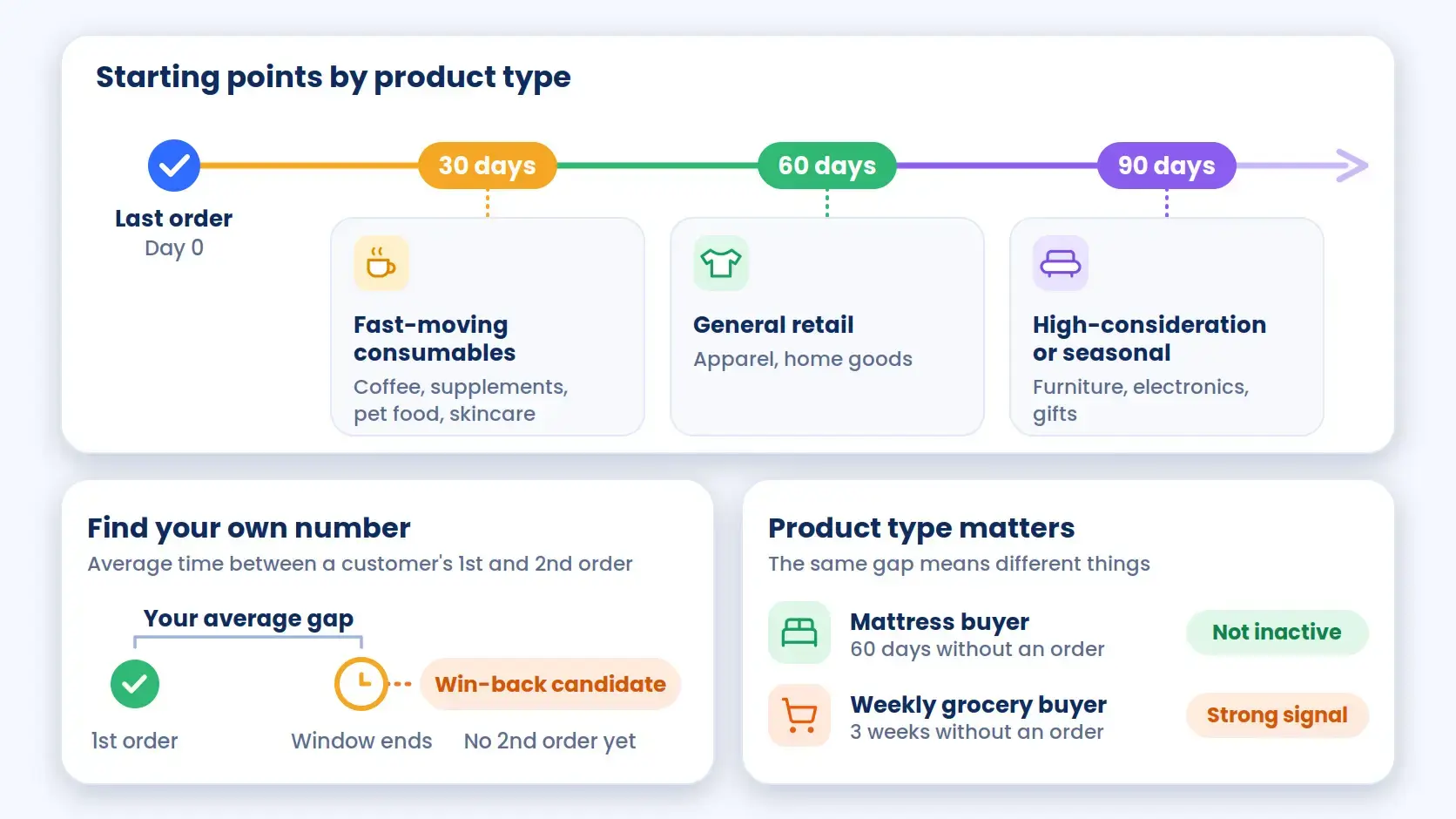
Timing depends entirely on how often your customers normally buy — there’s no single number that works for every store.
Common starting points:
To find your own number, look at the average time between a customer’s first and second order. Once a customer passes that window without buying again, they’re a reasonable win-back candidate.
Product type matters too. A customer who buys a mattress isn’t “inactive” at 60 days — they might not need another one for years. A customer who buys weekly groceries and stops for three weeks, on the other hand, is a strong signal.
How to Segment Customers for a Win-Back Campaign
Sending the same win-back email to every inactive customer wastes the opportunity. A first-time buyer who spent $20 has a different relationship with your store than a five-time buyer who spent $500. Segmentation lets you match the message to the customer.
Customers Who Have Not Purchased Recently
The base segment: anyone past your store’s typical repurchase window with no new order since. This is your starting pool before you narrow further.
High-Value Inactive Customers
Customers with high total order value or high order count deserve a stronger offer or more personal tone — they’ve already proven they’ll spend, and losing them costs more.
One-Time Buyers
Customers who bought exactly once are a different problem than lapsed repeat buyers. They may need reassurance or a reason to try again, not just a reminder.
Repeat Customers Who Became Inactive
These customers had a habit and broke it. Something likely changed — price, availability, or a competitor. Their win-back email can reference their past purchases directly.
Customers Based on Previous Product or Category
A customer who bought running shoes is a better fit for a new running-shoe arrival than a generic “we miss you” email. Segmenting by product or category purchased makes recommendations feel relevant instead of random.
Building segments like these manually in a spreadsheet doesn’t scale past a handful of customers. This is where picking the right WooCommerce customer segmentation approach makes the difference between a one-off email blast and a repeatable campaign.
5 WooCommerce Win-Back Email Ideas
|
# |
Email Type |
Best For |
Goal |
|
1 |
“We Miss You” |
First touch after a customer goes inactive |
Re-open the relationship, low pressure |
|
2 |
New Product / New Arrival |
Customers who might return for something new |
Give a real reason to look again |
|
3 |
Personalized Product Recommendation |
Customers with a clear purchase category |
Show relevance based on past behavior |
|
4 |
Exclusive Discount or Coupon |
After earlier emails get no response |
Create a concrete incentive to act |
|
5 |
Last-Chance Win-Back |
Final email in the sequence |
Close the loop before you stop contacting them |
1. “We Miss You” Email
When to use it: First touch after a customer crosses your inactivity threshold.
Purpose: Re-open the relationship without asking for anything yet.
Contents: A warm, short message acknowledging it’s been a while, with a link back to the store.
Example: “It’s been a while — your account is still here whenever you’re ready to shop again.”
2. New Product or New Arrival Email
When to use it: When there’s genuinely something new since the customer last shopped.
Purpose: Give them a real reason to look, not just a nudge.
Contents: New arrivals, restocks, or seasonal items relevant to what they bought before.
Example: “New arrivals just landed — including a few we think you’ll like.”
3. Personalized Product Recommendation
When to use it: For customers with clear purchase history in a specific category.
Purpose: Show relevance based on their own past behavior, not generic bestsellers.
Contents: Products similar to or complementary to what they previously bought.
Example: “Since you loved [Product], you might want to try [Related Product].”
4. Exclusive Discount or Coupon Email
When to use it: After one or two non-discounted attempts haven’t worked.
Purpose: Give a concrete incentive to act now rather than “someday.”
Contents: A time-limited coupon, framed as something earned, not a default tactic.
Example: “Here’s 15% off your next order — just for you, valid through Sunday.”
5. Last-Chance Win-Back Email
When to use it: The final email in the sequence before you stop contacting them.
Purpose: Create a clear closing point and filter out truly disengaged contacts.
Contents: A direct message that this is the last check-in, often paired with the best offer in the sequence.
Example: “This is the last time we’ll reach out about this — here’s one final offer.”
How to Create a WooCommerce Win-Back Email Sequence
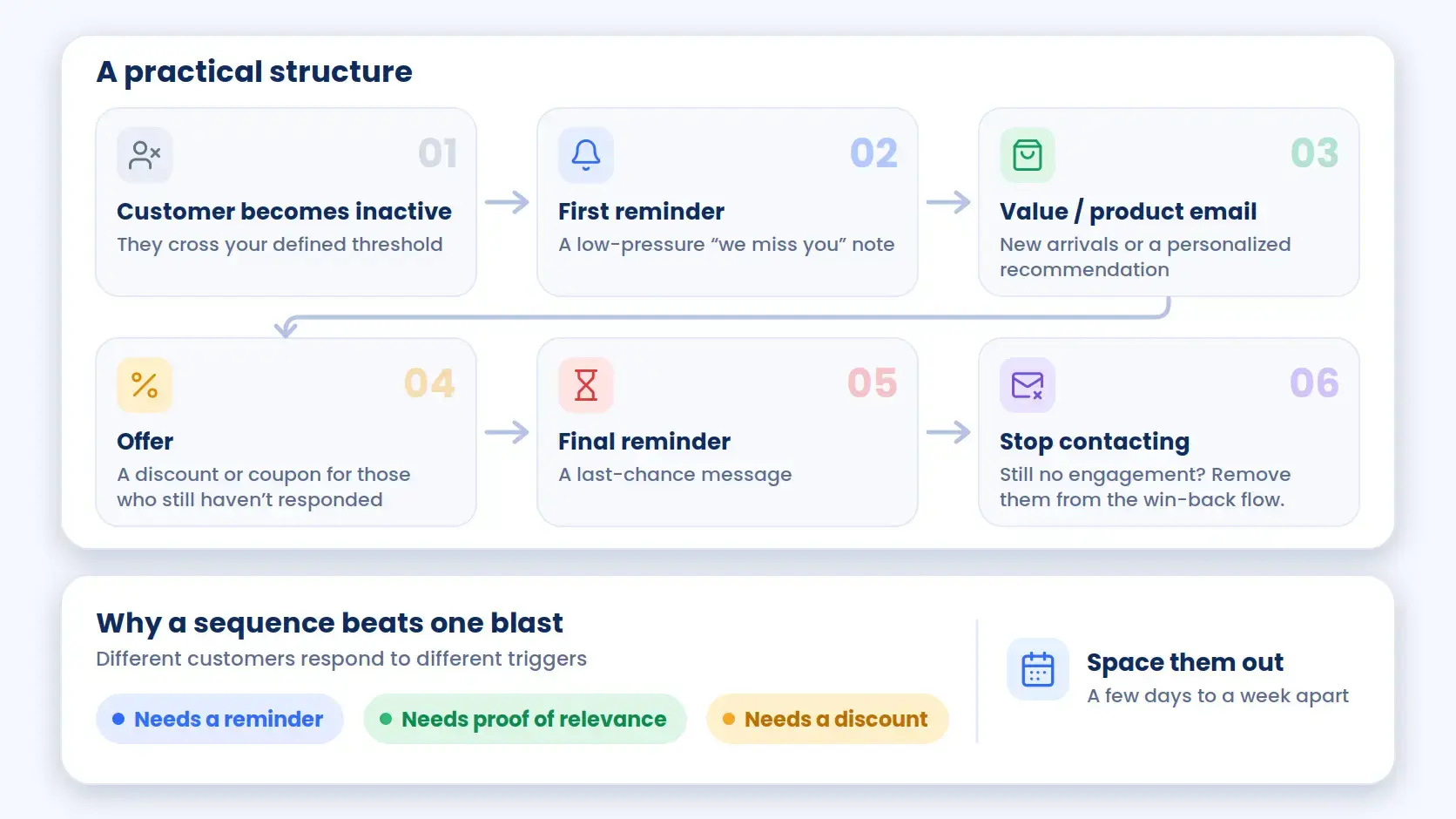
A single win-back email asks a customer to act on one impression. A sequence gives them several fair chances, each with a different angle.
A practical structure:
Multiple relevant emails outperform one generic blast because different customers respond to different triggers — some need a reminder, some need proof of relevance, some just need a discount. Spacing these out (a few days to a week apart) also avoids feeling like pressure.
How to Automate Win-Back Emails in WooCommerce
Running this manually for more than a handful of customers isn’t realistic. Here’s the practical setup process.
Step 1 — Track Customer Purchase Activity
Every order needs to be visible against the customer it belongs to — order date, order value, and products purchased, not just totals in WooCommerce’s own reports.
Step 2 — Identify Inactive Customers
Define your threshold (30, 60, or 90+ days without an order) and use it to pull the list of customers who’ve crossed it.
Step 3 — Create Customer Segments
Break that inactive list into the groups covered above — high-value, one-time, repeat-turned-inactive, and product/category-based. This is what lets you build a live, self-updating segment instead of re-running a manual export every week.
Step 4 — Define the Win-Back Trigger
Decide what starts the sequence — typically, a contact crossing the inactivity threshold or matching a segment’s conditions. Rule-based automation through Zaplane can apply a tag automatically when a contact matches, which is what kicks off the next step.
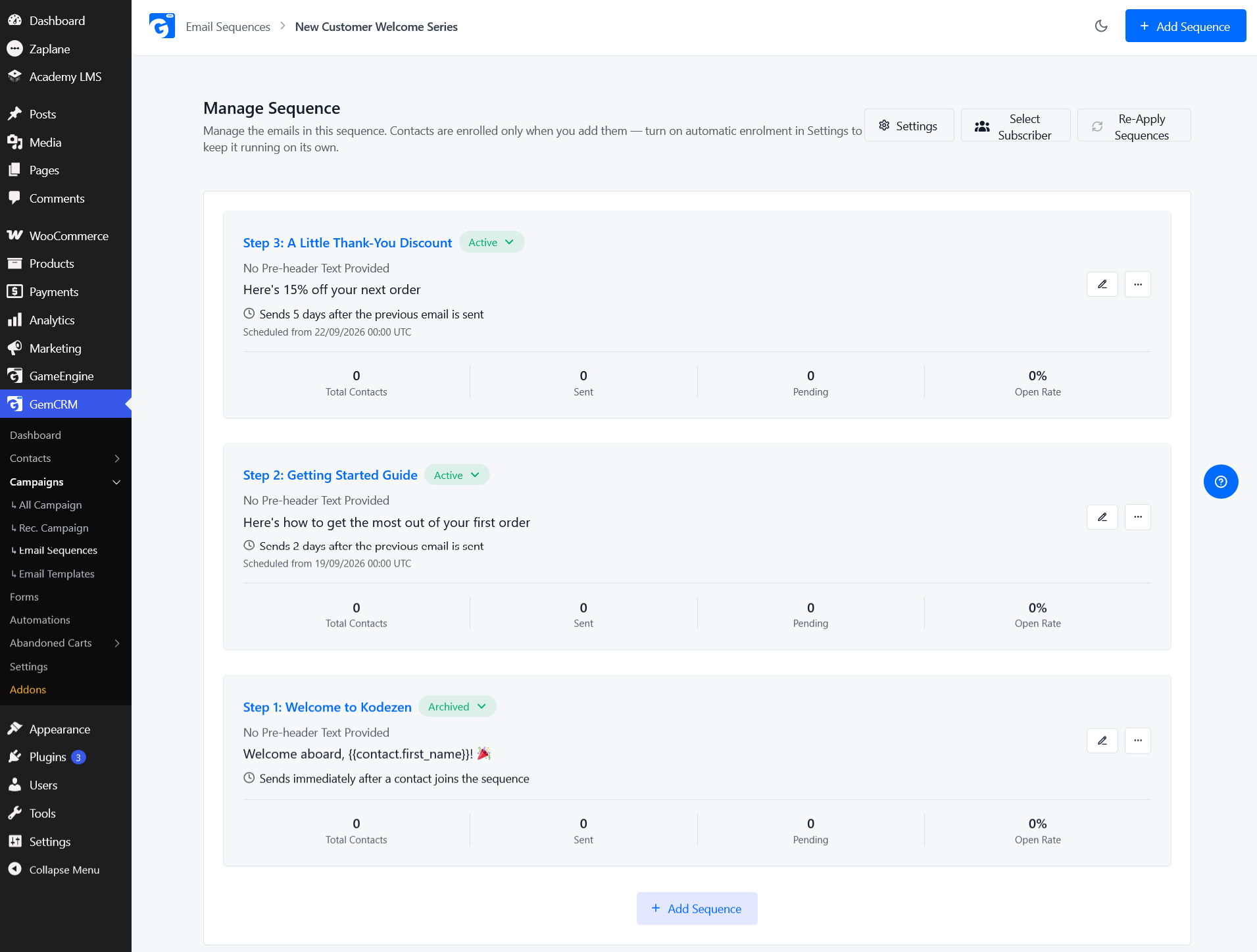
Step 5 — Create the Email Sequence
Build the ordered set of emails (reminder → value → offer → last chance) as an automated email sequence that fires based on that tag, with a delay between each step. For a campaign you want to keep running against newly-inactive customers on an ongoing basis, you can also schedule it as a recurring campaign.
Step 6 — Personalize the Emails
Pull in the customer’s name, their last purchased product or category, and — where relevant — their order history, so the email reads as specific rather than templated.
Step 7 — Track Results
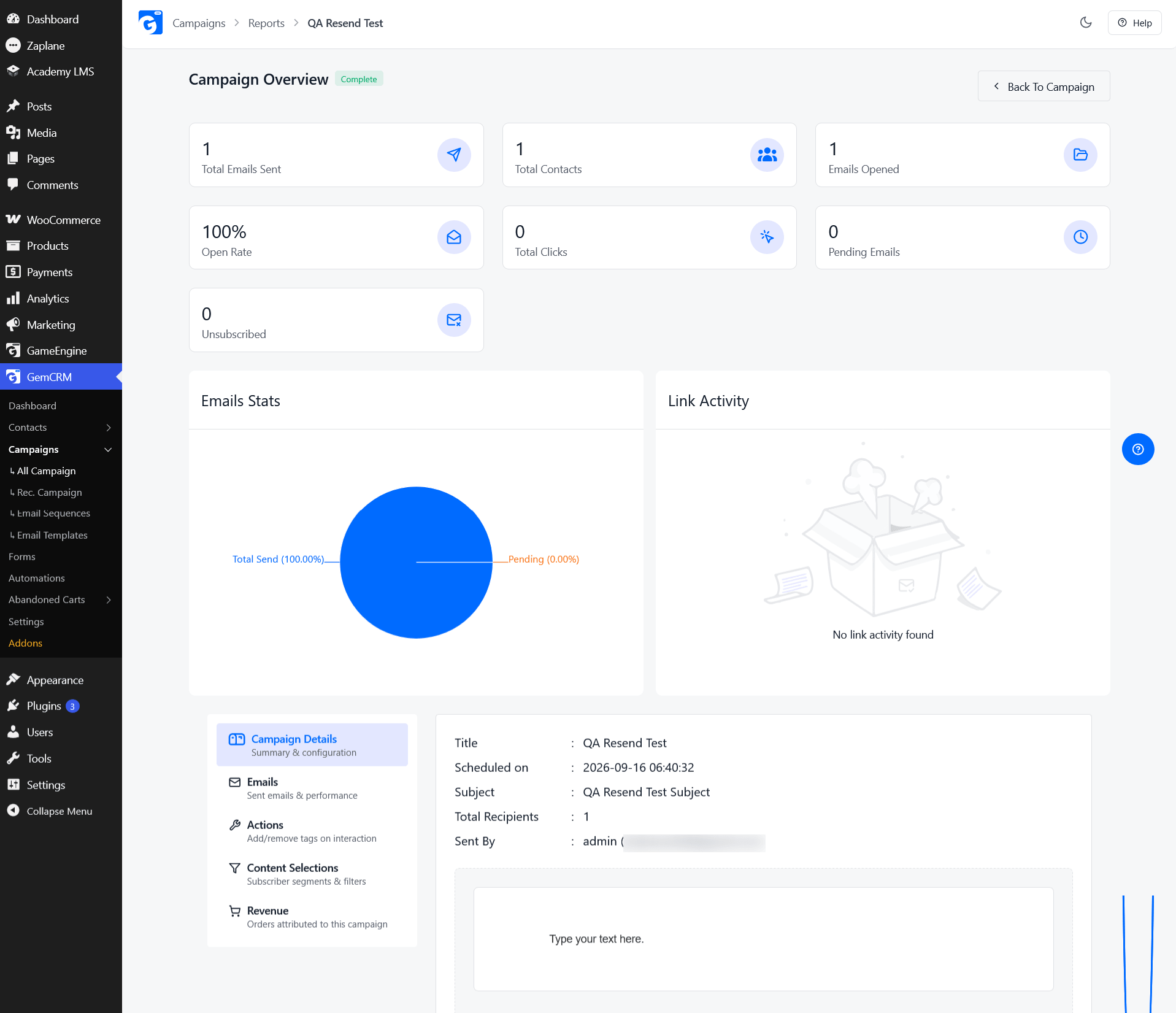
Once the sequence is live, campaign reports showing opens, clicks, and unsubscribes tell you which email in the sequence is actually doing the work — and which one to rewrite.
How a WooCommerce CRM Helps With Win-Back Emails
WooCommerce is built to process orders, not to manage ongoing customer relationships. A CRM fills that gap by giving you one place to see and act on customer behavior.
Specifically, a CRM helps with:
Without this, a win-back campaign means manually exporting WooCommerce order data, guessing at segments, and sending from a disconnected email tool — a process that breaks down as your customer list grows.
How to Run a Win-Back Campaign With GemCRM
GemCRM connects to your WooCommerce store and syncs customer and order data to each contact’s record, so you’re not working from a separate spreadsheet.
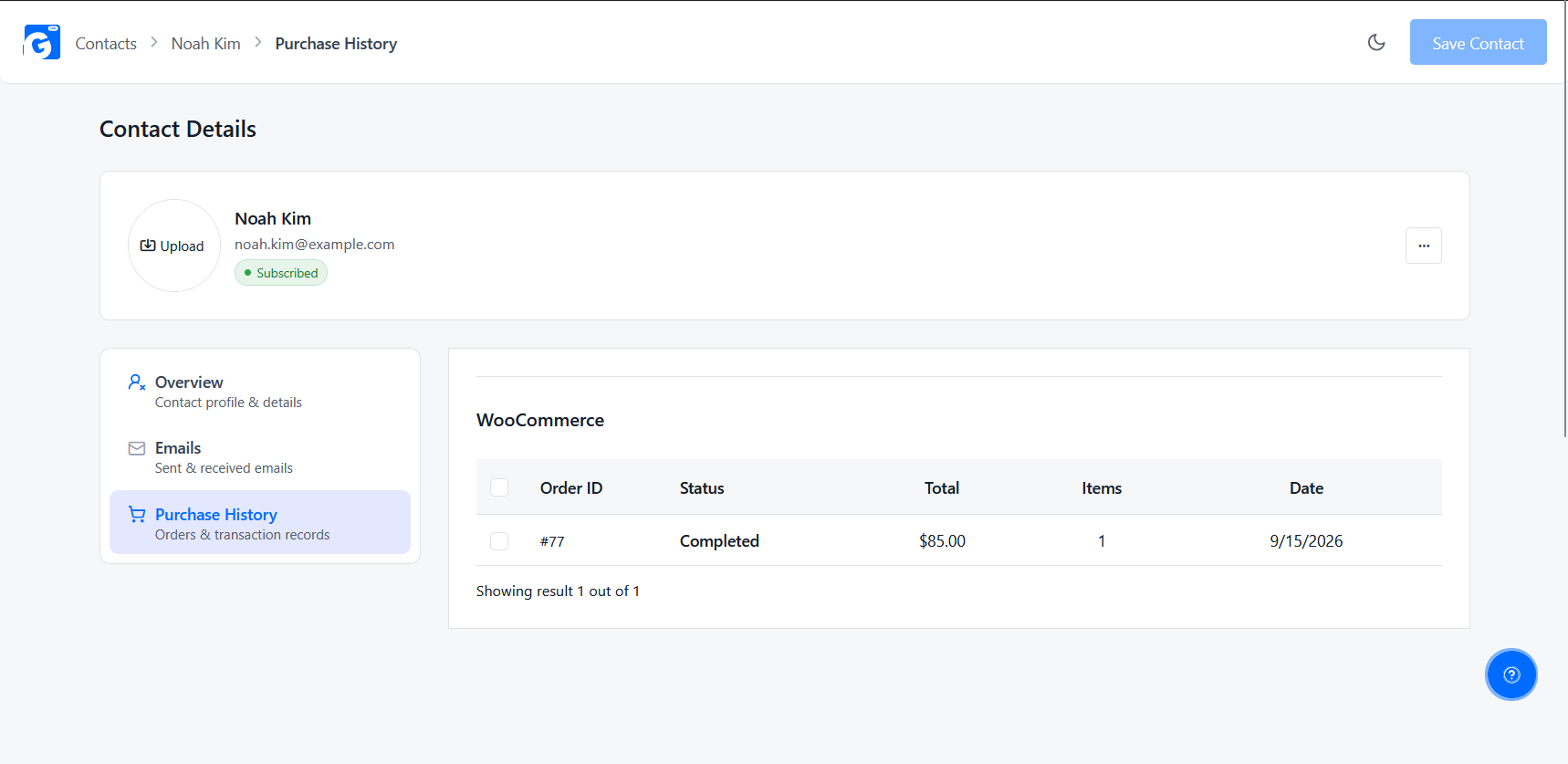
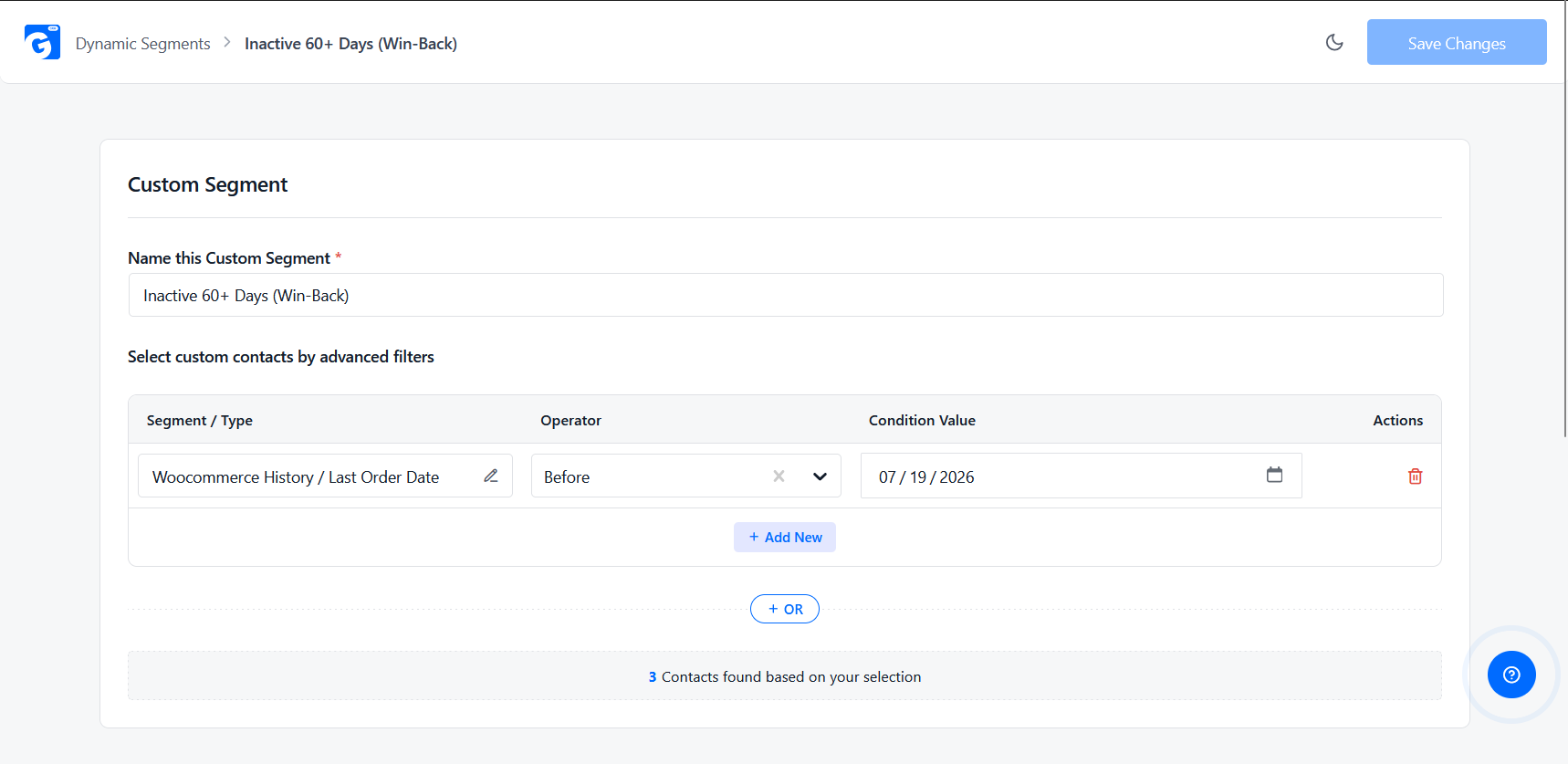
The point isn’t that GemCRM is required to run a win-back campaign — you can do this with a spreadsheet and enough patience. It’s that keeping order data, segments, and email automation in one system removes most of the manual work that makes win-back campaigns easy to start and hard to keep running.
Conclusion
Win-back emails aren’t about chasing every customer who’s gone quiet. They’re about noticing when someone who already trusted your store falls outside their normal buying pattern, and giving them one more relevant reason to return.
The stores that get this right don’t send one generic blast. They segment inactive customers by value, purchase history, and product interest, then let a short sequence — reminder, value, offer, last chance — do the work over a couple of weeks.
None of this requires guesswork once your WooCommerce order data is visible in one place. Whether you build that with a spreadsheet or a connected CRM, the goal is the same: catch customers before they’re gone for good, without leaning on discounts as the first move every time.
Start with one segment — customers inactive 60 days or more is a reasonable place to begin — and build from there.
FAQ
What is a win-back email in WooCommerce?
It’s an email sent to a customer who previously purchased from your store but hasn’t ordered again in longer than their typical buying gap, with the goal of getting them to purchase again.
When should you send a WooCommerce win-back email?
It depends on your product’s natural repurchase cycle — commonly somewhere between 30 and 90 days of inactivity, based on how often that specific customer segment normally buys.
How many win-back emails should you send?
Most sequences use 3 to 5 emails spaced several days to a week apart, ending with a clear final message rather than continuing indefinitely.
What should a win-back email include?
A clear reason to return — a reminder, new products, a personalized recommendation, or an offer — along with an easy way to get back to the store.
Should you offer a discount in a win-back email?
Not necessarily in the first message. Many sequences start with a reminder or product update, saving the discount for later emails if the customer hasn’t responded.
How do you automate win-back emails in WooCommerce?
By tracking purchase activity, identifying inactive customers, segmenting them, and setting up an automated sequence triggered by inactivity — either through a dedicated plugin or a WooCommerce-connected CRM.
Can a WooCommerce CRM automate win-back campaigns?
Yes. A CRM that syncs WooCommerce order data can identify inactive customers, group them into segments, and run the email sequence automatically, without manual list exports.