



A B2C customer is usually one person with one email address and one order. A B2B customer rarely looks like that.
One wholesale account might have a buyer who places the orders, a manager who approves them, and an accountant who wants the invoices. The relationship might start with a sample request, turn into a quote conversation over several weeks, and then become a reorder every month. Some of those customers are worth ten times more than others, and nothing in a plain customer list tells you which.
When that information lives in a spreadsheet, an inbox, and a store’s order screen, follow-ups get missed and nobody has the full picture of an account. This is the problem a CRM for B2B is built to solve: one place to see companies, the people inside them, what they’ve bought, and what happens next.
It matters even more if you sell online. A store that takes wholesale or business orders through WooCommerce has real sales and purchase data, but that data is usually disconnected from the follow-up work. This guide explains what a B2B CRM is, which features matter, how it works for B2B ecommerce, and how to choose one without overpaying.
What Is a B2B CRM?
A B2B CRM (customer relationship management system) is software that stores and organizes everything about your business customers and prospects: who they are, who works there, what they’ve bought, what you’ve discussed, and what should happen next.
The key difference from a simple contact list is the structure. A B2B CRM is built around the account, not just the individual:
Company → Multiple contacts → Deals or orders → Communications → Customer history
Here is what each layer holds:
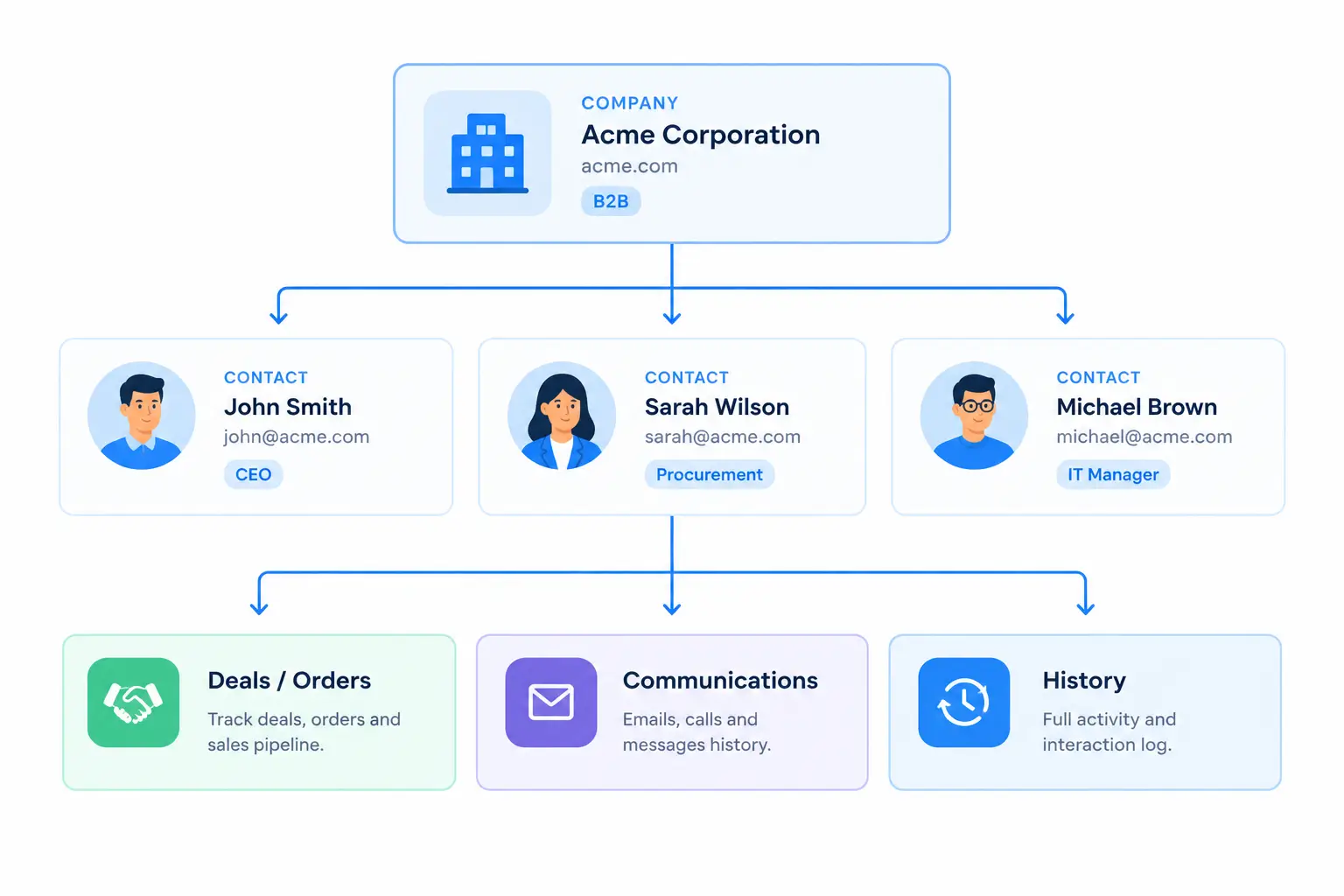
With a consumer, you manage a person. With a business customer, you manage a relationship that involves several people and a longer timeline. That’s the gap a B2B CRM fills.
How Is a B2B CRM Different From a B2C CRM?
|
B2B CRM |
B2C CRM |
|
Company/account focused |
Individual customer focused |
|
Multiple contacts per account |
Usually one customer profile |
|
Longer sales cycles |
Often shorter purchase cycles |
|
Multiple decision-makers |
Usually fewer stakeholders |
|
Deal and pipeline management |
Transaction and customer activity focused |
|
Relationship-focused |
Higher-volume customer management |
These are tendencies, not laws. A B2B business selling low-cost consumables to small shops may have a short sales cycle, and a B2C business selling high-ticket items may have a long one. What matters is which pattern is closer to yours.
Why the differences matter in practice:
Why Do B2B Businesses Need a CRM?
Centralize Customer Information
Without a CRM, customer information is typically spread across spreadsheets, email threads, your order system, sales notes, and a support tool. Each holds a piece, and nobody holds all of it. A CRM gives every team member the same record to work from.
Manage Leads and Opportunities
Not every inquiry becomes a customer. A CRM lets you capture leads from forms and other sources, mark which ones are qualified, and track them until they convert or drop off. You stop relying on memory to know who asked for wholesale pricing last month.
Track Customer Interactions
Emails, calls, notes, meetings, and purchases all become part of one timeline. When a buyer calls, whoever picks up can see the recent history first.
Manage Follow-Ups
In B2B, deals are often lost to silence rather than rejection: a quote is sent, then nobody follows up. A CRM makes follow-ups a task with an owner and a date instead of a good intention.
Improve Sales Visibility
A pipeline view shows which deals are at which stage and how much is in play. It helps you spot stalled deals and decide where to spend time.
Automate Repetitive Work
Welcome emails, reorder reminders, internal notifications, and task creation are predictable. A CRM with automation handles them, so your team spends time on conversations that need a person.
Understand Customer Relationships
When you can see what an account buys, how often, and when it last ordered, you can make future outreach specific rather than generic.
Key Features to Look for in a B2B CRM
Account and Contact Management
This is the foundation. Look for:
Some CRMs also let you assign roles to contacts (buyer, approver, finance). It’s useful if your sales involve committees, but check whether a tool actually offers it before you count on it.
Lead Management
Sales Pipeline and Deal Management
Customer Segmentation
Segmentation means grouping customers by shared traits so you can treat groups differently. Useful B2B dimensions include:
Communication and Interaction Tracking
Look for a shared record of emails and interactions, not just a “notes” field. The goal is that a teammate can see what was said without asking you.
Workflow and Marketing Automation
Automation should be able to trigger follow-up emails, run customer journeys, notify your team, and create tasks. The important question is what triggers it can react to: form submissions and orders are common, but the more events it can see, the more useful it is.
Reporting and Analytics
Useful reports cover pipeline performance, sales activity, customer value, campaign performance, and conversion. Reports you’ll never open are not a feature; check that the numbers a decision-maker actually needs are easy to reach.
Integrations
A B2B CRM rarely works alone. Check how it connects to your ecommerce platform, email marketing, accounting, support tools, and payment or order systems. A CRM that can’t see your orders forces you back to copy-pasting.
How CRM Helps B2B Ecommerce Businesses
A B2B ecommerce business has two kinds of data that usually live apart:
The most useful setups combine them. Here’s what that looks like.
Manage Wholesale Customers
Wholesale buyers behave differently from retail shoppers: larger orders, repeat purchases, sometimes negotiated terms. In a CRM you can group these customers under their company, keep notes on the relationship, and see who owns the account on your team.
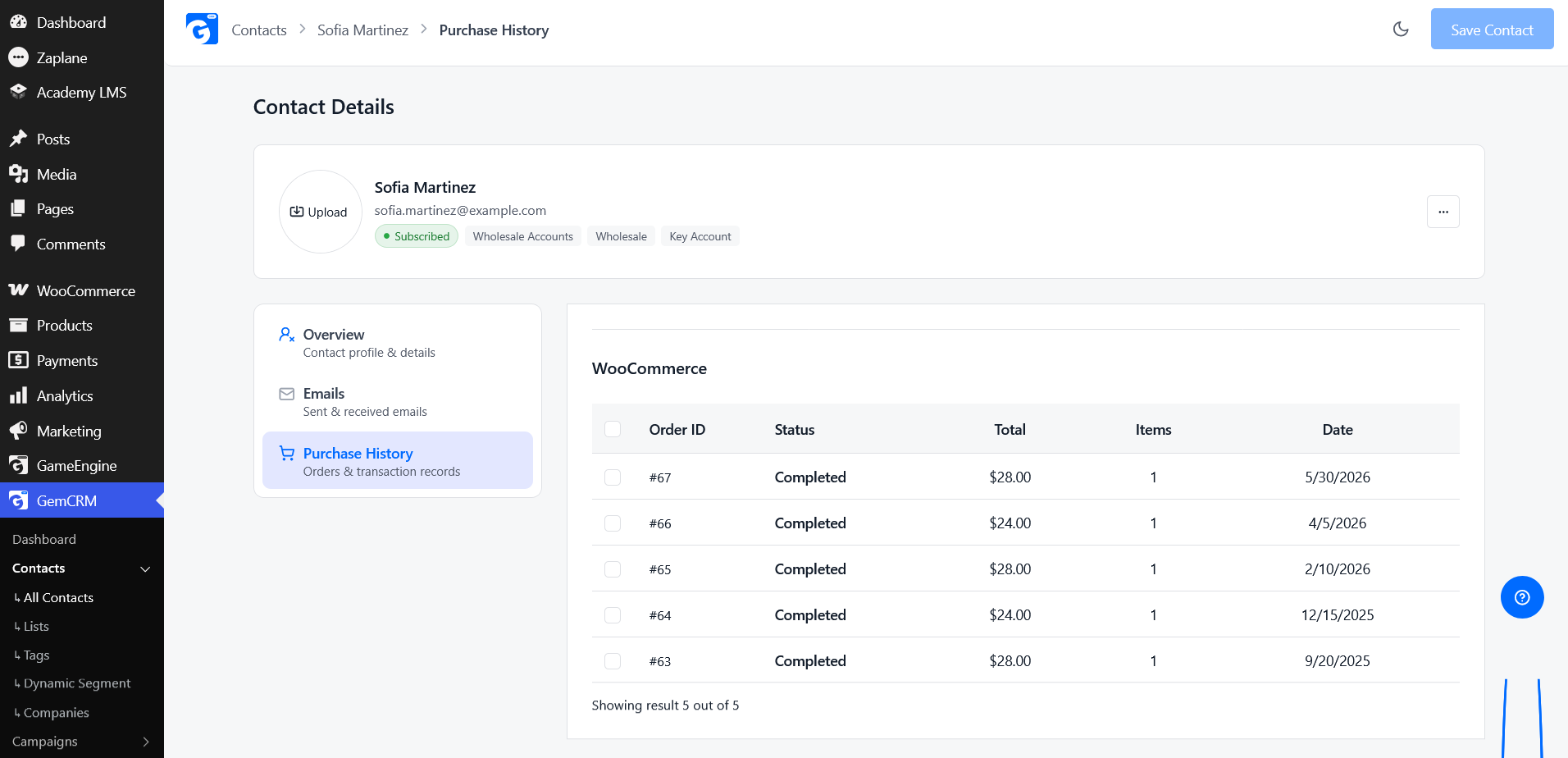
Track Customer Purchase History
Being able to open a customer record and see every order, its total, and when it was placed means you never quote or follow up blind. You can see whether an account is growing, flat, or drifting away.
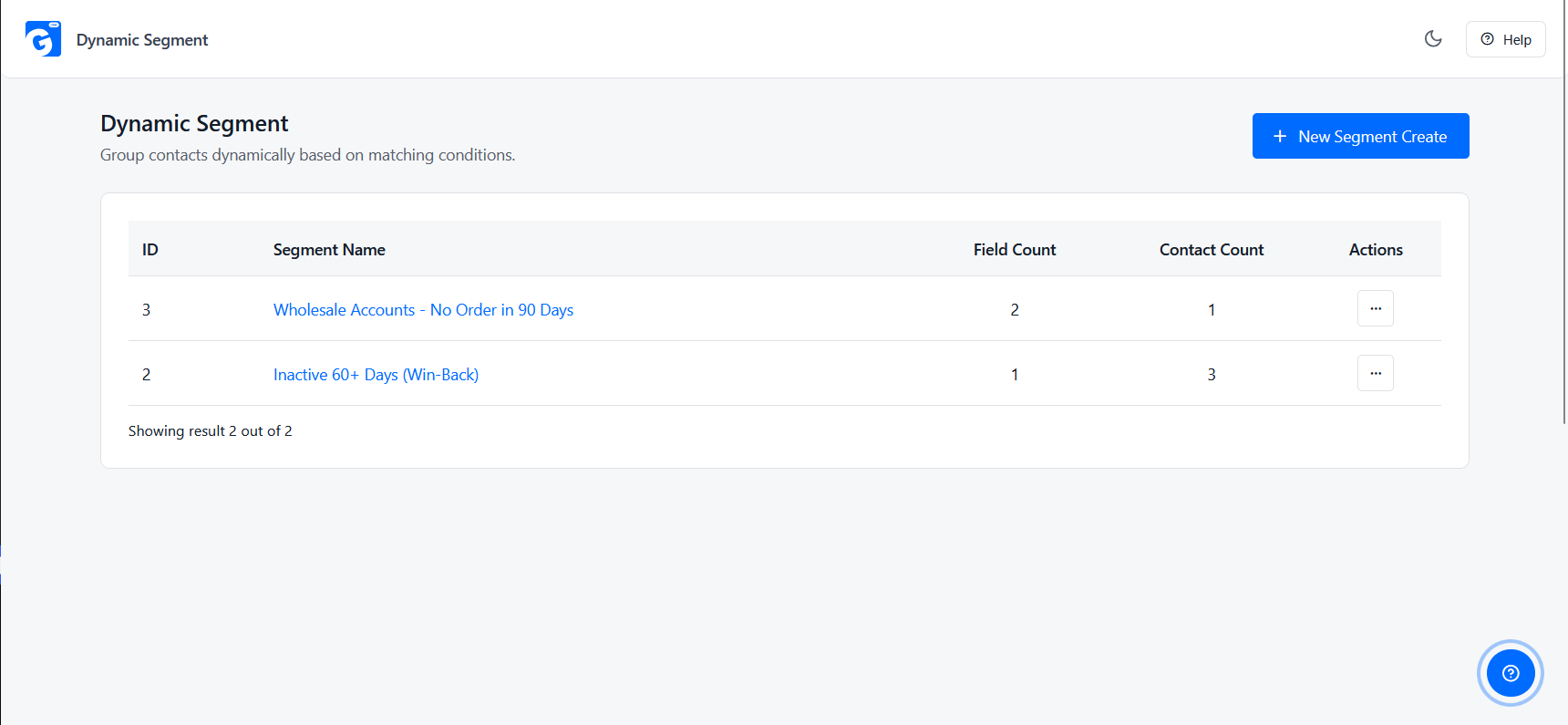
Segment B2B Customers
Segments turn purchase data into action. Common ones for B2B stores:
Personalize Customer Communication
Once you know what a customer bought, you can write to them about it. A restaurant supplier who ordered coffee beans doesn’t need an email about tea. A message that references real orders reads as attention, not marketing.
Automate Follow-Ups
Good candidates for automation:
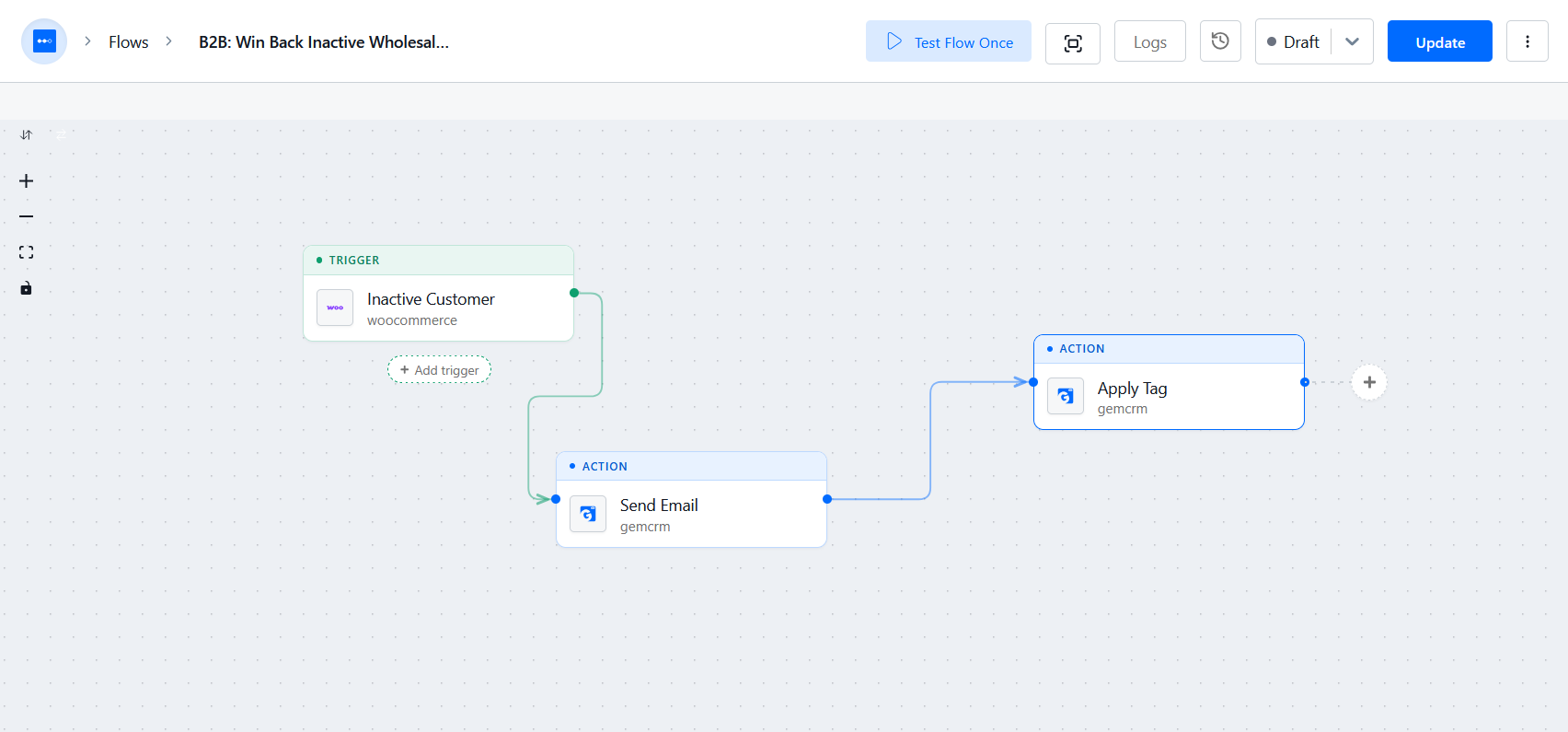
Identify High-Value Customers
Order value and frequency tell you which accounts deserve a phone call and which are fine with an email. It’s a simple way to decide where your limited time goes.
B2B CRM vs WooCommerce CRM
The two terms overlap, and the difference is mostly about starting point.
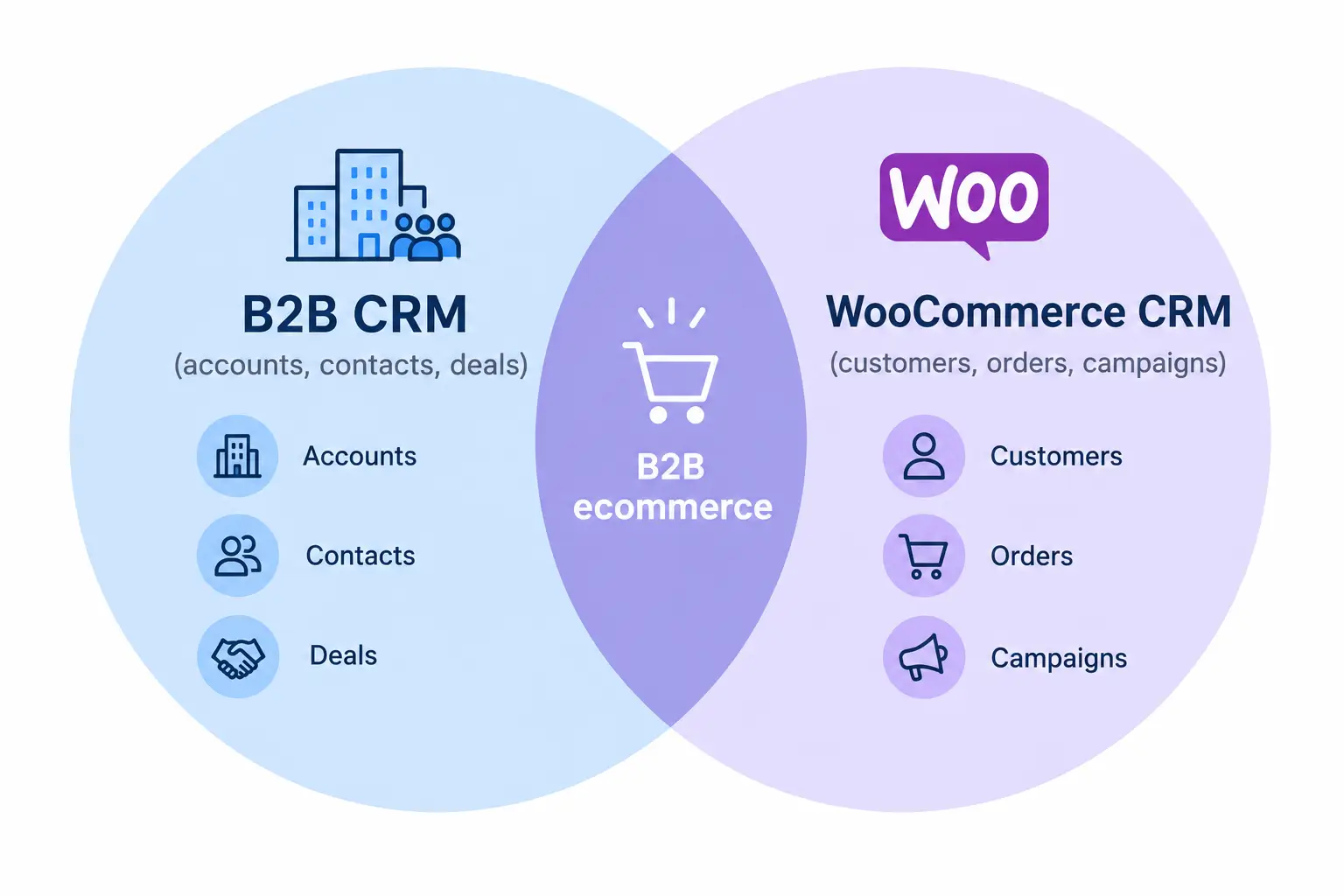
A B2B CRM starts from managing business relationships: accounts, contacts, leads, deals, and sales activities. A WooCommerce CRM starts from ecommerce data: customers, their orders, and the campaigns you send based on that behavior.
|
B2B CRM |
WooCommerce CRM |
|
Accounts and contacts |
Customers and orders |
|
Leads |
Customer acquisition |
|
Deals |
Purchases and orders |
|
Sales pipeline |
Customer purchase journey |
|
Sales activities |
Ecommerce activities |
|
Relationship history |
Customer and order history |
|
Sales automation |
Customer and email automation |
They aren’t separate products by necessity. A WooCommerce store that sells to businesses often needs both sets of capabilities: the account and pipeline side to manage relationships, and the order side to know what customers actually buy. The best fit is a CRM that covers both without forcing you to stitch tools together.
Best B2B CRMs for WooCommerce
If you run a WooCommerce store that serves wholesale customers, distributors, or other businesses, the right CRM should do more than manage contacts. It should help you connect customer relationships with orders, purchase history, segmentation, sales follow-ups, and marketing automation.
Here are some CRM options worth considering for B2B WooCommerce businesses:
|
CRM |
Best For |
WooCommerce/B2B Focus |
Key Strength |
|
HubSpot CRM |
Growing B2B teams |
WooCommerce through integrations |
Sales pipeline, marketing, reporting |
|
GemCRM |
WordPress & WooCommerce businesses |
Strong WooCommerce focus |
Customer/order data, segmentation, CRM inside WordPress |
|
Zoho CRM |
Businesses needing broader CRM capabilities |
WooCommerce through integrations |
Sales automation and customization |
|
FluentCRM |
Email-focused WooCommerce businesses |
Strong WordPress/WooCommerce integration |
Email automation and customer segmentation |
|
Jetpack CRM |
Small businesses and freelancers |
WordPress-focused |
Customer management, quotes, invoices |
|
Groundhogg |
Advanced WordPress automation |
WooCommerce integration |
Funnels, email automation, tagging, segmentation |
What to Consider When Comparing B2B CRMs
The best choice depends on how your B2B business operates. Consider:
For WooCommerce businesses, the key difference is often how closely the CRM works with ecommerce customer and order data. A general-purpose B2B CRM may offer extensive sales features, while a WordPress-focused CRM may provide a more direct connection to WooCommerce data.
How to Choose the Right CRM for Your B2B Business
Understand Your Sales Process
If most of your revenue is reorders through your store, order data and follow-up automation may matter more than a complex pipeline.
Consider Your Customer Structure
If the answer to the first two is yes, insist on company records with linked contacts.
Check Ecommerce Integration
If you run a WooCommerce store, confirm the CRM can see your customers and orders. Ask specifically: are orders matched to contacts automatically, and can you build segments from order data? See WooCommerce customer management for what that involves.
Look at Automation Capabilities
Check for email automation, follow-up tasks, segmentation, and workflows. Then check what events can trigger them.
Evaluate Reporting
Ask to see the reports you’d actually use: pipeline, sales activity, customer value, campaign results.
Check Integrations
List the tools you already use, such as email, accounting, support, and payments, and check each against the CRM’s integration list. If a tool is missing, ask whether an automation platform or API can bridge it.
Consider Ease of Use and Scalability
If your team won’t use it, it doesn’t matter what it can do. Try it with a real account before committing. Also check what happens when your contact list, team, or order volume grows, including how pricing changes.
Compare Pricing With Actual Requirements
The most expensive CRM is not automatically the best. Write down the features you need now and the ones you’ll likely need in a year, then compare. Pay attention to pricing models: some charge per user, some per contact, some by feature tier. Paying for enterprise features you’ll never touch is the most common mistake.
Do Small B2B Businesses Need a CRM?
Not always, and not immediately.
A spreadsheet can be enough when you have a handful of customers, one person handling all of them, and few follow-ups to remember.
It starts to break down when:
If two or three of those are true, a CRM will likely save more time than it costs. If none are, wait, and put your effort into selling.
Common B2B CRM Use Cases
Choosing a CRM for Your B2B Business
Choosing the right CRM for B2B comes down to a short list:
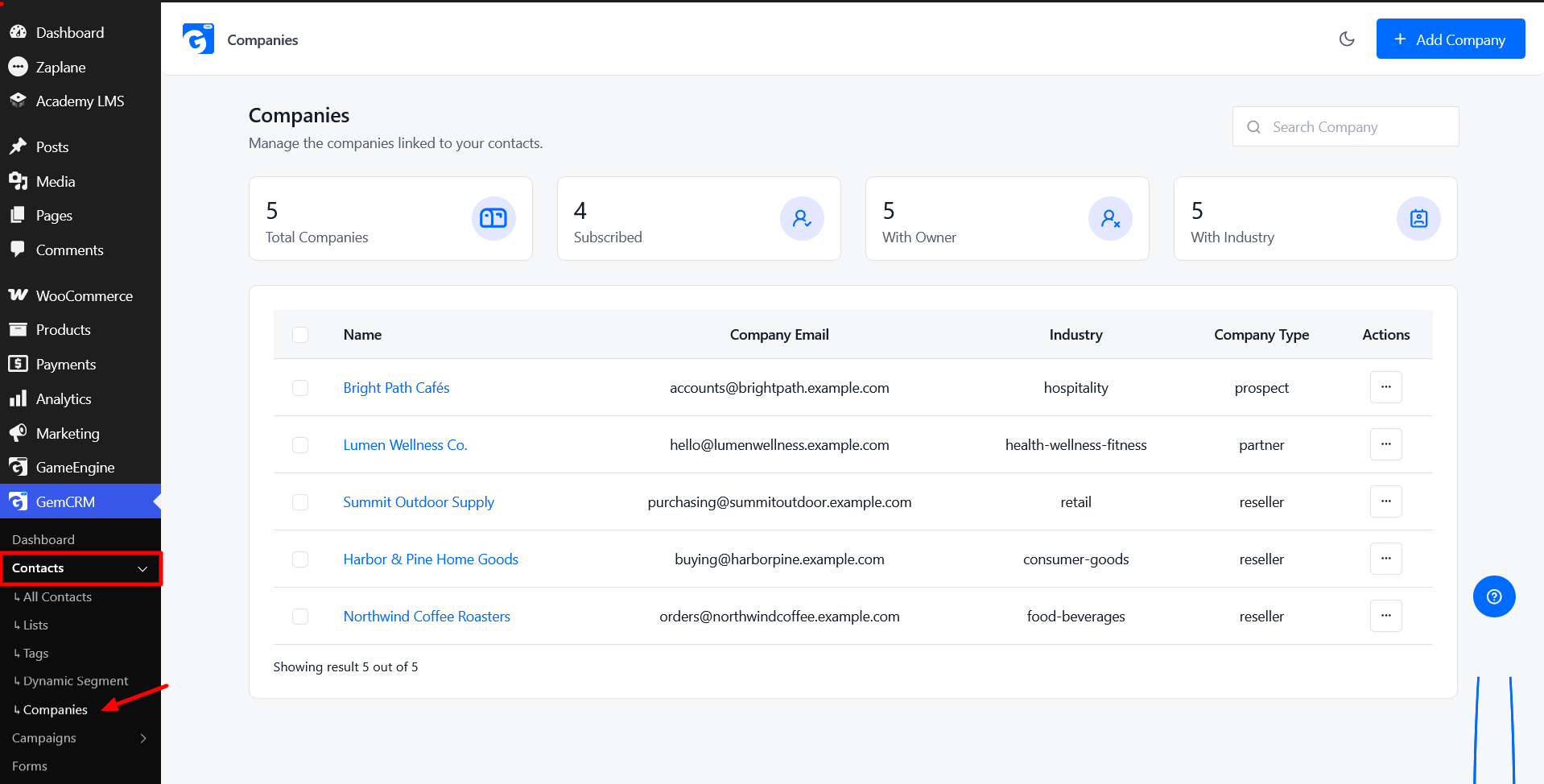
If you run a WooCommerce store that sells to businesses, GemCRM is worth a look. It runs inside WordPress, so your customer data stays on your own site. The free plugin includes a Companies module for grouping contacts under business accounts, and each contact’s WooCommerce order history sits in their profile. The Pro version adds a deal pipeline with company linking and dynamic segments built from order data, such as total order value, last order date, or products bought. That lets you create groups like “wholesale accounts that haven’t ordered in 90 days” and follow up automatically through Zaplane, without per-task fees.
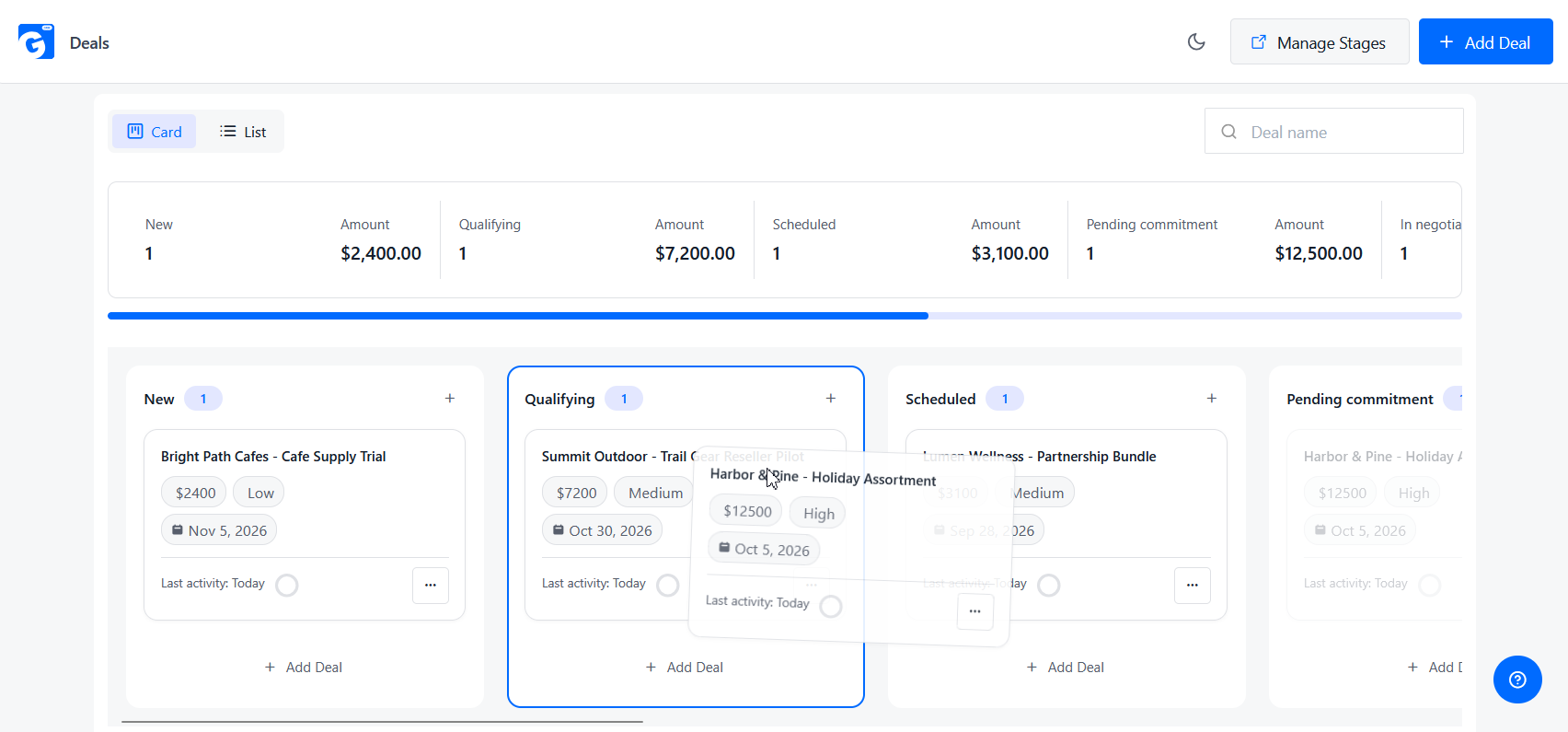
GemCRM is a CRM, not a wholesale pricing tool, so if you need tiered prices or quote workflows, you’d pair it with a plugin built for that. But if the gap you’re trying to close is knowing your business customers and following up with them on time, it covers that ground in one place.
Whichever route you take, test with your own accounts and real workflows before you commit.
B2B CRM FAQs
What is a B2B CRM?
A B2B CRM is software for managing relationships with business customers. It organizes companies, the contacts within them, deals or orders, and communication history in one place.
What is the difference between B2B CRM and B2C CRM?
A B2B CRM is built around companies with multiple contacts, longer sales cycles, and deal tracking. A B2C CRM is built around individual customers and higher-volume transactions. Real businesses often sit somewhere in between.
What features should a B2B CRM have?
At minimum: company and contact management, lead and deal tracking, segmentation, automation, reporting, and integrations with the tools you already use. Ecommerce order data matters if you sell online.
Is CRM useful for small B2B businesses?
It can be, once manual tracking starts causing missed follow-ups or you have several people working with the same customers. A very small business with few accounts may do fine on a spreadsheet for a while.
Can WooCommerce businesses use a B2B CRM?
Yes. A CRM that connects to WooCommerce can use your customers and orders alongside company records, segments, and follow-up campaigns.
Can a WooCommerce CRM manage B2B customers?
It can, provided it supports the structure B2B needs: grouping contacts under companies, tracking order history, and segmenting by behavior. Check for those specifically. Note that a CRM manages relationships; wholesale pricing, quotes, and payment terms are handled by your store or a dedicated wholesale plugin.
What is the difference between CRM and ERP for B2B?
A CRM manages customer relationships and sales activity. An ERP manages internal operations such as inventory, purchasing, accounting, and fulfillment. Some businesses use both, and they can be connected.