



When a store has 200 customers, email is easy. You know who bought what, and you can write to people one by one if you need to.
At 5,000 or 50,000 customers, that stops working. Customer data ends up in the store, the inbox, and a few spreadsheets. Everyone gets the same newsletter. Nobody remembers who already received the discount code.
Good customer email management fixes this. It means keeping customer data in order, sending the right message to the right group, and letting automation handle the repeat work.
This guide explains how that works for ecommerce stores. You will learn the main parts, the best practices, the difference between a shared inbox, a help desk, and a CRM, and what to look for when you choose software.
Quick Overview: What Is Customer Email Management?
|
Part |
What it means |
Simple example |
|
Customer data |
Contact details, purchase history, and activity in one place |
A customer’s orders and last purchase date on one record |
|
Segmentation |
Splitting customers into groups |
Customers who bought running shoes |
|
Targeted campaigns |
One-time emails sent to a chosen segment |
A sale email for repeat customers |
|
Email flows |
Automated emails sent after a trigger |
A welcome series after signup |
|
Lifecycle emails |
Messages based on the customer’s stage |
A review request after a first purchase |
|
Automation |
Emails that send themselves on a trigger or schedule |
A reminder for an abandoned cart |
|
Tracking and reporting |
Opens, clicks, bounces, and unsubscribes |
A campaign report |
|
List hygiene |
Keeping the list clean and respecting opt-outs |
Removing bounced addresses |
What Does Customer Email Management Include?
Many people think it means “sending newsletters.” That is only one part. Customer email management is broader than email campaign management. A campaign is one email sent to a group. Management is the whole system around it.
Here are the main parts:
If one of these parts is missing, the others get harder. You cannot segment well without clean data. You cannot automate well without segments.
How to Manage Customer Emails Effectively
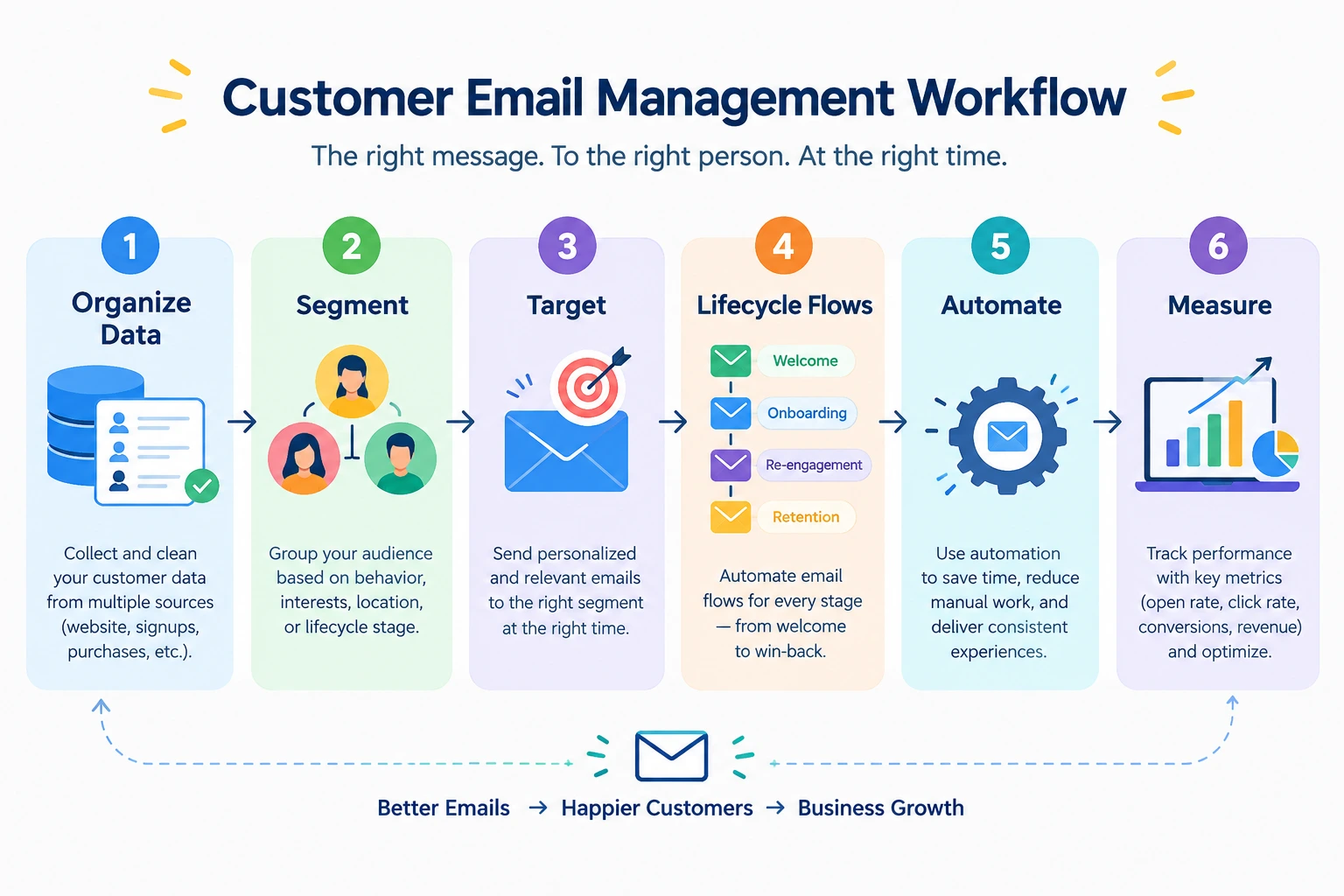
Think of this as a chain. Each step depends on the one before it.
Organize Customer Data
Start with the data. Useful fields for an online store include:
Not every tool stores all of these. Check what your system can hold before you plan campaigns around a field it does not have.
Keep the data in one place if you can. When purchase data lives in the store and email data lives in another tool, you will spend time matching the two.
Segment Customers
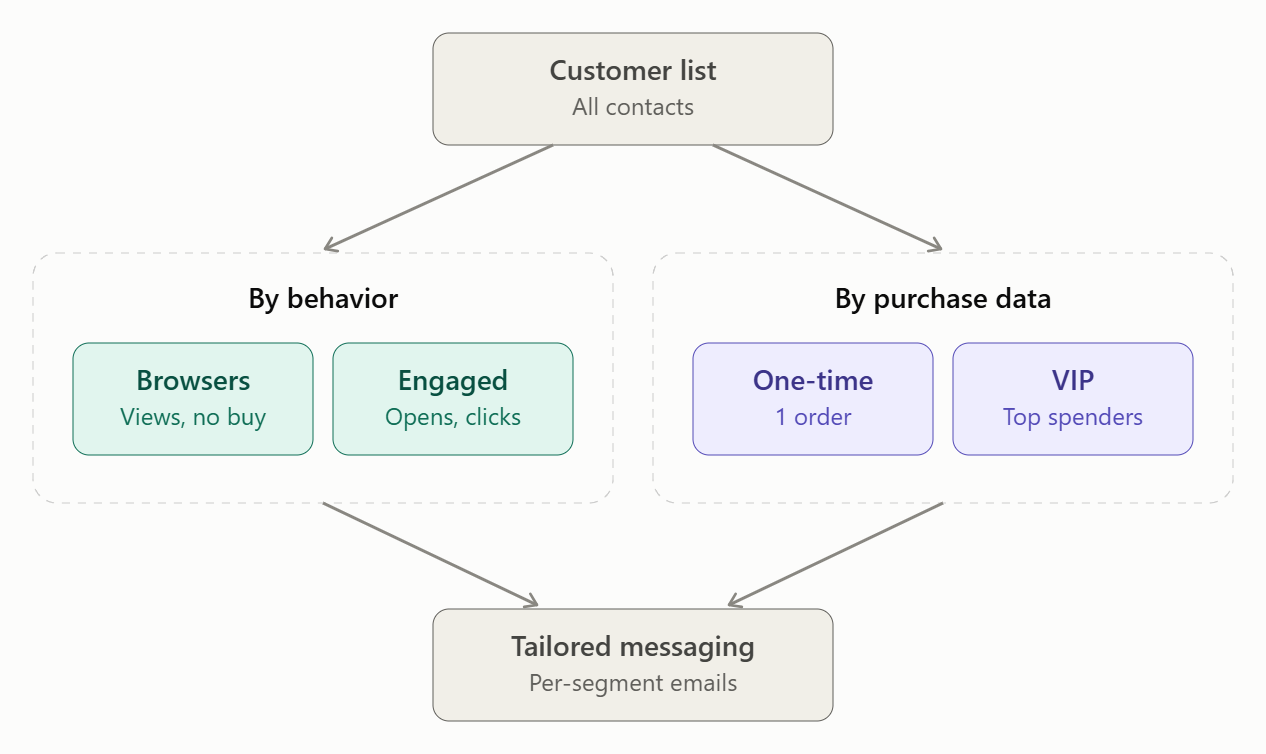
Segmentation means splitting your list into smaller groups. For a store, the most useful groups usually come from behavior and purchases:
Segmentation and personalization are related, but they are not the same. Segmentation chooses who gets the email. Personalization changes what the email says for each person, such as using their first name or a product they viewed. You can segment without personalizing, and it still helps.
Track Customer Interactions
History gives context. If a customer opened your last three emails but never clicked, that tells you something. If a customer bought last week, sending them a “come back and buy” email feels off.
A record of past emails and orders also helps your team. Anyone can see what was already sent before writing to the customer.
Personalize Customer Communication
Personalization works best when it is useful. Adding a first name is fine. Recommending a product that fits what the person bought is better.
Do not overdo it. Emails that mention too many personal details can feel strange. Use data that helps the customer, not data that only shows you have it.
Keep Customer Lists Clean
A clean list protects your sender reputation. It also gives you more accurate reports. Regular cleanup includes:
Monitor Email Performance
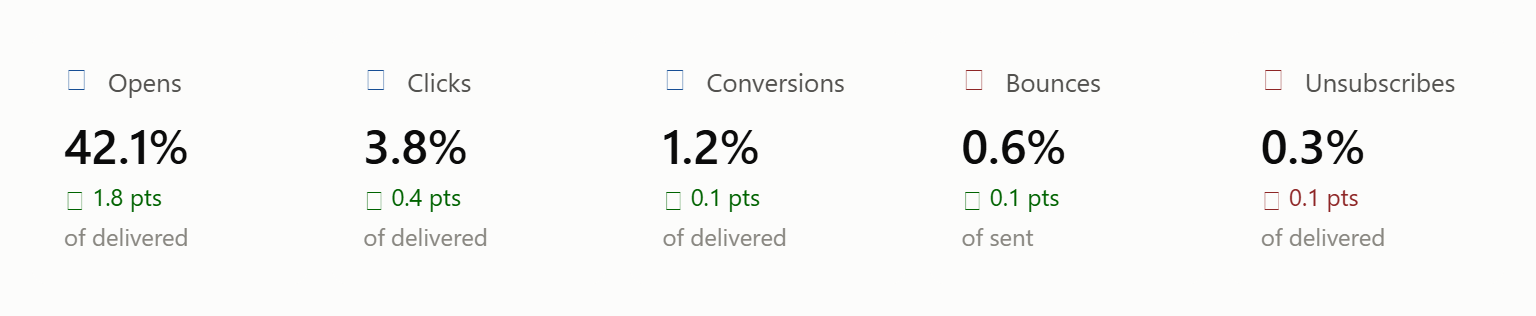
Watch a few numbers over time: opens, clicks, conversions, bounces, and unsubscribes.
No single number tells the full story. Open rates can be affected by privacy features in email apps. A high click rate with no orders may point to a problem on the landing page. Look at the numbers together and compare campaigns to your own past results.
Targeted Email Campaigns: Send Relevant Messages to the Right Customers
Sending the same email to every customer is easy, but it is often less useful. A first-time buyer and a customer who orders every month need different messages.
Targeted email campaigns fix this. You choose a segment first, then write the email for that group. Segmentation is the input. The targeted campaign is the result.
Some practical segments for a store:
You do not need all seven. Start with two or three that match your store.
Ecommerce Email Flows for Different Customer Stages
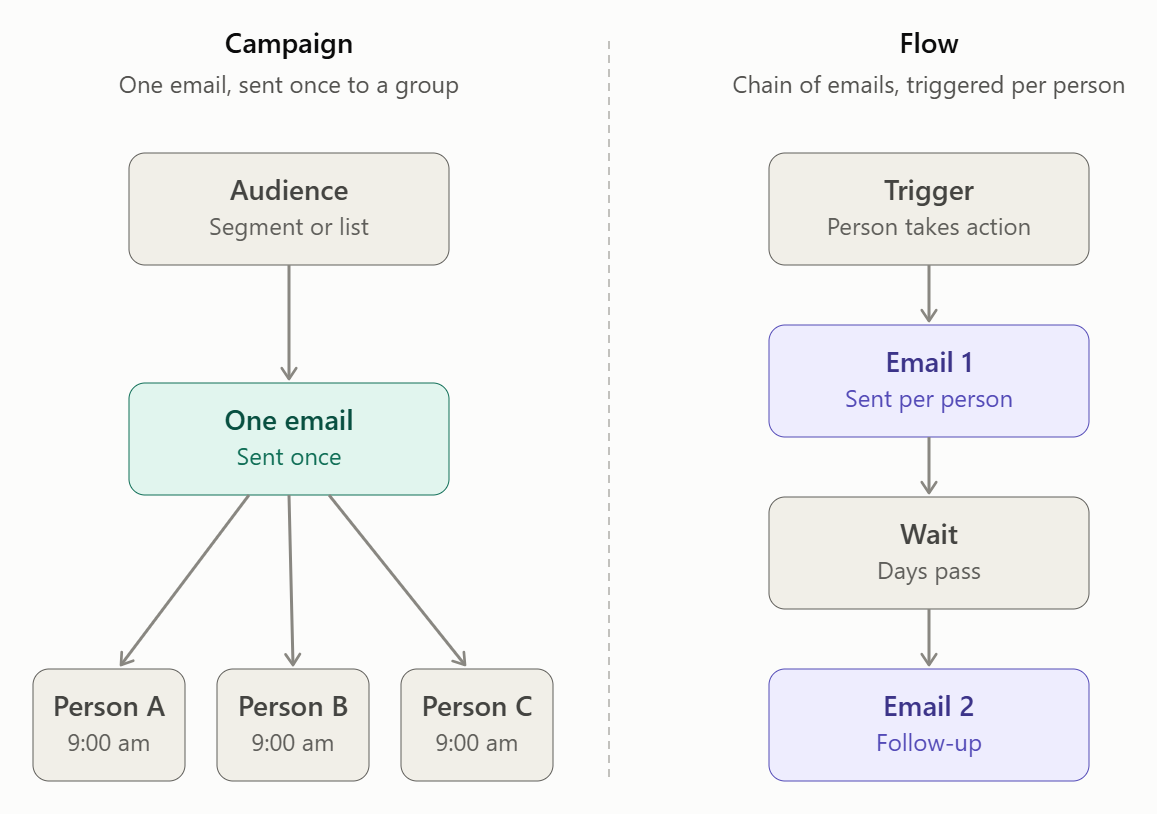
An email flow is a set of emails that sends automatically after a trigger. The trigger might be a signup, a purchase, or a cart left behind. After that, the emails go out on a set schedule without you doing anything.
A campaign is different. A campaign is sent once, to a chosen group, at a time you pick. A flow keeps running in the background for every new person who enters it.
Welcome Email Flow
This flow starts when someone joins your list. Its job is to introduce your store and set expectations. A common pattern is a welcome message right away, followed by one or two emails over the next few days that show popular products or explain how your store works.
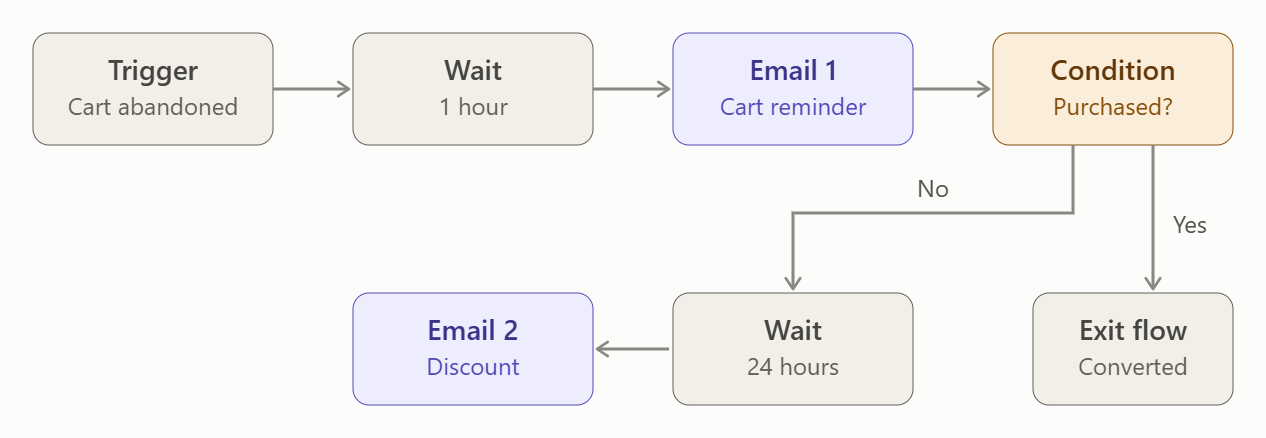
Abandoned Cart Flow
A customer adds items to the cart and leaves. Maybe they got distracted, or wanted to compare prices. A short sequence of reminders can bring some of them back.
A typical sequence starts with a simple reminder, then a follow-up that answers common doubts such as shipping or returns. Some stores add an offer at the end. Whether an offer is needed depends on your margins and your customers.
Post-Purchase Flow
This starts after an order. It can include:
Be careful here. Order confirmations and shipping updates are transactional emails. They exist to give order information. Marketing content, like product suggestions, should be kept clearly separate. Check the rules in your region on what a transactional email may contain.
For example, a customer buys running shoes. A few days later, a care-tips email arrives. Later, the store suggests running socks.
Replenishment Flow
This works for products that get used up, such as coffee, skincare, pet food, or supplements. Estimate how long the product lasts and send a reminder shortly before it runs out. It is less useful for one-time purchases like furniture.
Cross-Sell or Upsell Flow
Purchase history tells you what a customer might want next. Someone who bought a camera may like a memory card or a bag. Keep the suggestions related to what they bought. Random recommendations feel like ads.
Win-Back Flow
This targets customers who have not bought or opened emails for a while. Start gently. Ask if they still want to hear from you, or show what is new. If they stay silent, you can stop emailing them, which also keeps your list clean.
Not every business needs every flow. A store with one-time purchases may skip replenishment. A small store may only need welcome, abandoned cart, and post-purchase to begin with.
Lifecycle Email Marketing Examples
Ecommerce email flows are about automation. Lifecycle email marketing is about the customer’s stage. The two overlap, but they answer different questions.
A lifecycle email can be sent through a flow, a campaign, or by hand. The stage decides the message.
|
Customer stage |
Example email |
Main goal |
|
New subscriber |
Welcome email with a best-sellers list |
Build trust, get a first order |
|
New customer |
“Here’s how to get started” email |
Help them succeed with the product |
|
First-time buyer |
Review request and related products |
Encourage a second purchase |
|
Repeat customer |
Early access to a new collection |
Reward loyalty |
|
Inactive customer |
“We miss you” email with what’s new |
Bring them back |
|
Returning customer |
Welcome-back note with helpful picks |
Rebuild the habit |
Lifecycle emails and promotional emails are also different. A lifecycle email is timed by the customer’s situation, such as a care guide after a purchase. A promotional email is timed by your business, such as a seasonal sale. Both are useful. If a customer only ever hears from you when you want something, they may stop reading.
Customer Email Management Best Practices
These are the general rules for the whole system.
Segment before you send. Even a simple split, like customers versus non-customers, makes emails more relevant. Relevant emails are more likely to be read.
Match the email to customer intent. A person who just bought does not need a “buy now” push. They may need shipping news or a how-to guide.
Avoid sending too often. There is no perfect number. Watch unsubscribes and complaints. If they rise after you increase frequency, slow down.
Keep each message focused. One email should have one main idea. Emails that try to say five things usually get none of them across.
Write clear subject lines. Say what is inside. Tricks may raise opens once, but they lower trust over time.
Use one clear call to action. Make it obvious what you want the reader to do next.
Personalize when it helps. Use data that makes the email more useful, not just more “personal.”
Test important emails. Send a test to yourself. Check how it looks on a phone. For larger campaigns, try comparing two subject lines.
Monitor results. Look at trends, not single sends.
Respect unsubscribe choices. Honor them right away. It is the right thing to do and it is often a legal requirement.
Keep your list clean. Remove bounces and pause long-inactive contacts.
Email Campaign Best Practices for Ecommerce
The section above covers how to manage customer email as a system. This section is about running a single campaign well.
Benefits of Email Automation for Customer Email Management
Automation means emails send themselves after a trigger or on a schedule. The benefits of email automation are practical:
Automation does not guarantee more sales. Results depend on your offer, your audience, and the quality of your emails. Automation helps you send good emails consistently. It cannot fix a weak message.
How to Choose Customer Email Management Software
When people search for customer email management, many are looking for software. Before comparing products, decide what problem you need to solve. Then check these areas.
Customer and Contact Management
The tool should let you store contacts and their details, add custom fields, and tag or group them. Check how easy it is to import an existing list and how contacts are added from your store.
Customer History
Look for purchase history and email activity on each contact record. Support agents and marketers both benefit when they can see the full picture in one place.
Segmentation
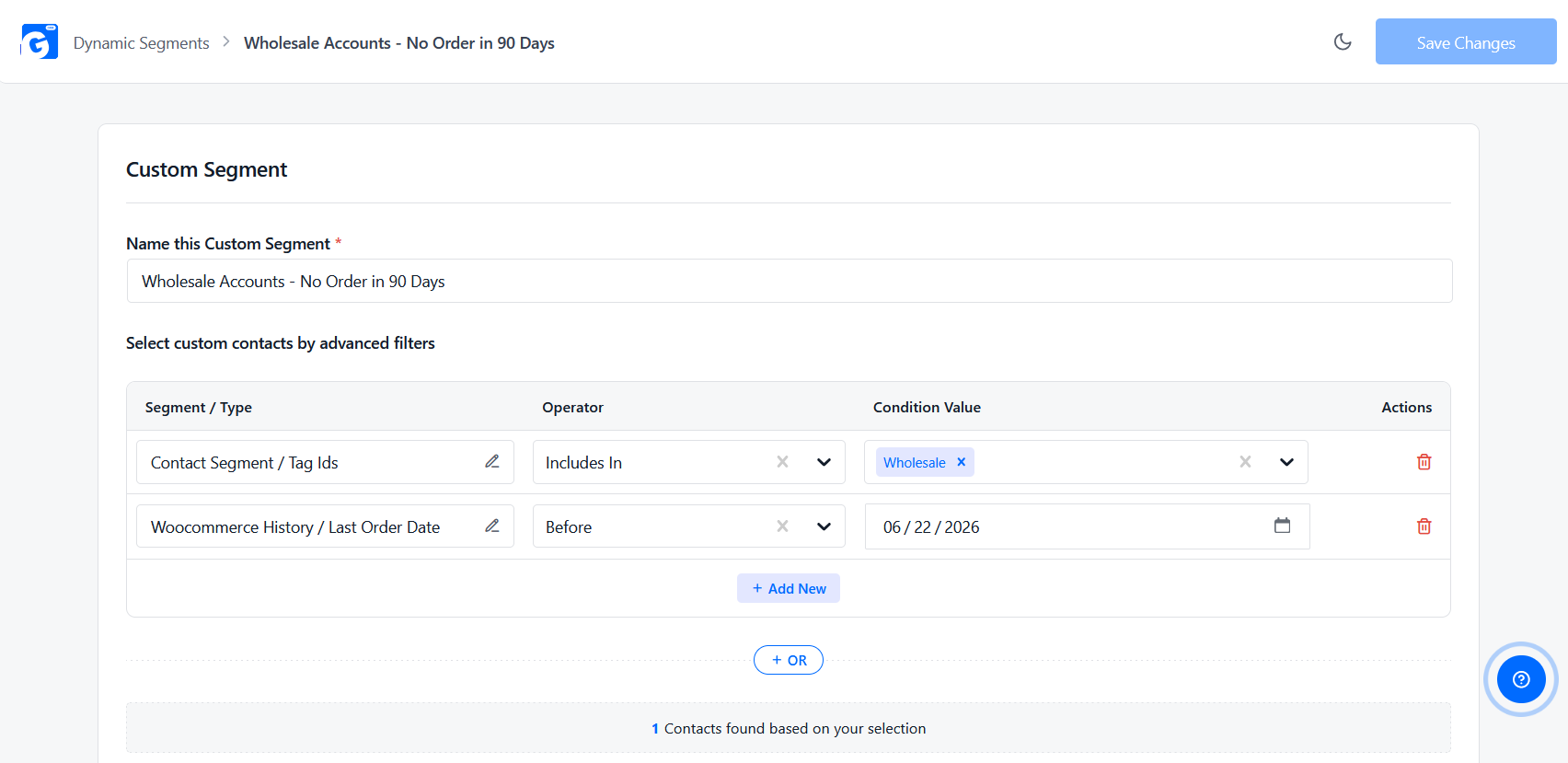
Ask how segments work. Static segments are fixed lists you build by hand. Dynamic segments update on their own as customers meet or stop meeting your rules, such as “bought in the last 60 days.” Dynamic segments save time as the list grows.
Email Campaign Management
You need a way to build emails, choose an audience, schedule sends, and see what was sent. A template library and an easy builder save time.
Automation
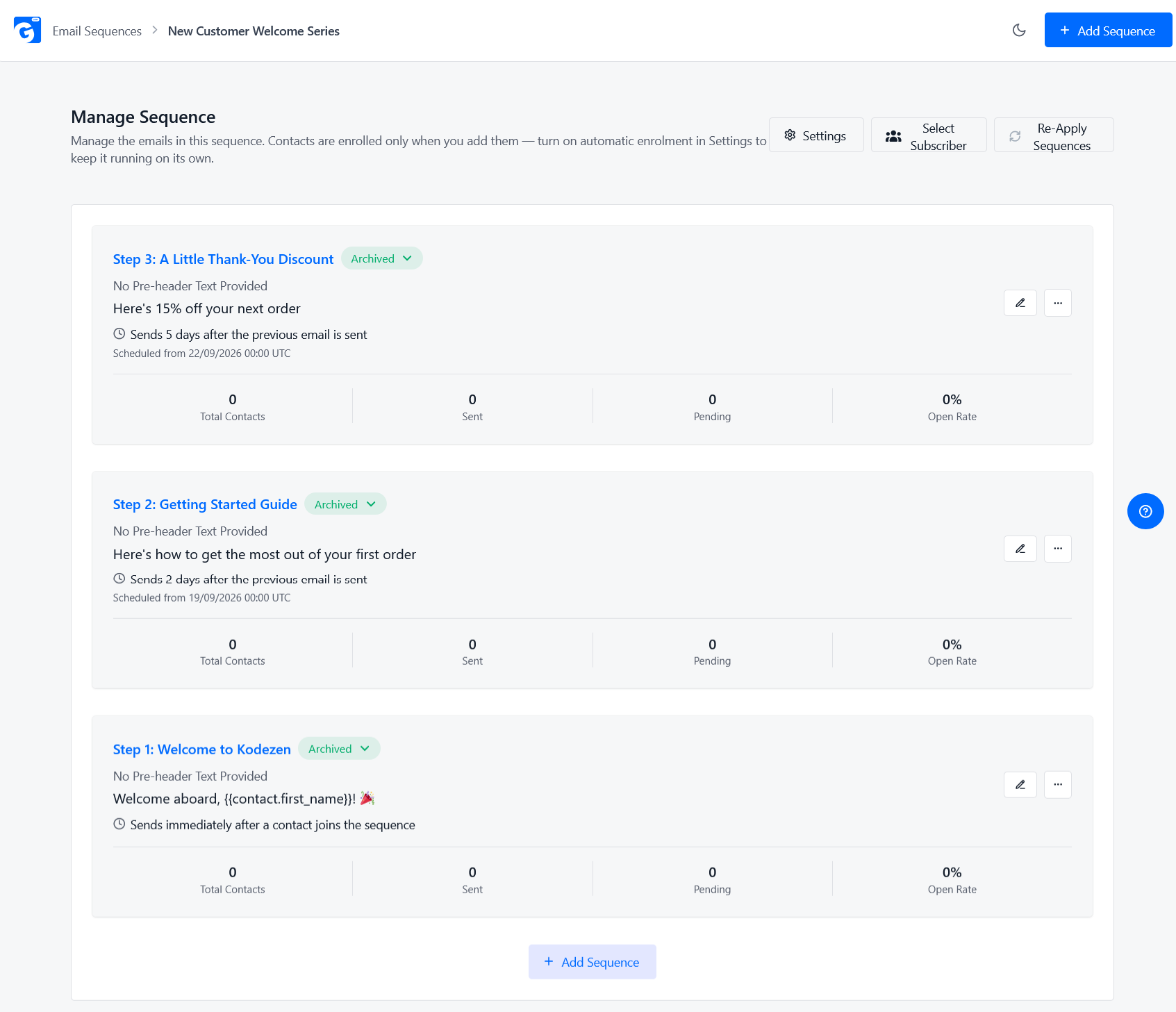
Check what can start an automation, how you build sequences, and whether you can add waits and conditions. Confirm that lifecycle flows, such as welcome and win-back, are possible.
Ecommerce Integration
If you run a WooCommerce or similar store, the tool should read order and customer data from it. Without this, you will export and import files or build connections yourself.
Reporting
You should see opens, clicks, bounces, and unsubscribes per campaign. Better still, you should be able to tie results back to orders.
Ease of Use
A tool your team finds confusing will not be used well. Try a demo or free version. Ask whether a non-technical person can build a campaign without help.
4 Best Customer Email Management Tools
Many tools can manage customer email. The four below suit ecommerce stores, especially stores that run on WordPress. They are not ranked in order. Each one fits a different type of business.
Features and prices change often, so check each tool’s website for current details before you decide.
1. GemCRM
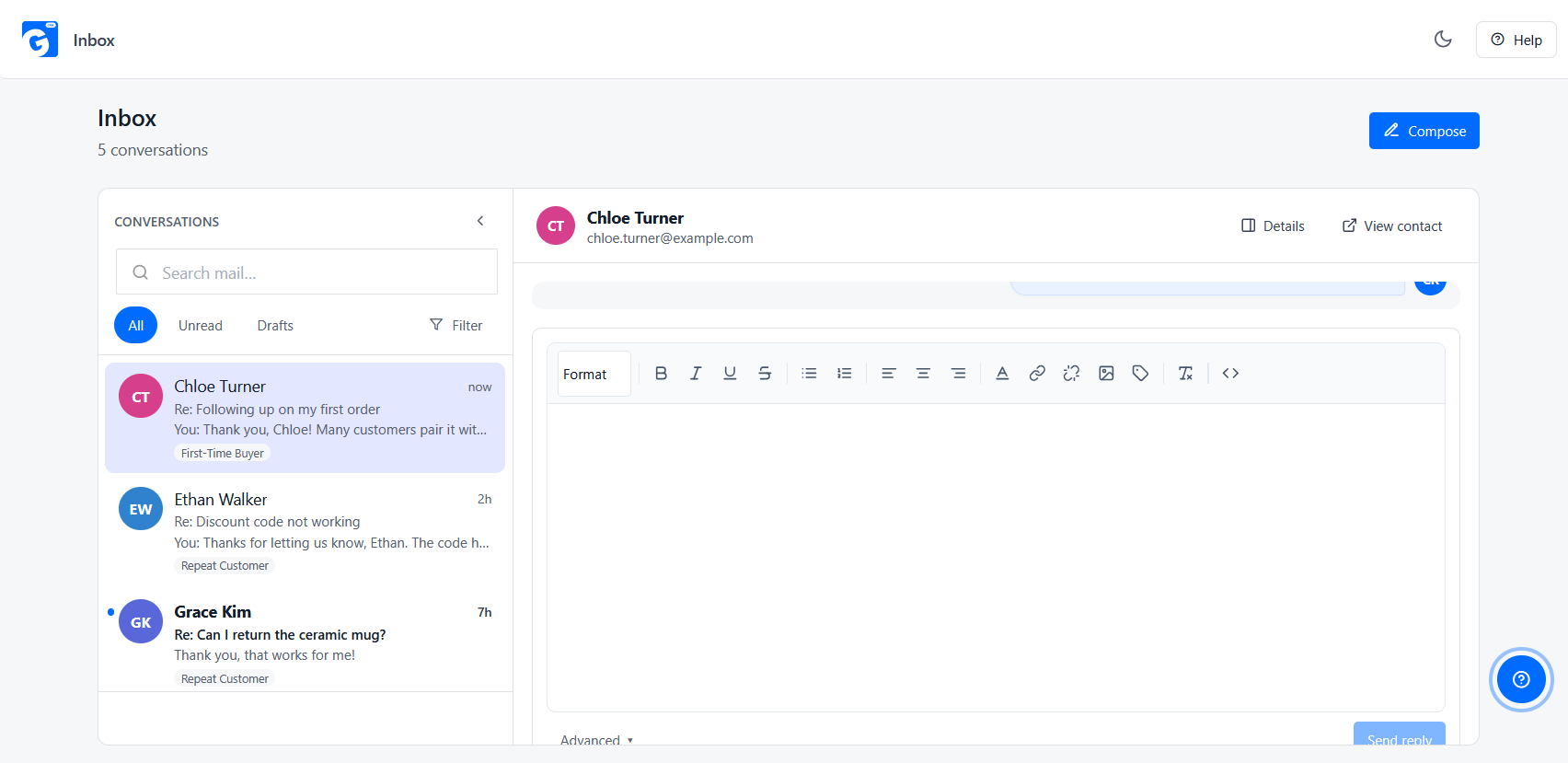
GemCRM is a CRM and email marketing plugin that runs inside WordPress. It keeps contacts, tags, lists, and purchase history from WooCommerce and StoreEngine in one place. You can build emails with a drag-and-drop builder, test subject lines with A/B testing, and track opens and clicks. Contacts from StoreEngine and Academy LMS sync automatically. GemCRM Pro adds email sequences, dynamic segments, abandoned cart recovery, and an Email Inbox that links customer replies to contact records.
Pros
Cons
2. FluentCRM
FluentCRM is a well-known marketing automation plugin for WordPress. It also runs on your own site, so your data stays with you. It offers email campaigns, automation workflows, audience segmentation, and WooCommerce integration. It has a free version and a paid version. The paid version uses an annual license, and it does not charge more as your contact list grows. Many WordPress store owners choose it as a lower-cost alternative to hosted email platforms.
Pros
Cons
3. HubSpot
HubSpot is a hosted CRM and marketing platform. Its free CRM and free marketing tools let small teams store contacts, send basic emails, and use limited automation. Paid Marketing Hub plans add more automation, reporting, and personalization. HubSpot also has sales, service, and shared inbox tools, so one platform can cover marketing, sales, and support. It works on any website, not only WordPress. Businesses often choose it when they want everything in one system and have a budget for it.
Pros
Cons
4. Brevo
Brevo (formerly Sendinblue) is a hosted platform for email, SMS, and marketing automation, with a built-in CRM. Its free plan has a daily email sending limit, and paid plans raise the limits. It has ready-made templates, automation workflows, and a WordPress plugin, and it can connect to WooCommerce. Brevo also offers WhatsApp campaigns, which are sold separately from email. It suits small and mid-size businesses that want a hosted tool with email and SMS in one account.
Pros
Cons
Quick comparison
|
Tool |
Runs where |
Best for |
Main trade-off |
|
GemCRM |
Inside WordPress |
WooCommerce and StoreEngine stores that want CRM, email, and automation in one plugin |
WordPress only, and some features need Pro |
|
FluentCRM |
Inside WordPress |
WordPress stores focused on email automation |
No built-in sales pipeline or inbox |
|
HubSpot |
Hosted |
Teams that want marketing, sales, and support together |
Cost grows on paid plans |
|
Brevo |
Hosted |
Small businesses that want email and SMS in one account |
Data on Brevo’s servers, and limits on the free plan |
How a CRM Can Improve Customer Email Management
A CRM (customer relationship management) system keeps customer information in one place. For email, that gives you several advantages:
For an ecommerce store, the biggest gain is connecting purchase data to email. When the CRM knows what a person bought and when, you can send the post-purchase email, the replenishment reminder, and the win-back message based on real behavior rather than guesses.
A CRM may be more than you need if you only answer a few support emails a day. It makes sense when your customer list is growing, and your emails need to be more relevant.
How GemCRM Fits Into Ecommerce Customer Email Management
GemCRM is a CRM and email marketing plugin that runs inside WordPress. It is one option for stores that already run on WordPress. Here is how its verified features map to the steps in this guide. Some features are in the free plugin, and some need GemCRM Pro.
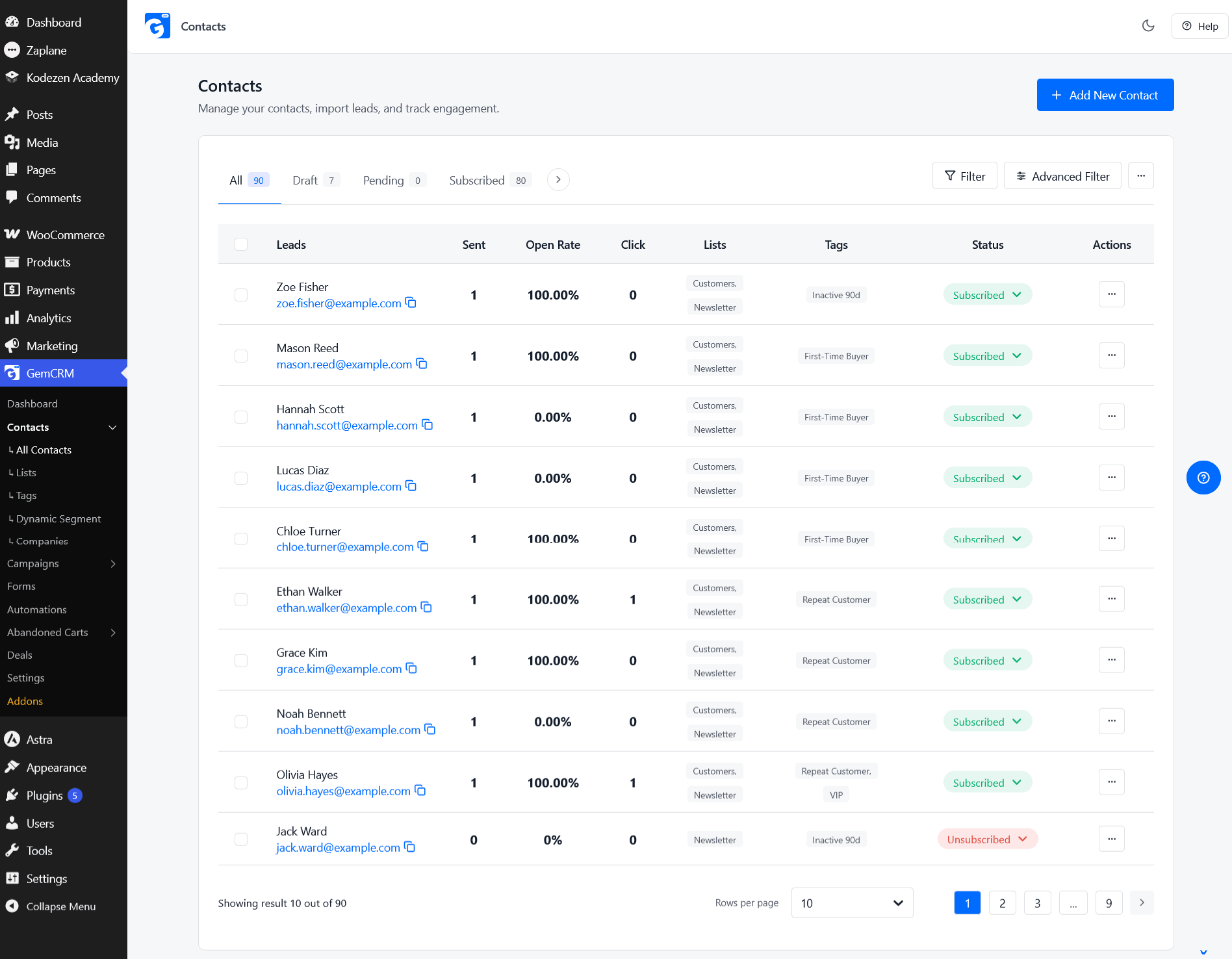
Organizing customer data (free). GemCRM lets you manage contacts, leads, and companies. You can add custom fields, tags, lists, and labels. Contacts from StoreEngine and Academy LMS sync automatically, and WooCommerce customers and WordPress users are included. Purchase history from WooCommerce and StoreEngine shows on the contact record.
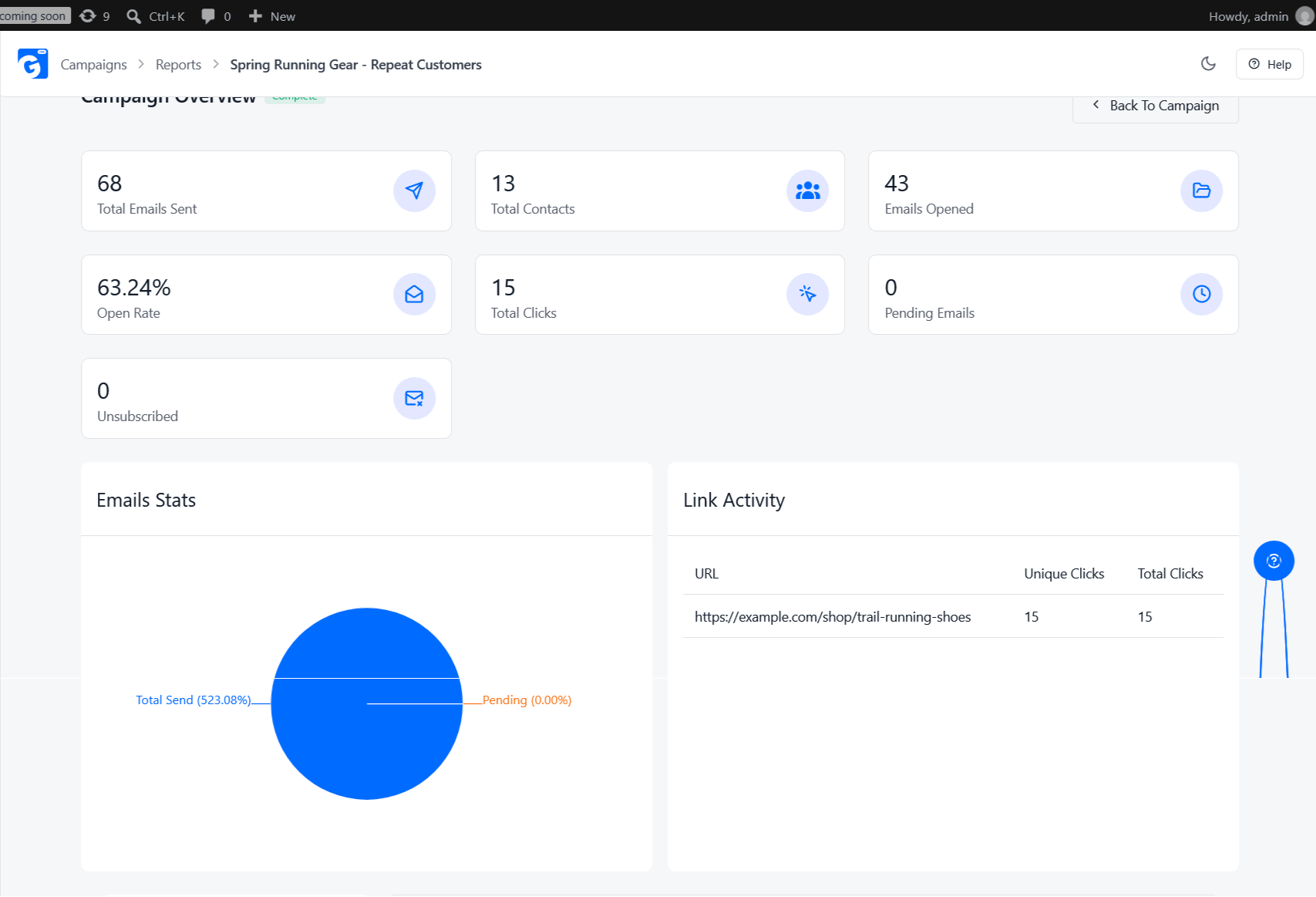
Campaigns and testing (free). You get a drag-and-drop email builder, reusable templates, A/B testing, follow-up emails for contacts who did not open, and open and click tracking. Bounces are handled for Amazon SES, Mailgun, SendGrid, and Pepipost.
Forms and list building (free). Subscription forms create contacts in GemCRM automatically. Incoming webhooks can bring in leads from other tools.
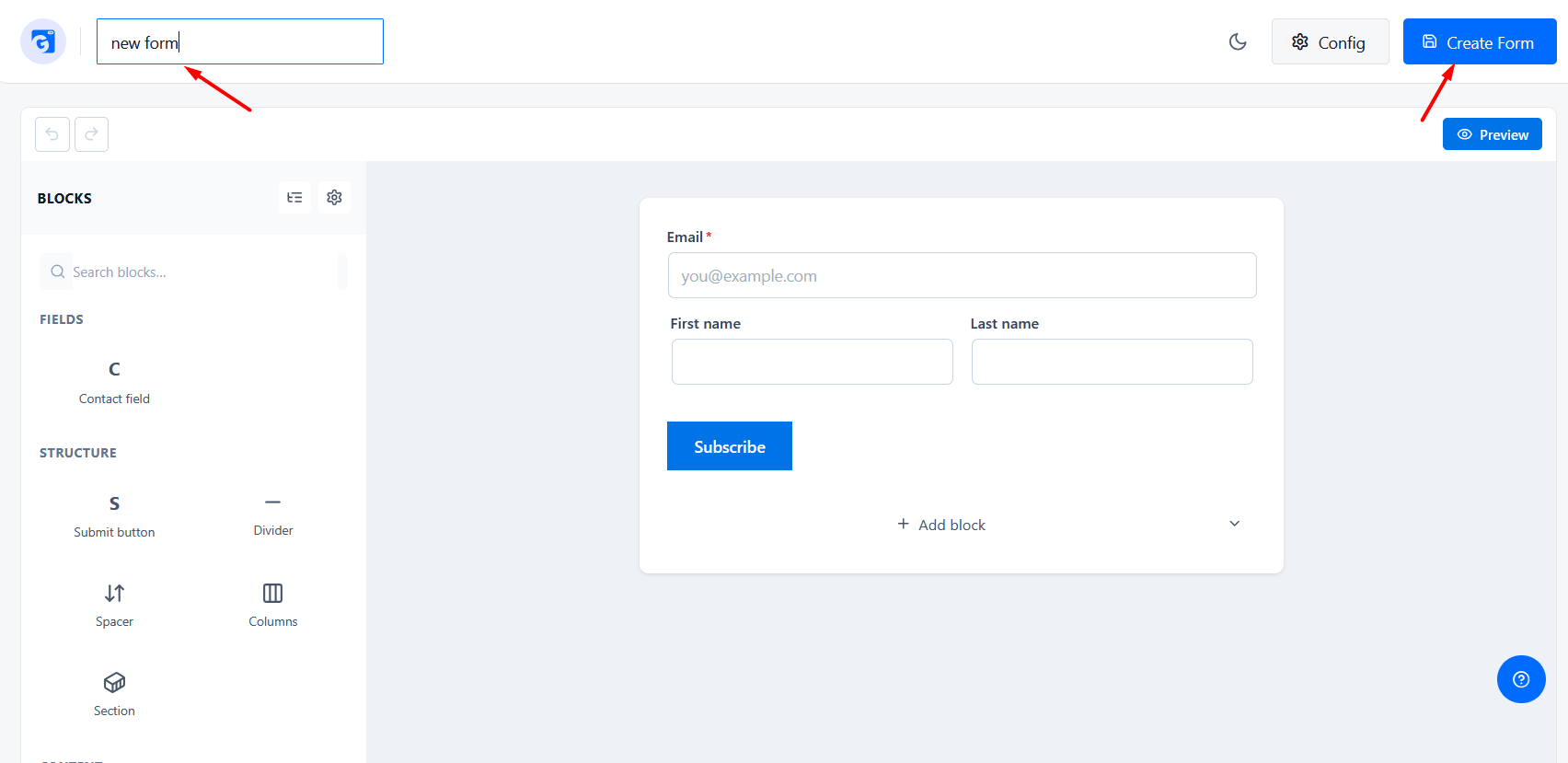
Automation and segments (Pro). GemCRM Pro adds email sequences, recurring campaigns, dynamic segments with advanced filters, and smart links. Abandoned cart recovery for WooCommerce is also part of Pro.
Workflow automation across other apps. GemCRM connects to Zaplane, a no-code automation plugin from the same team, for workflows beyond email.
Incoming customer email (Pro). GemCRM Pro includes an Email Inbox that can connect to Gmail, Outlook, Zoho, or standard IMAP/POP3 mailboxes. Replies are matched to contacts. This covers some of the ground that a shared inbox covers, while keeping the conversation attached to the customer record. It is not a full help desk ticketing system, so check whether it fits your support needs.
Other channels (Pro). SMS and WhatsApp campaigns can be sent from the same contact records. Email, SMS, and WhatsApp share consent tracking and a suppression list.
Cost. GemCRM does not charge by the number of subscribers. You still pay for whatever email or SMS service you use to send.
GemCRM may not be the right pick for every business, especially if you do not use WordPress or you need a dedicated help desk. But for WordPress and WooCommerce stores that want customer data, segmentation, and email automation in one place, it is worth a look.
Conclusion
Customer email management is not about sending more emails. It is about organizing customer information, knowing where each customer is in their journey, sending relevant messages, using automation where it saves time, and choosing tools that fit your business.
Start small. Clean up your data, create two or three segments, and set up a welcome flow. As your list grows, a CRM can help keep customer data, campaigns, and automation in one place.
FAQ
What is customer email management?
It is the practice of organizing customer data and using it to send relevant emails, plus tracking results and keeping your list clean. It goes beyond sending campaigns and includes flows, segmentation, and reporting.
What is the difference between an email campaign and an email flow?
A campaign is sent once to a chosen audience at a chosen time. A flow is a set of emails that starts automatically when someone does something, like signing up or buying. A store usually needs both.
How does segmentation help targeted email campaigns?
Segmentation decides who receives the email. When the audience is grouped by behavior or purchases, the message can be more specific and the campaign is more likely to be useful to the reader.
Is a CRM different from an email management tool?
Often, yes. An email management tool may focus on handling incoming mail. A CRM focuses on customer data, history, segmentation, and campaigns. Some products cover parts of both, so check what each one actually includes.
How often should I email my customers?
There is no set number. It depends on your products and audience. Start with a schedule you can keep, then watch unsubscribes, complaints, and clicks. If unsubscribes go up after a change, reduce the frequency.
What is the difference between a lifecycle email and a promotional email?
A lifecycle email is based on where the customer is in their journey, such as a welcome or a post-purchase tip. A promotional email is based on a business goal, such as a sale. A healthy program uses both.