



If you run a WordPress blog or content-heavy site, you have almost certainly stared at an ActiveCampaign invoice and wondered where all your money went. The entry tier is affordable enough — $15–$19/month for 1,000 contacts — but the moment your list grows, the pricing engine quietly accelerates against you. By the time you reach 10,000 subscribers, you’ll be looking at $79–$99/month for the Pro plan, with no ceiling in sight. Add CRM pipelines as a separate add-on ($68/month), a dedicated IP ($67/month), and a few extra user seats, and a mid-sized blog can easily clear $3,000+ per year before accounting for annual price increases.
There is now a better path: GemCRM, a self-hosted WordPress CRM plugin built by the team behind Academy LMS. It runs entirely inside your WordPress dashboard, charges a lifetime license fee with no recurring bills, and caps nothing — not contacts, not campaigns, not automations. This article breaks down exactly why self-hosted wins for WordPress bloggers in 2026, and why GemCRM is the tool making that argument easier to make than ever.
The Self-Hosted Shift: Why WordPress Users Are Moving Away from SaaS

The conversation has changed. It used to be that self-hosted CRM tools felt like a compromise — you sacrificed polish and features to avoid monthly fees. That trade-off no longer exists. The WordPress plugin ecosystem has matured dramatically, and tools like GemCRM now offer feature sets that rival dedicated SaaS platforms — without the recurring cost structure that makes SaaS increasingly hostile to growing audiences.
Three forces are accelerating this shift in 2026. First, SaaS pricing has become unpredictable. ActiveCampaign quietly revised its billing policy in November 2025 to charge for all contacts in your database — including unsubscribed, bounced, and unconfirmed addresses. This means a blog with 6,000 active subscribers could be billed for 8,500–9,000 contacts once historical list data is included, quietly bumping the account into a higher pricing tier. Second, data privacy regulations are tightening. Under GDPR, CCPA, and emerging regional frameworks, knowing exactly where subscriber data lives is no longer optional. A self-hosted plugin means your data never leaves your server. Third, WordPress-native integration is now genuinely superior for content sites. Auto-syncing user roles, capturing leads from comment submissions, and triggering automations based on course progress or purchase history — all of this works better when the CRM is inside WordPress, not bolted onto it from outside.
What Is GemCRM?
GemCRM is a WordPress-native CRM and email marketing automation plugin developed by the Academy LMS team. Its core premise is simple: manage your entire subscriber base, run campaigns, and automate follow-up sequences directly from your WordPress dashboard, with no external services required. What makes it distinct is the combination of deep WordPress integration and a lifetime pricing model that permanently removes the anxiety of contact-count billing.
On the feature side, GemCRM delivers the core daily toolkit a content publisher or blogger actually uses: unlimited contacts and lists with tag-based segmentation, an email campaign builder with ready-made templates, drip sequences (scheduled email automations), subscriber import/export, and analytics with open and click tracking. The plugin auto-syncs with WordPress user roles — so when a reader registers on your site, creates an account, or enrolls in a course, they can be automatically tagged and enrolled in a sequence without any manual intervention.
The plugin is newer than FluentCRM or ActiveCampaign, and advanced features like a visual automation canvas and dynamic segmentation are confirmed for the 2026 roadmap, but not yet live. That transparency is worth noting — GemCRM is honest about what it is today versus what it is becoming. For most WordPress bloggers, however, the current feature set covers 90% of daily needs: list management, campaigns, and follow-up sequences.
ActiveCampaign: Powerful, But Built for a Different World
ActiveCampaign is a serious platform. Its visual automation builder, predictive sending, advanced conditional content, and deep CRM capabilities are genuinely impressive — and for a retail brand with a large sales team, dedicated IP requirements, and complex multi-channel journeys, the price may be worth it. But for a WordPress blogger or indie course creator, you are paying for a machine that is massively over-engineered for your actual use case.
The pricing structure alone is worth examining carefully. ActiveCampaign’s Starter plan begins at $15–19/month for 1,000 contacts, but caps automations at 5 actions per workflow, limits the account to 1 user seat, and excludes landing pages, advanced segmentation, predictive sending, and CRM tools. To access features that actually serve a growing blog — conditional content, attribution tracking, A/B testing in automations — you need the Plus plan at $49–$59/month or the Pro plan at $79–$99/month, both for just 1,000 contacts. Every time your list crosses a new tier threshold, your bill jumps.
✓ ActiveCampaign Strengths
- Mature visual automation builder with branching logic
- Predictive sending & advanced segmentation
- 970+ third-party integrations
- Built-in CRM (as a paid add-on)
- Enterprise deliverability tools
✗ ActiveCampaign Weaknesses
- Price scales aggressively with list size
- Charges for inactive contacts (since Nov 2025)
- CRM is an extra add-on ($68+/mo)
- Not native to WordPress — external iframe integration
- Hidden costs: extra users, dedicated IP, transactional email
The Real Cost Comparison: 3-Year Projection
Numbers tell the clearest story. Let’s look at a WordPress blogger whose list grows from 2,500 to 10,000 contacts over three years, and compare what they would pay on ActiveCampaign Pro versus a GemCRM lifetime license.
|
Year |
Plan & Contacts |
Monthly Price |
Annual Cost |
Notes |
|
Year 1 |
Pro — 2,500 contacts |
~$99/mo |
$1,188 |
Base Pro plan |
|
Year 2 |
Pro — 5,000 contacts |
~$139/mo |
$1,668 |
Contact tier increase |
|
Year 3 |
Pro — 10,000 contacts |
~$187/mo |
$2,244 |
Contact tier increase |
|
Total |
3-Year Estimated Total |
— |
$5,100 |
Combined cost (approx.) |
GemCRM — Lifetime License 3-Year Cost Breakdown (Unlimited contacts)
|
Item |
Details |
Cost Structure |
3-Year Total |
Notes |
|
License Plan |
Choose one plan (Solo / Team / Agency / Enterprise) |
One-time payment |
One-time fee only |
Each plan is purchased separately (not all included together) |
|
Contacts |
Years 1, 2, and 3 |
Unlimited |
$0 |
No per-contact pricing or upgrades required |
|
Core Features |
CRM, Campaigns, Automation, Integrations, Analytics |
Included in plan |
$0 |
Features depend on the selected plan |
|
Updates & Support |
Based on license terms |
Included / Limited |
$0 (or optional) |
May vary depending on plan (lifetime or time-limited support) |
|
Estimated 3-Year Total |
One-time payment only |
— |
One-time fee |
No monthly or annual recurring charges |
The math is stark. A single ActiveCampaign CRM add-on subscription alone costs more over three years than most lifetime WordPress plugin licenses. For growing blogs, the compounding effect of contact-based SaaS pricing is one of the most underappreciated budget risks in digital publishing.
WordPress Integration: Native vs Bolted-On
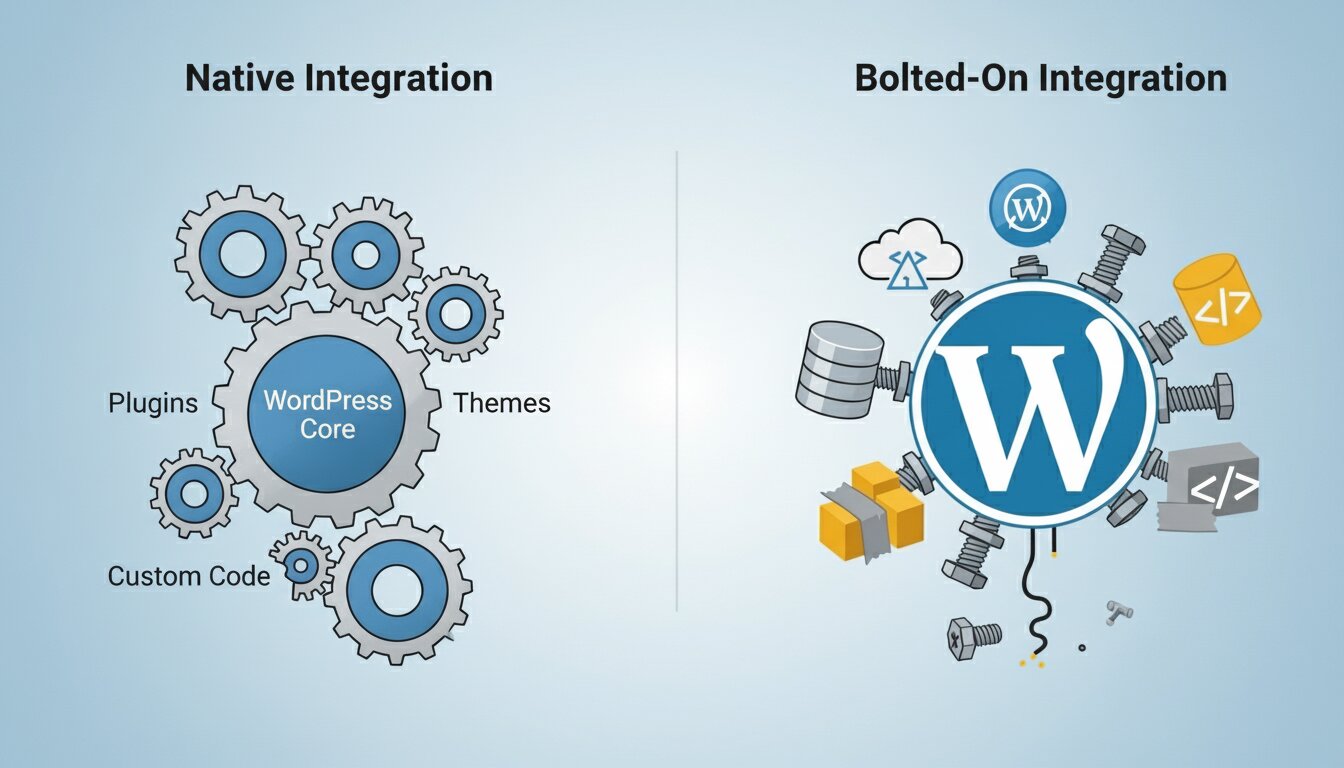
Here is one of the most important distinctions that rarely gets enough attention in comparison articles: ActiveCampaign is not a WordPress tool. It is an external SaaS platform that connects to WordPress via a plugin bridge. That means your subscriber data lives on ActiveCampaign’s servers, your automation triggers have latency, and native WordPress events — user registration, comment submission, role changes, course enrollment — require additional configuration or third-party bridges to work reliably.
GemCRM is built inside WordPress. It connects directly to your WordPress database and reads data from it in real time. When a reader registers, leaves a comment, or completes a purchase via WooCommerce, GemCRM knows immediately — no webhooks, no API polling, no latency. This native architecture also means full GDPR compliance by default: your subscriber data never leaves your hosting environment, and you remain in complete control of deletion, export, and audit requests under EU data protection law.
For bloggers running a WooCommerce store, an LMS with Academy LMS, or a membership site, GemCRM’s direct integration removes an entire category of maintenance overhead — no API key management, no webhook debugging, no version conflicts between your CRM bridge plugin and your actual CRM platform.
Where ActiveCampaign Still Wins
This article would be incomplete without being honest about the gaps. ActiveCampaign’s multi-step visual automation builder — with conditional branching, time delays, goal tracking, and A/B split testing — is significantly more mature than GemCRM’s current offering. If your marketing strategy depends on complex behavioral journeys (e.g., a visitor views a product page three times, doesn’t convert, gets a sequence, opens email 2, then enters a re-engagement flow), GemCRM cannot replicate that today.
ActiveCampaign also supports SMS marketing, Facebook Custom Audiences sync, and site tracking across external domains. For bloggers running paid acquisition campaigns who
need cross-channel retargeting data in a single platform? Those integrations have real value that a WordPress-only tool cannot match.
Head-to-Head Feature Comparison
|
Feature |
GemCRM |
ActiveCampaign |
|
Hosting |
Self-hosted (WordPress) |
SaaS (external server) |
|
Pricing Model |
One-time lifetime payment (based on site license) |
Monthly/annual subscription |
|
Contact Limits |
Unlimited |
Tiered — increases with contacts |
|
Contact-Based Pricing |
No |
Yes |
|
Email Campaigns |
Unlimited sends |
Unlimited (fair usage) |
|
Email Sequences |
Included |
Included |
|
Automation Builder |
Basic (growing) |
Advanced visual builder |
|
WordPress User Sync |
Native/automatic |
Requires integration |
|
WooCommerce Integration |
Native |
Available (setup required) |
|
Comment Lead Capture |
Native trigger |
Requires setup |
|
GDPR / Data Control |
Full control (self-hosted) |
Stored on external servers |
|
CRM Pipelines |
Included |
Included (Plus/Pro plans) |
|
SMS Marketing |
Not available |
Available (extra cost) |
|
Predictive Sending |
Not available |
Available on higher plans |
|
Trial / Refund |
Depends on policy (not clearly confirmed) |
14-day free trial |
Migration from ActiveCampaign: How Hard Is It?

If you are currently on ActiveCampaign and considering a move, the migration path is straightforward. ActiveCampaign allows full CSV export of your contact list, including tags, custom fields, and list membership. GemCRM accepts CSV imports, and the field-mapping process preserves your segmentation structure. Existing automations will need to be rebuilt as email sequences — which is actually a useful audit opportunity, since most marketers find that fewer than 40% of their automation workflows are actively performing when properly reviewed.
The more significant migration consideration is your historical campaign analytics. Five years of open rates, click maps, and A/B test results live in ActiveCampaign and will not transfer. For most bloggers, that data has limited forward-looking value — but if your strategy depends heavily on comparative benchmarks, plan to export reports before deactivating your account. You can find more migration guidance in GemCRM’s official documentation.
Final Verdict
For the vast majority of WordPress bloggers, course creators, and content publishers in 2026, GemCRM represents a fundamentally more rational choice than ActiveCampaign. Not because ActiveCampaign is a bad product — it is excellent at what it does — but because what it does is built for a different kind of business.
When you run a content site on WordPress, your CRM should live where your content lives. It should sync natively with your users without bridges or webhooks. It should cost a fixed amount regardless of how much your audience grows. And it should give you complete ownership of your subscriber data on the day of installation.
GemCRM checks every one of those boxes today. The lifetime pricing window is the real signal: locking in a lifetime license now means you pay once and benefit from every future feature update at no additional cost. For WordPress publishers tired of watching their email marketing bill scale faster than their revenue, the case for self-hosted has never been clearer.
Frequently Asked Questions
Is GemCRM truly a one-time purchase with no ongoing monthly fees?
Yes. GemCRM uses a one-time lifetime license model. You pay once and get unlimited contacts, campaigns, and automations — no renewal invoices, ever.
Can GemCRM replace ActiveCampaign completely?
For most bloggers, yes. If your workflow is list building → campaigns → follow-up sequences, GemCRM covers it fully. It cannot yet match ActiveCampaign’s visual multi-branch automation builder or SMS channel.
Does GemCRM work without a hosting upgrade?
Yes, on any standard WordPress host. It runs inside your existing WordPress install with no special server requirements. For high-volume sending, pair it with a transactional SMTP service like Amazon SES or SendGrid.